Question

How to disable AI

  • June 26, 2025
  • 8 replies
  • 745 views

Forum|alt.badge.img+4

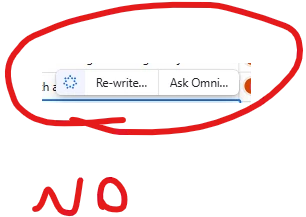
I don’t really want to not have AI available to me, but I need to get rid of the constant annoying prompts and slide over panels urging me to use AI.

I am happy to forgo it’s availability just to get rid of the incessant interruptions to my work.


So my simple request is: how can I disable AI?


Thank you

8 replies

nroshak
Forum|alt.badge.img+9
  • Inspiring
  • June 26, 2025

If you have an Admin panel, you can opt out of Airtable AI’s rollout in late July. Go to Admin Panel → Settings → AI Settings.


Forum|alt.badge.img+2
  • New Participant
  • June 27, 2025

The AI pop-up is absolutely DREADFUL, and there is no way to dismiss it. It forces you to click the “Continue” button, and there’s no exit or close button.


ScottWorld
Forum|alt.badge.img+35
  • Genius
  • June 27, 2025

You can completely disable all of the new AI features by going into your “Workspace Settings” and toggling the option to disable AI for all of your bases within that workspace.

Note that you will need to be the owner of the workspace in order to get into the workspace settings.

Hope this helps!

If you have a budget and you’d like to hire the best Airtable consultant to help you with this or anything else that is Airtable-related, please feel free to contact me through my website: Airtable consultant — ScottWorld


Mike_AutomaticN
Forum|alt.badge.img+28

Lol, I feel the pain as well 😂

Love to see Airtable launching new updates though!


Forum|alt.badge.img+4
  • Author
  • New Participant
  • June 28, 2025

Thank you all for your suggestions and empathy. I have turned off AI.

This does seem to be an own goal by AirTable and I don’t understand why they are over-zealous in promoting these great features yet turning off users by over-egging it.


nroshak
Forum|alt.badge.img+9
  • Inspiring
  • June 30, 2025

> I don’t understand why they are over-zealous in promoting these great features yet turning off users by over-egging it.


Probably the usual combination of FOMO and hoping to draw new customer workflows into Airtable in order to get customer lock-in...


Forum|alt.badge.img+1
  • New Participant
  • September 19, 2025

So glad they made me do extra work to disable something I didn’t choose to add in the first place. 🙄 (Note to Airtable devs: it’s not just annoying when you do this with AI features, it’s annoying when you do this with *any* feature.)


Mike_AutomaticN
Forum|alt.badge.img+28

Hey ​@Dustin_Hodge,

Even if this is not really a product idea, you might want to reach out to the Airtable team with your feedback using this link. Otherwise, reaching out to support@airtable.com might also help. 

For now that seems to be the best way to provide feedback.

Mike, Consultant @ Automatic Nation 
YouTube Channel