Question

Create Attendance Records via automation

  • May 12, 2026
  • 3 replies
  • 14 views

Forum|alt.badge.img+6

Hi!

I need to track attendance for different cohorts put on throughout the year. Each cohort has multiple sessions and multiple attendees. When attendees are linked to a cohort, I would like to automatically create attendance records for every session linked to that cohort. Attendance statuses will be updated manually later. I am having trouble setting up the looping automation. I have never set one up before and I am getting stuck. Any help pointing me in the right direction is greatly appreciated!


My base has the following tables:

TABLE: Cohorts
Fields:

  • Cohort Name (primary field)
  • Attendees (linked to attendee table)
  • Sessions (linked to Cohort Sessions table)
  • Session Record IDs (lookup field pulling Record ID from linked Sessions)

TABLE: Cohort Sessions
Fields:

  • Session Name (primary field)
  • Linked Cohort (linked to Cohorts table)
  • Record ID (formula field)

TABLE: Cohort Attendance
Fields:

  • Attendance Record (primary field formula)
  • Leader (linked to Leaders table)
  • Session (linked to Cohort Sessions table)
  • Cohort (linked to Cohorts table)
  • Attendance Status (single select)


My workflow would ideally look like this - 

  1. Create cohort
  2. Create sessions and link them to cohort (*possibly have the sessions be automatically updated when the cohort is created. we typically have 6 sessions)
  3. Add attendees to cohort
  4. Automation creates ALL attendance records automatically
  5. After sessions conclude, manually update attendance status
 

3 replies

nroshak
Forum|alt.badge.img+11
  • Inspiring
  • May 12, 2026

Create cohort

This one you would do via a form, correct?

Create sessions and link them to cohort (*possibly have the sessions be automatically updated when the cohort is created. we typically have 6 sessions)

To automate this, you would create a “When record created” automation triggered when a record is added to the cohort table. For the action, have it create six records in the cohort-sessions table, linked to the record you just created in the cohort table. 

Add attendees to cohort

This one you would also have to do via a form, which lets you select the cohort for each attendee.

Automation creates ALL attendance records automatically

Create a “When record created” automation that triggers when a record is added to the attendee table. What this one does is select all the records in the cohort-sessions table with a matching cohort to your attendee and loop through them. For each record in the cohort-session table, have it create a record in the cohort-attendance table which has the attendee from the record you just added, their cohort from the record you just added, and the cohort session from the loop.  (I don’t know where the Leader comes from.) 

Let us know if you need clarification on how to create any of these!

Hope that helps

Natalka


Mike_AutomaticN
Forum|alt.badge.img+29

Hey ​@Jan123!

I’d be happy to go through it together with you on a brief call and help you out :D

Feel free to grab a slot using this link. Then we can come back to this post and share our conclusions.

Mike, Consultant @ Automatic Nation 
YouTube Channel 


TheTimeSavingCo
Forum|alt.badge.img+32

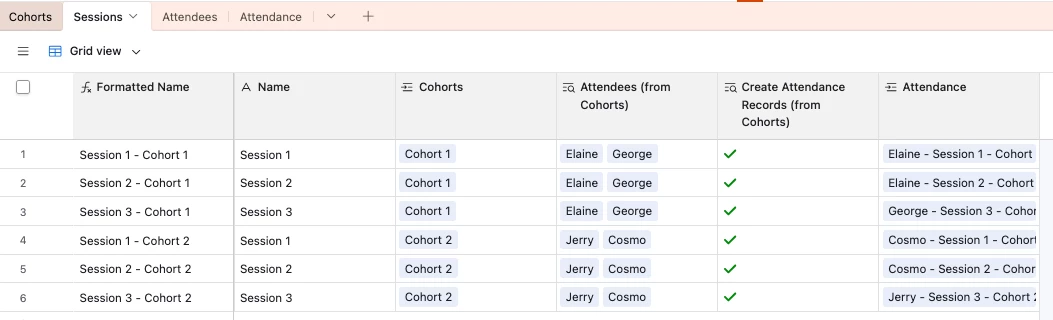
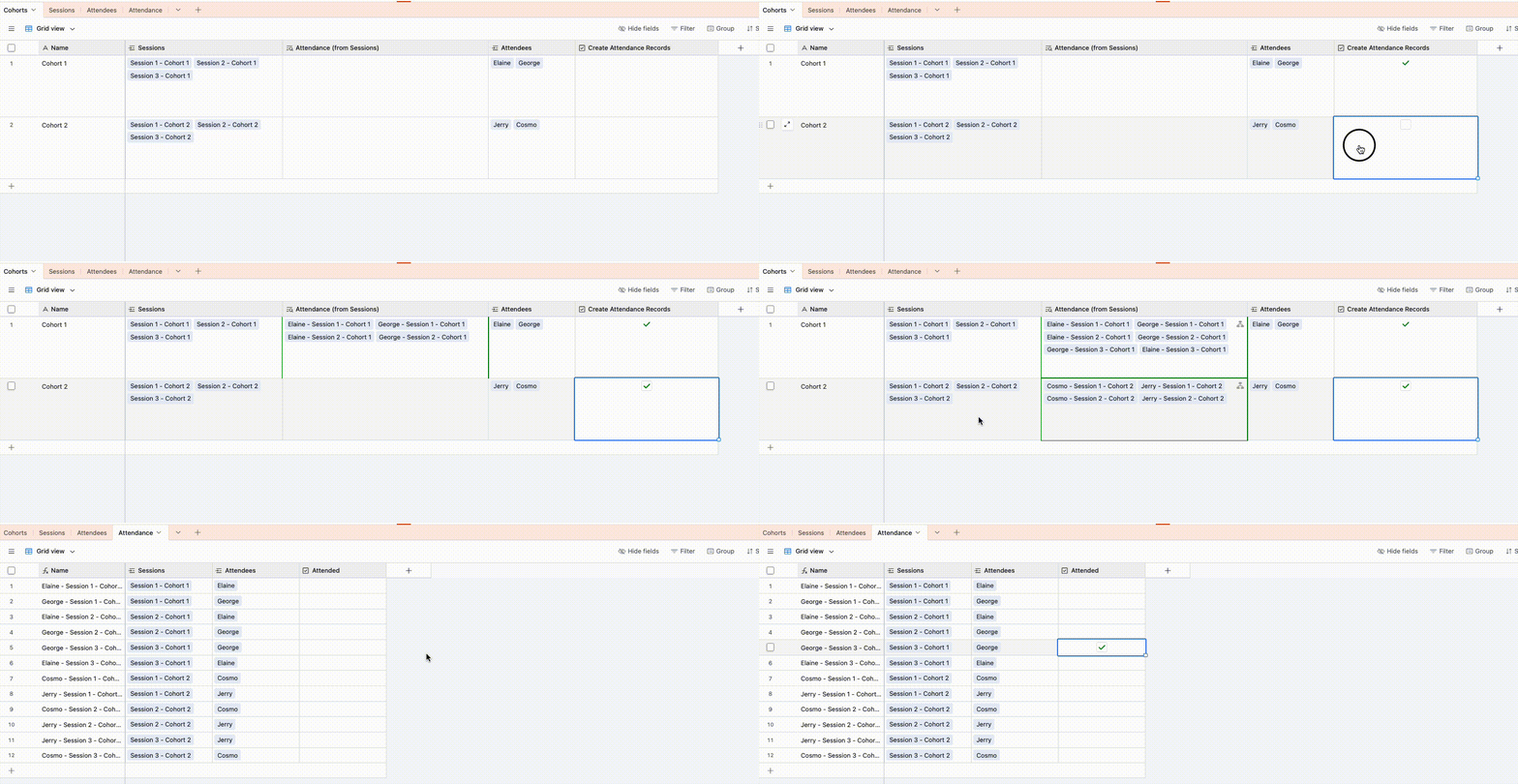
Does this look right?  If so I’ve set it up here for you to check out

The idea is to create the Session records and link the Attendee records to the Cohort, then tick the ‘Create Attendance Records’ checkbox

In the ‘Sessions’ table, we have a lookup field to display that checkbox field, which will trigger an automation that will create one Attendance record per linked Attendee:

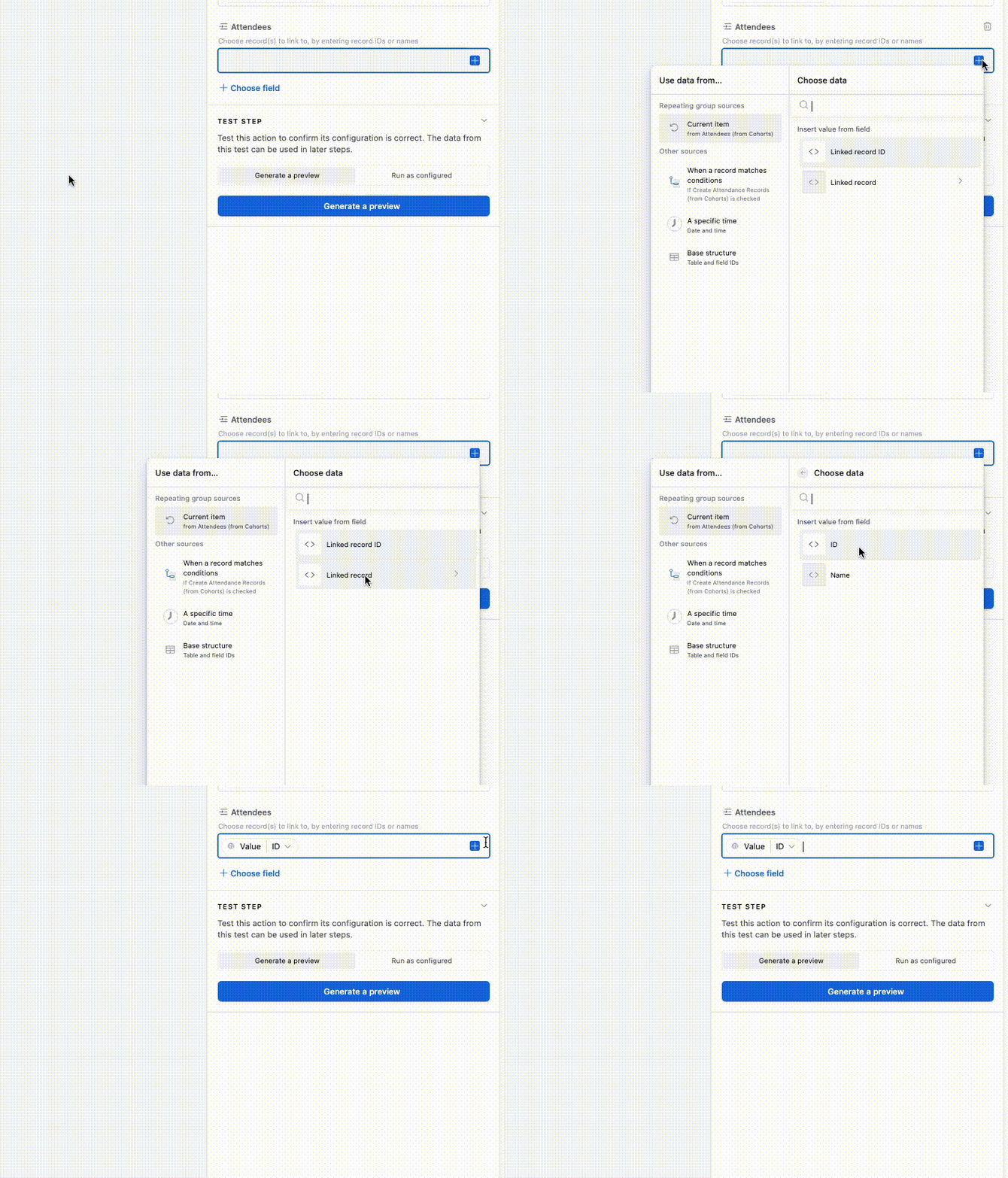
A tricky bit for this is for the ‘Attendees’ field we can’t use the Linked Record ID, we have to click into the Linked Record itself then use the ID there: