Question

Form to linked record to task create tasks

  • May 18, 2026
  • 2 replies
  • 12 views

I’m coming from an Asana background and am trying to build a project management system in Airtable. I’ve watched several tutorials and gathered advice on setup architecture, but I’m running into a few issues with automation and record relationships.

Current structure:

Base Tables

  • Projects (connected to my submission form)
  • Teams
  • Team Members
  • Project Types
  • Tasks
  • Task Templates

Current flow / logic
Request Type (submitted via form) → Project Type → linked Task Templates → Teams → Team Members

Automation setup

  • Trigger: When record meets conditions
  • Lookup record
  • Create repeating tasks based on Project Type

I’m running into two main issues:

1. Task templates are not filtering correctly
When I submit the form, all task templates are being created rather than only the templates associated with that specific Project Type.

From what I’ve read pulling “project type” from a linked field is an Airtable limitation, but many tutorials seem to solve this as they separate Projects and Templates. I’m wondering:

  • Is there a best-practice structure for filtering task templates by Project Type?
  • Should I introduce an intermediary table (Project Type ↔ Task Template mapping)?
  • Is there a cleaner automation approach I’m missing?

2. Child tasks aren’t inheriting parent/form data
I also can’t get generated tasks to pull information from the original project/form submission (project owner, request details, linked project info, etc.).

My goal is for tasks created from templates to automatically inherit key fields from the parent Project and display correctly in Interfaces.

How are others passing parent project values into created tasks? Rollups? Lookups? Additional automation steps?

Would appreciate any examples from teams using Airtable as a more robust PM system, especially anyone migrating from Asana workflows.


2 replies

TheTimeSavingCo
Forum|alt.badge.img+32

re: 1. Task templates are not filtering correctly

Yeap, doing the Project Type <> Task Template mapping would make sense here, and you’d make your Find Record step use that field to filter the right Task Template records to create

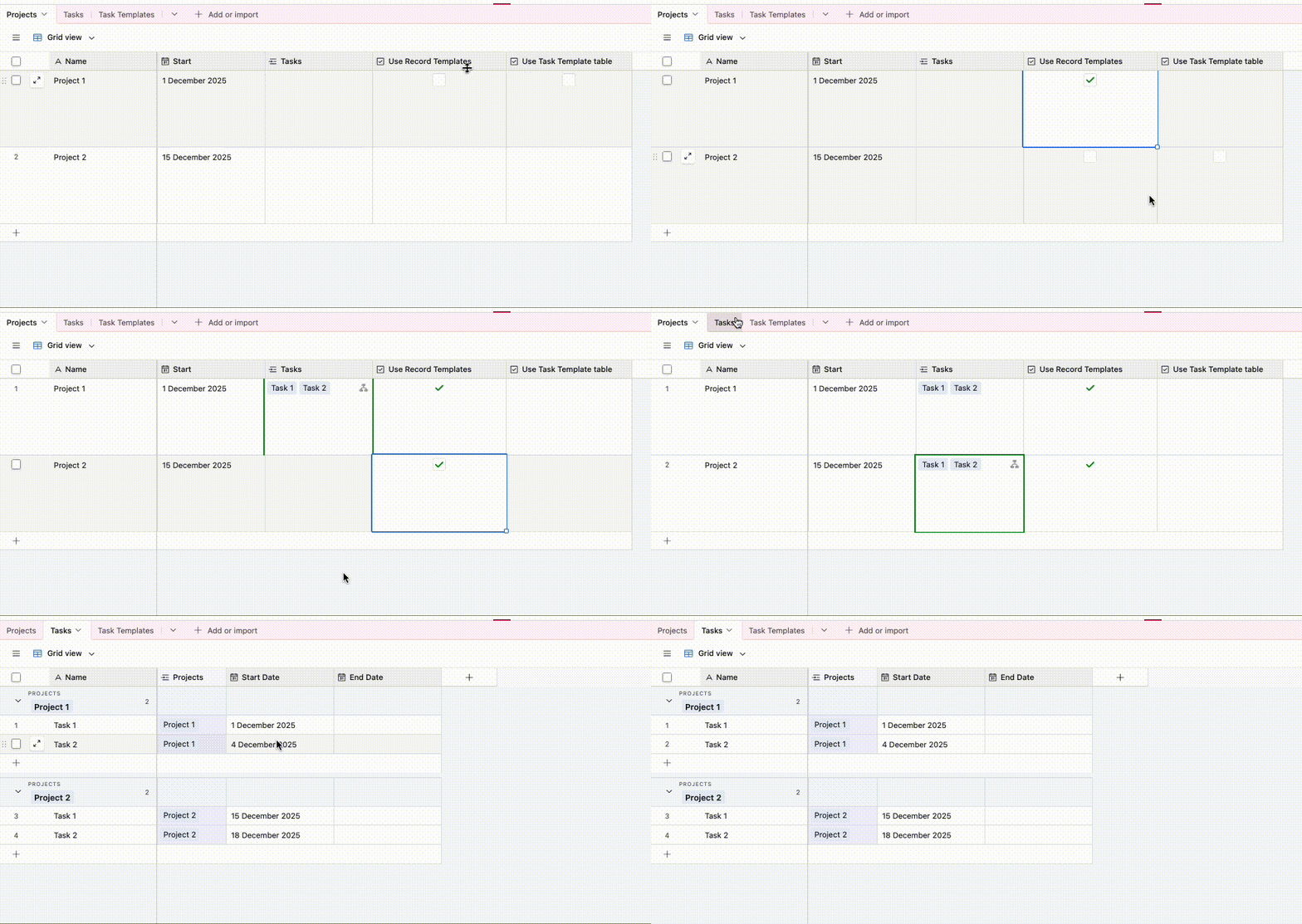
You may also want to look into Record Templates too: https://support.airtable.com/docs/using-record-templates-in-airtable

Does the same thing as Task Templates but without the extra table and will let you do relative dates based off of the original record too which is nice, and I have an example set up here
 

In the example below, Task 1 is set to start on the same date as the ‘Start Date' value, while Task 2 is set to start 3 days after ‘Start date’


---

re: 2. Child tasks aren’t inheriting parent/form data

Yeap, lookups and rollups are the way to go here.  Depending on the data type I also sometimes stamp in the data as well so that I have the correct information at that point of time, e.g. cost or something

---

Hit me up if you’d like to brainstorm or something, I do free half hour calls and you can schedule a time here!


Holly Nilson-Clay
Forum|alt.badge.img+1

As you're coming from a background in Asana, another thing worth a mention is that in Airtable you generally don’t need to copy parent project data into child task records. Usually the cleaner pattern is link the task back to the Project, then use lookups to surface whatever project info you need (owner, request details, status, etc.)

That keeps everything live and avoids maintaining the same data in multiple places. If we wanted to record a point-in-time snapshot that shouldn’t change later (budget, status at approval, etc.), then we'd copy the values directly into the task.

Holly @Simple Stack