Question

HTML In Emails

  • April 8, 2026
  • 2 replies
  • 21 views

Hi there,


It appears that there are a lot of threads but I can’t find an answer.


I want to be able to add some images and font sizes and colours.


I’ve tried connecting to GMail and setting up a signature but it doesn’t include the signature in the email body.


I also have a field with the persons name in the airtable base, however that isn’t displaying for some reason. 


This should be pretty straight forward. I’m open to paying someone to do this. 


Thanks in advance.


Jared.

2 replies

TheTimeSavingCo
Forum|alt.badge.img+31

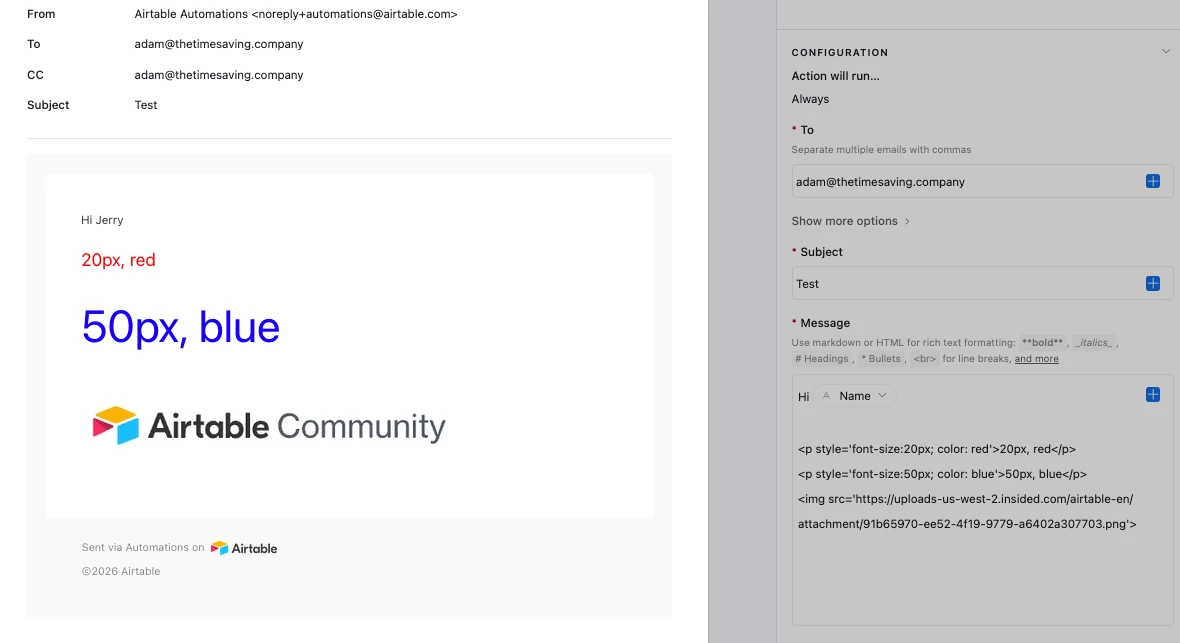
Hm, could you provide some screenshots of what you’ve tried so far?  I’ve created something here for you to check out where we set the font size and colors and include an image via HTML, and display a value from the table as well

If you’re still facing issues, feel free to schedule a free half hour call here!  Should be able to sort you out within that time!

---

The signature bit is trickier I’m afraid, as emails sent via the Gmail action won’t have the Gmail signatures included.  A workaround I’ve used for that is to grab the signature’s HTML from the email and then put it into the automation directly, which looks exactly the same.  Just have to remember to update it if we update the signature on Gmail!


ScottWorld
Forum|alt.badge.img+35
  • Genius
  • April 8, 2026

@JaredT 

Yes, Airtable supports a few of the most basic HTML tags in outgoing emails, such as “img src”, “a href”, “b”, “u”, “i”, and a few more.

There used to be a list somewhere of the HTML tags that Airtable supports in outgoing emails, but I can’t seem to find that list at the moment.

Although this support article mentions the “img src” tag.

However, if you want to use more complex HTML code, then you would need to turn to something like Make’s Gmail integrations or Make’s Outlook integrations, in conjunction with Make’s Airtable automations.

Make supports full HTML code.

If you’ve never used Make before, I’ve assembled a bunch of Make training resources in this thread. For example, here is one of the ways that you can instantly trigger a Make automation from Airtable

Hope this helps!

If you’d like to hire the best Airtable consultant to help you with anything Airtable-related, please feel free to contact me through my website: Airtable consultant — ScottWorld