Question

Best architecture for daily price updates from 5 separate Excel files (3k-4k items)

  • June 11, 2026
  • 5 replies
  • 18 views

CC19a
Forum|alt.badge.img

Hi everyone,

I’ve been managing our entire product catalog in Excel, but it’s getting short. I really need to have a better workflow, and I’m trying to figure out if Airtable is the right solution for my company or if I will hit a wall soon.

I interact a lot with the products, change prices frequently, and need a highly visual and optimized system. Here is my specific scenario:

The Data & Workflow:

We manage around 3,000 to 4,000 products.

I have a Master Products Table with historical data: UPC, Name, Brand, and Image 

Every single day, I receive 5 separate Excel files with updated prices and current availability. Each file belongs to a different customer tier (VIP, Wholesale, Distributor, etc.). If an item is not in the daily Excel, it means it's out of stock for the day.

My ultimate goal is to use Airtable Interfaces (Gallery View) to show the active products with their respective prices, export them to PDF, and send them to clients.

Based on your experience, is Airtable truly the right fit for this kind of high-frequency, multi-file workflow compared to Excel?

5 replies

ScottWorld
Forum|alt.badge.img+35
  • Genius
  • June 11, 2026

@CC19a 

I think that Airtable would be a fine solution for this.

  • Even better, you can even set it to “merge” the newly-imported products with the old products by using the Airtable “upsert module" -- so any old products that have updated pricing will reflect their newest prices.
  • I demonstrate how to automatically “import & merge” CSV files into Airtable on this Airtable podcast episode. This video will give you a step-by-step walkthrough on how to set this up in Make.

A few challenges for you:

  1. If you’ve never used Make before, it has a very steep learning curve, so it could take you many hours to set it up for the first time. Because of this learning curve, I’ve assembled a bunch of Make training resources in this thread.
     
  2. You will need to figure out some way to hide or delete the outdated products in Airtable that are no longer a part of the daily import. One simple way of approaching this would be to automatically add a timestamp in Airtable to your newly-imported/newly-merged records, so anything that doesn’t have the current timestamp gets hidden.

Hope this helps!

If you have a budget and you’d like to hire the best Airtable consultant to help you with this or anything else that is Airtable-related, please feel free to contact me through my website: Airtable consultant — ScottWorld


nroshak
Forum|alt.badge.img+11
  • Inspiring
  • June 11, 2026

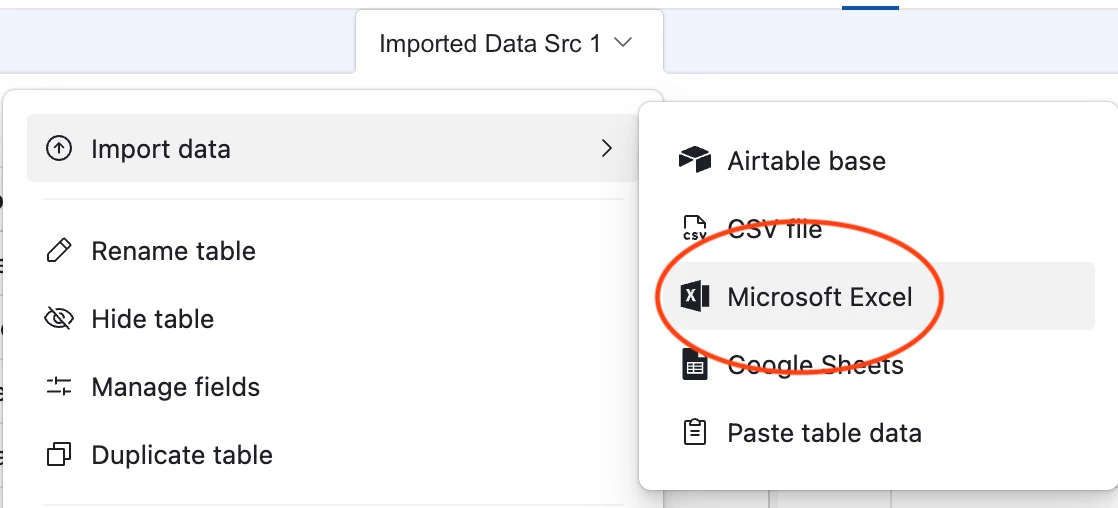
Yes, you can do this in Airtable and it will probably be easier than doing it all in Excel :) Airtable has the native ability to import data from Excel or other spreadsheets.

You could set it up pretty much how you have it now, with the benefit of Airtable's automations and interfaces. You won't be able to do it on the free plan, though. To hold that number of products you will need Team or Business plan. Here are the record limits: https://support.airtable.com/docs/airtable-plans 

And yes, you can print a massive gallery to PDF, although it may take a while to render. (Alternatively, you could just send your clients a link to the gallery page.)

Happy building!

-Natalka


TheTimeSavingCo
Forum|alt.badge.img+32

Every single day, I receive 5 separate Excel files with updated prices and current availability. Each file belongs to a different customer tier (VIP, Wholesale, Distributor, etc.). If an item is not in the daily Excel, it means it's out of stock for the day.

Hm, check out the CSV Import extension, seems like it’d come in useful here!  The idea is you’ll have the ‘Master Products’ table and each product will have a unique ID (probably their SKU?), and you can then use the CSV Import extension to merge the new data using the unique ID

As an example, let’s say we’ve got the following in Airtable:

  1. Item 1 - $4 - Available
  2. Item 2 - $1 - Available
  3. Item 3 - $5 - Unavailable

And in the CSV we have the following:

  1. Item 1 - $0 - Unavailable
  2. Item 2 - $2 - Available
  3. Item 4 - $10 - Available

After we do the merge, the data in Airtable would be:

  1. Item 1 - $0 - Unavailable
  2. Item 2 - $2 - Available
  3. Item 3 - $5 - Unavailable
  4. Item 4 - $10 - Available

This does mean you’re going to have to manually import these 5 Excel files everyday though

I do free half hour calls and would be happy to walk you through this bit if you’d like!

---

May I know how you receive these Excel files?  If it’s via email, I’m wondering if we could make an automation that would help you automatically convert them into CSVs, which would allow us to email the CSVs into Airtable to have them automatically imported (https://support.airtable.com/docs/airtable-sync-integration-emailed-data - Needs a Business plan).  That way you don’t even need to do anything, you just receive these Excel files via email and everything would happen on its own

The setup for this would be different though, you’d still have your Master Products table, but the imported data would go into a ‘Imports’ table, and we’d need to build an automation to help you update the Master Products table.  Doable though!

My ultimate goal is to use Airtable Interfaces (Gallery View) to show the active products with their respective prices, export them to PDF, and send them to clients.

Hm, any chance you could just invite your clients to the Interface as read-only users instead?  It wouldn’t cost you anything and your clients would then be able to see the most up to date data without you needing to send anything out?


CC19a
Forum|alt.badge.img
  • Author
  • New Participant
  • June 11, 2026

Every single day, I receive 5 separate Excel files with updated prices and current availability. Each file belongs to a different customer tier (VIP, Wholesale, Distributor, etc.). If an item is not in the daily Excel, it means it's out of stock for the day.

Hm, check out the CSV Import extension, seems like it’d come in useful here!  The idea is you’ll have the ‘Master Products’ table and each product will have a unique ID (probably their SKU?), and you can then use the CSV Import extension to merge the new data using the unique ID

As an example, let’s say we’ve got the following in Airtable:

  1. Item 1 - $4 - Available
  2. Item 2 - $1 - Available
  3. Item 3 - $5 - Unavailable

And in the CSV we have the following:

  1. Item 1 - $0 - Unavailable
  2. Item 2 - $2 - Available
  3. Item 4 - $10 - Available

After we do the merge, the data in Airtable would be:

  1. Item 1 - $0 - Unavailable
  2. Item 2 - $2 - Available
  3. Item 3 - $5 - Unavailable
  4. Item 4 - $10 - Available

This does mean you’re going to have to manually import these 5 Excel files everyday though

I do free half hour calls and would be happy to walk you through this bit if you’d like!

---

May I know how you receive these Excel files?  If it’s via email, I’m wondering if we could make an automation that would help you automatically convert them into CSVs, which would allow us to email the CSVs into Airtable to have them automatically imported (https://support.airtable.com/docs/airtable-sync-integration-emailed-data - Needs a Business plan).  That way you don’t even need to do anything, you just receive these Excel files via email and everything would happen on its own

The setup for this would be different though, you’d still have your Master Products table, but the imported data would go into a ‘Imports’ table, and we’d need to build an automation to help you update the Master Products table.  Doable though!

My ultimate goal is to use Airtable Interfaces (Gallery View) to show the active products with their respective prices, export them to PDF, and send them to clients.

Hm, any chance you could just invite your clients to the Interface as read-only users instead?  It wouldn’t cost you anything and your clients would then be able to see the most up to date data without you needing to send anything out?

Hi

Thank you so much for the detailed answer.

To answer your questions and give you more context:

About the files: Right now, I keep the price sheets in the cloud, open them, and update them there. We currently work 100% with Excel, but if there is a way to optimize the workflow and move away from Excel entirely by doing everything natively inside Airtable, that would be even better!

About the Catalog & Clients: I actually love the idea of sending clients a link to the Interface instead of static PDFs. However, we need to make sure they can only see their specific price list (e.g., the VIP client should only see the VIP interface/prices, and the Wholesale client only the Wholesale prices), without seeing each other's data.

My Current Goal:
Before my company officially adopts Airtable as our main business tool, I need to present a proof of concept. I am currently building a small test model with 100 products to show management how the workflow, the price updates, and the client interfaces would look in real life.


nroshak
Forum|alt.badge.img+11
  • Inspiring
  • June 11, 2026

 I actually love the idea of sending clients a link to the Interface instead of static PDFs. However, we need to make sure they can only see their specific price list (e.g., the VIP client should only see the VIP interface/prices, and the Wholesale client only the Wholesale prices), without seeing each other's data.


With 5 customer tiers, I would simply make 5 Gallery Views, one for each customer tier :) You can share the view with a private link, which you can restrict to an email domain and/or password-protect. Here is the menu in AT:


A gallery view looks very nice to external clients; here’s one I have:


-Natalka