Solved

Summarize (i.e. total) Records by Linked Type

  • June 8, 2026
  • 5 replies
  • 77 views

Forum|alt.badge.img+6

I’m invoicing time records by project, by month. Each time record has a “Time Task” which comes from a linked lookup table. There’s some 42 time tasks and more may be added in the future. When creating a monthly invoice I want to summarize the hours for each task utilized by that monthly collection of time records for each project invoiced.

e.g.

5/1/2026 2.0 hours Preparation

5/19/2026 1.3 hours Preparation

5/21/2026 1.0 hours Preparation

*Total Preparation 4.3 hours


5/8/2026 1.5 hours Development

5/8/2026 5.8 hours Development

*Total Development 7.3 hours


I only want to show the * totals, not the actual individual time records.

Ideally these totals would simply go into a separate table linked to the invoice.

I really don’t want to use a third party tool like Make or Zapier.


How can I go about doing that?
Best answer by TheTimeSavingCo

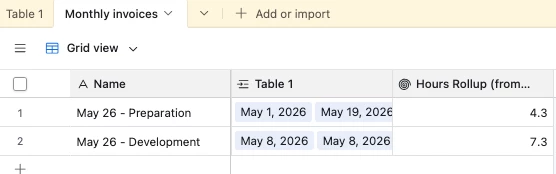
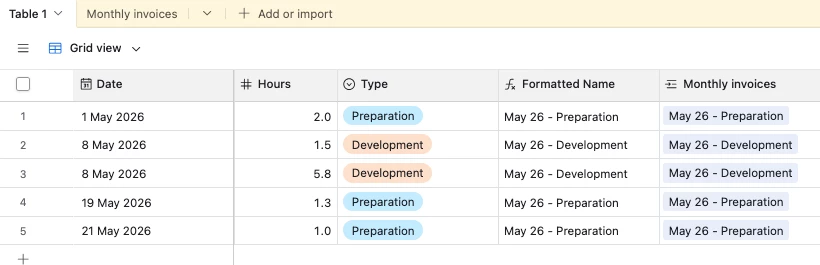
I like solving this with a formula field that outputs the month + type and a table where each record represents a single summary, and I’ve set it up here for you to check out!

Time log
Summary with rollup field to display hours

Formula:

DATETIME_FORMAT(
Date,
'MMM YY'
) &' - '&
Type

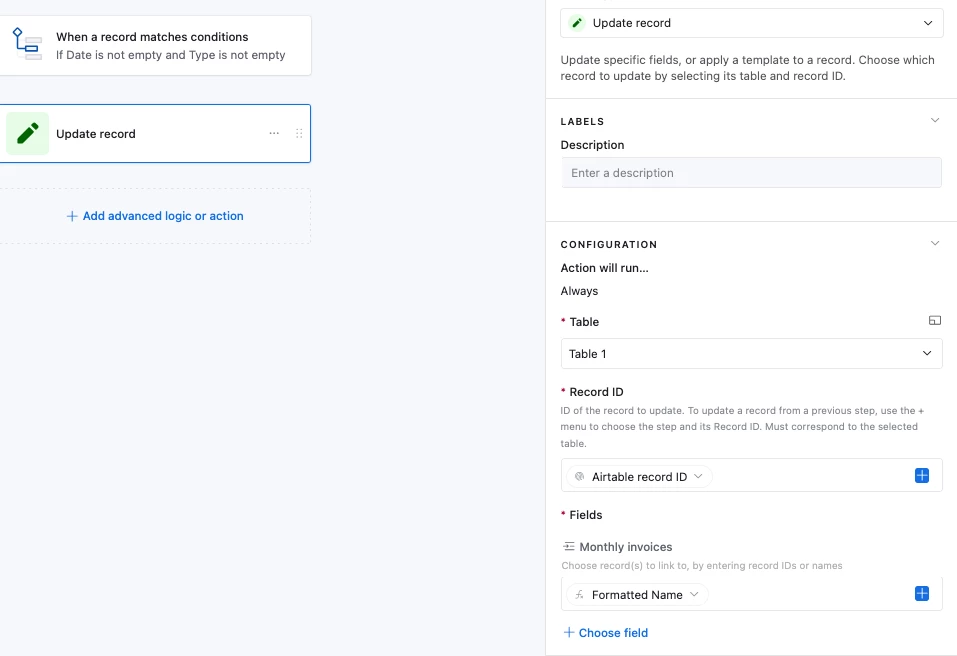
The idea is to have an automation that triggers whenever the Date and the Type field are completed, and its action will be to paste the value from the formula field (“Formatted Name”) into the linked field, which will either create a new record or link to an existing one:

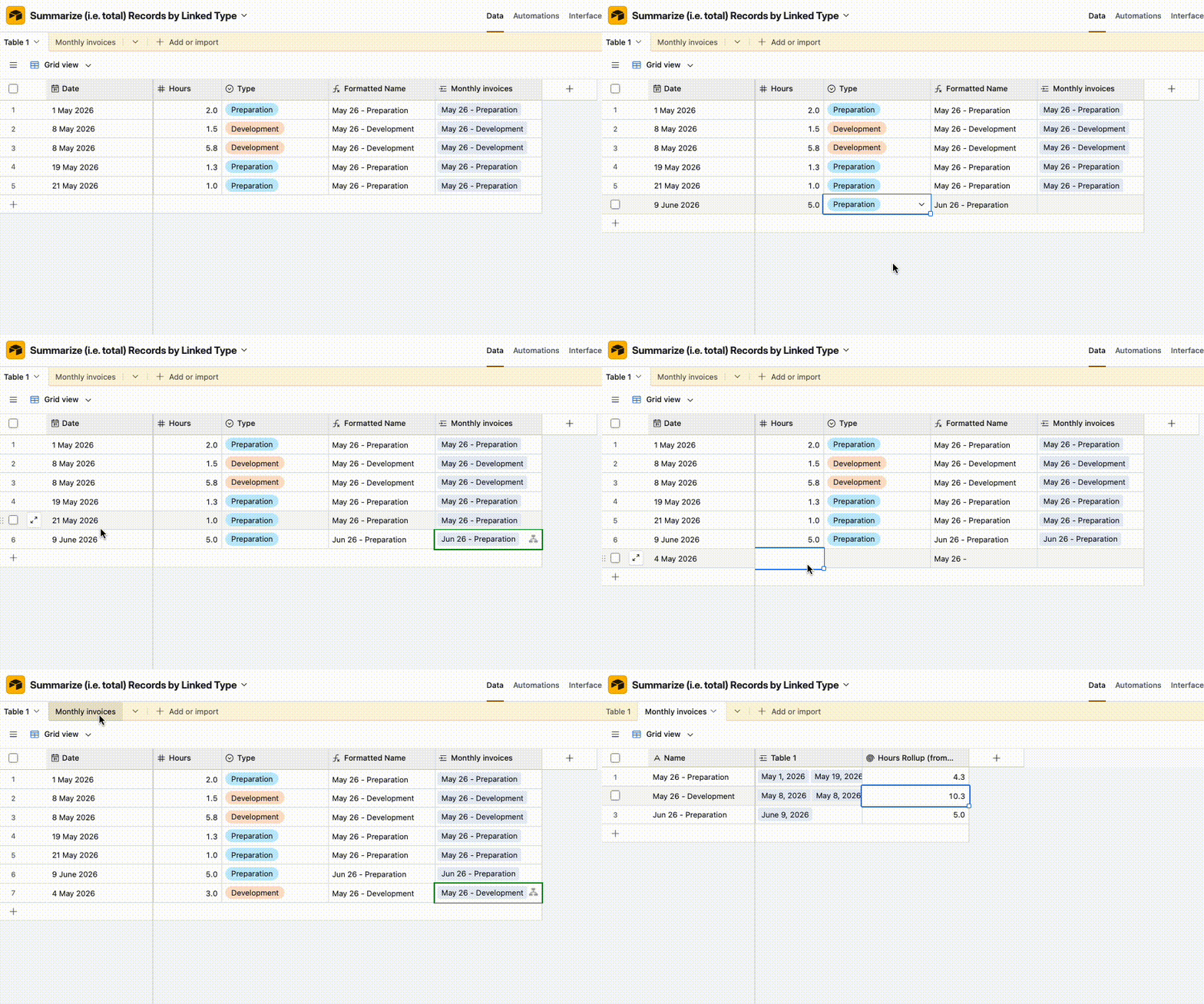
And here’s how it’d look in action:


5 replies

Matt_Shepherd
Forum|alt.badge.img+1
  • Participating Frequently
  • June 8, 2026

I think the cleanest approach for this is a summary table where you have 1 row per invoice / task type combo, and a linked field linking to all the relevant time records for that task type & invoice. Then a rollup field gives you the total for each row.

You need an automation that triggers whenever a time record is created, conditionally creating the summary row if it doesn’t exist yet, or linking it to the existing summary row.

Hope that helps, let me know if there’s any particular part you’re stuck on and I’m happy to provide more detail.


DisraeliGears01
Forum|alt.badge.img+22

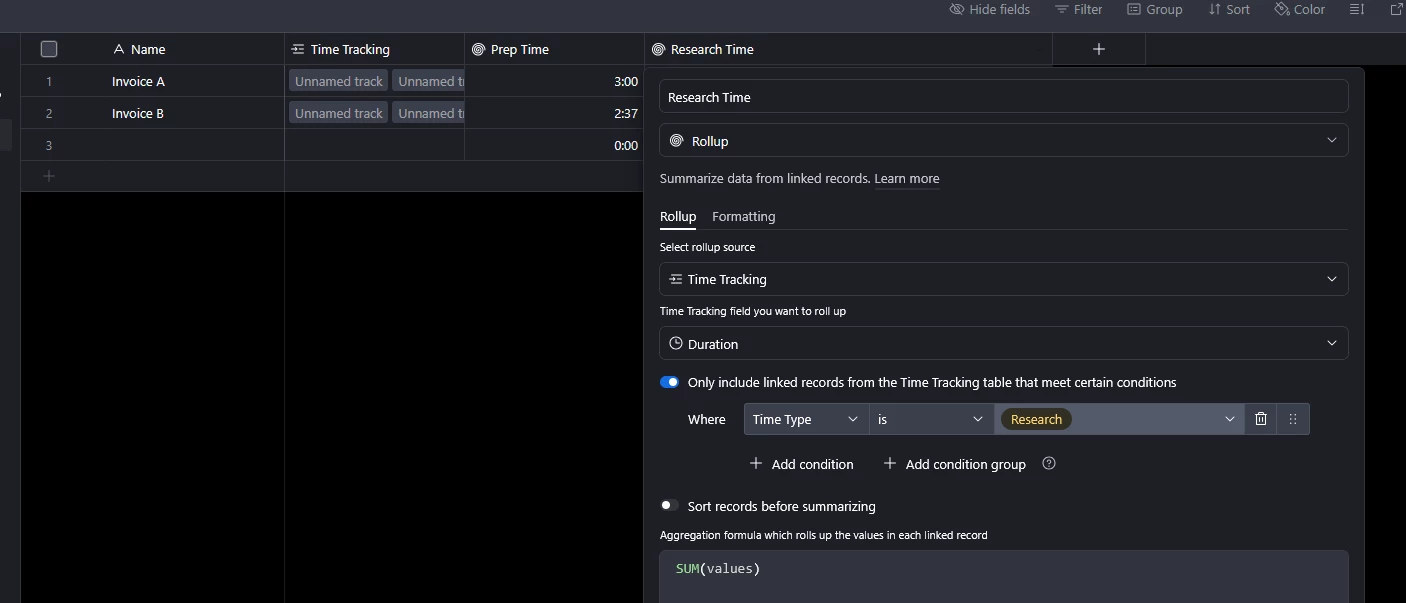
Depending on your types of Time Task (e.g. “Preparation”, “Development”, etc) you could just use filtered rollups to sum the time lengths, assuming you don’t have dozens of time categories. Something like this…

 That’s of course dependent on your data structure, helps to see some base layout screenshots 🤷‍♂️


TheTimeSavingCo
Forum|alt.badge.img+32

I like solving this with a formula field that outputs the month + type and a table where each record represents a single summary, and I’ve set it up here for you to check out!

Time log
Summary with rollup field to display hours

Formula:

DATETIME_FORMAT(
Date,
'MMM YY'
) &' - '&
Type

The idea is to have an automation that triggers whenever the Date and the Type field are completed, and its action will be to paste the value from the formula field (“Formatted Name”) into the linked field, which will either create a new record or link to an existing one:

And here’s how it’d look in action:


Jonghyun_Oh
Forum|alt.badge.img+2
  • Inspiring
  • June 13, 2026

The summary-table approach above is the right direction. I would just be careful about two implementation details: use a stable key, and decide what should happen when a time record later changes invoice, month, task, or hours.

A native setup could look like this:

Tables:
- Time Records
- Invoices
- Time Tasks
- Invoice Task Totals

In the summary table, each record represents one invoice + month + task combination. The primary field can be a key such as:

invoiceRecordId | YYYY-MM | taskRecordId

Using record IDs is safer than using names, because task names and invoice labels can change later.

Then the summary table can have:
- linked Invoice
- linked Time Task
- linked Time Records
- rollup of hours from linked Time Records using SUM(values)

The automation pattern is:

1. When a time record has invoice, date/month, task, and hours filled in, build the same summary key.
2. Find an existing Invoice Task Totals record with that key.
3. If it exists, update its linked Time Records field by appending the current time record.
4. If it does not exist, create the summary record and link the invoice, task, and current time record.
5. Show the linked summary records on the invoice instead of showing every raw time record.

One caveat: when an automation updates a linked-record field, make sure it keeps the existing linked records and adds the new one. If the action only sends the new record, it can overwrite the existing list.

The other caveat is edits. If someone changes a time record from Preparation to Development, or moves it to a different invoice/month, the old summary row needs to lose that time record and the new summary row needs to gain it. If edits are common, I would either add a small script step just for the append/remove logic, or periodically rebuild the summary table from the current time records to keep it clean.

This keeps the invoice output to only the totals, and it avoids adding 42+ separate rollup fields that need maintenance every time a new task type is added.


Forum|alt.badge.img+6
  • Author
  • Inspiring
  • June 17, 2026

Thanks everyone for all your help. ​@TheTimeSavingCo that works great. My situation was slightly more complex that I presented, but it works now.