




Hey everyone, Kyle here!
I’ve recently joined the product team at Airtable following the recent acquisition by Bending Spoons, which closed earlier this month. I wanted to say hello, meet the community here, and share what we’ve been working on recently.
We know a lot of people have been wondering what’s next for Airtable, post-acquisition.
We’re 100% committed to making Airtable the very best it can be, and we’ve been studying the product from every angle, parsing the data and listening to feedback from across the user base. We have a lot of projects already in the works that we look forward to sharing in the coming weeks.
But actions speak louder than words, which is why we wanted to hit the ground running and improve your experience as soon as possible.
To that end, I’m happy to share that we’ve worked hard to ship 15 updates in the past 15 days. For this first sprint, we’ve focused on addressing some of the small gaps around the product that many customers have been requesting for some time, ranging from admin usability improvements to bug fixes.
Here’s what’s live now:
The highlights:
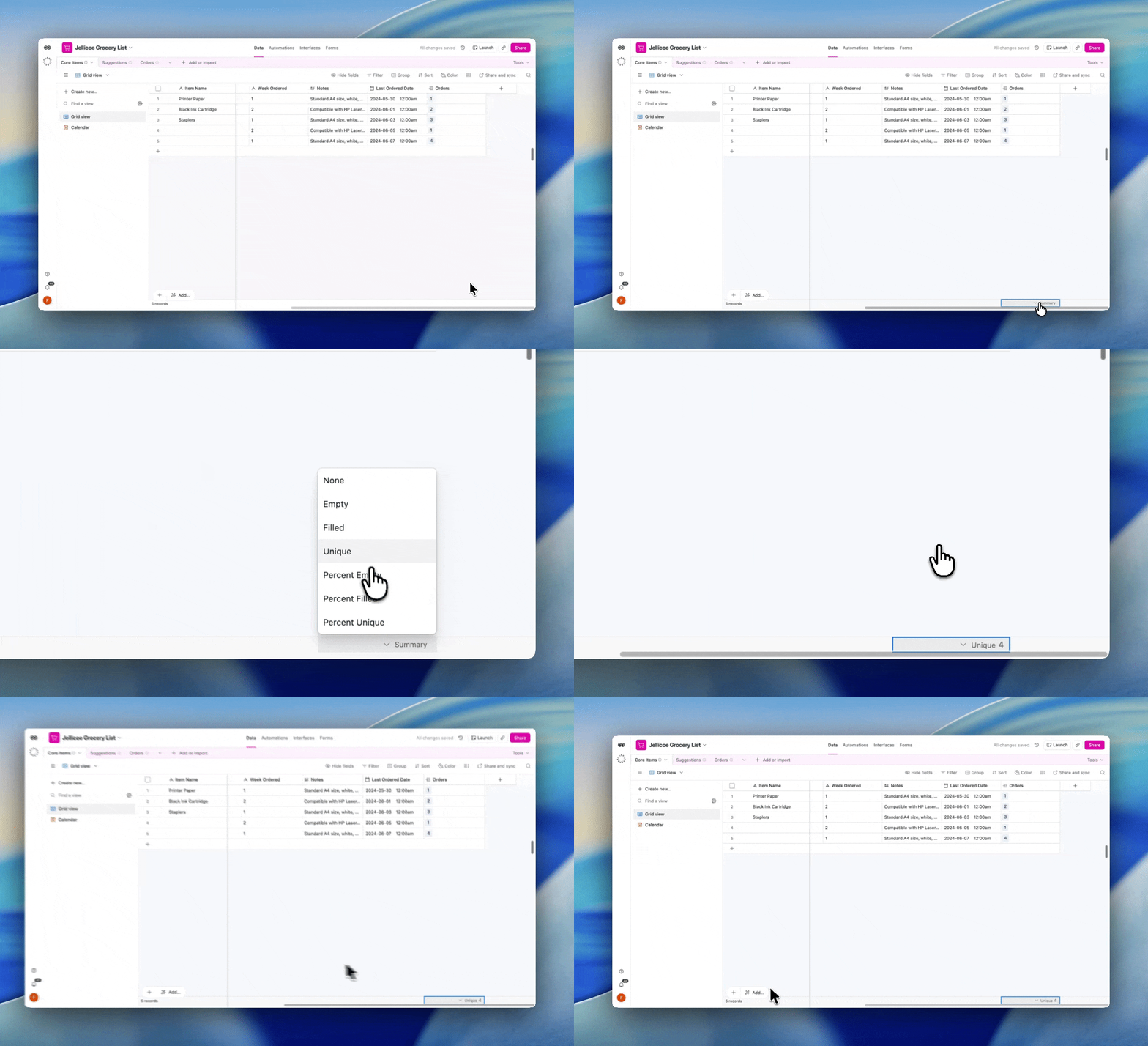
- Unique count on linked-record fields
One glance at the summary bar can now tell you how many unique records a linked-record field points to. No manual counting, just the answer.
- Admin panel tables that fit your screen
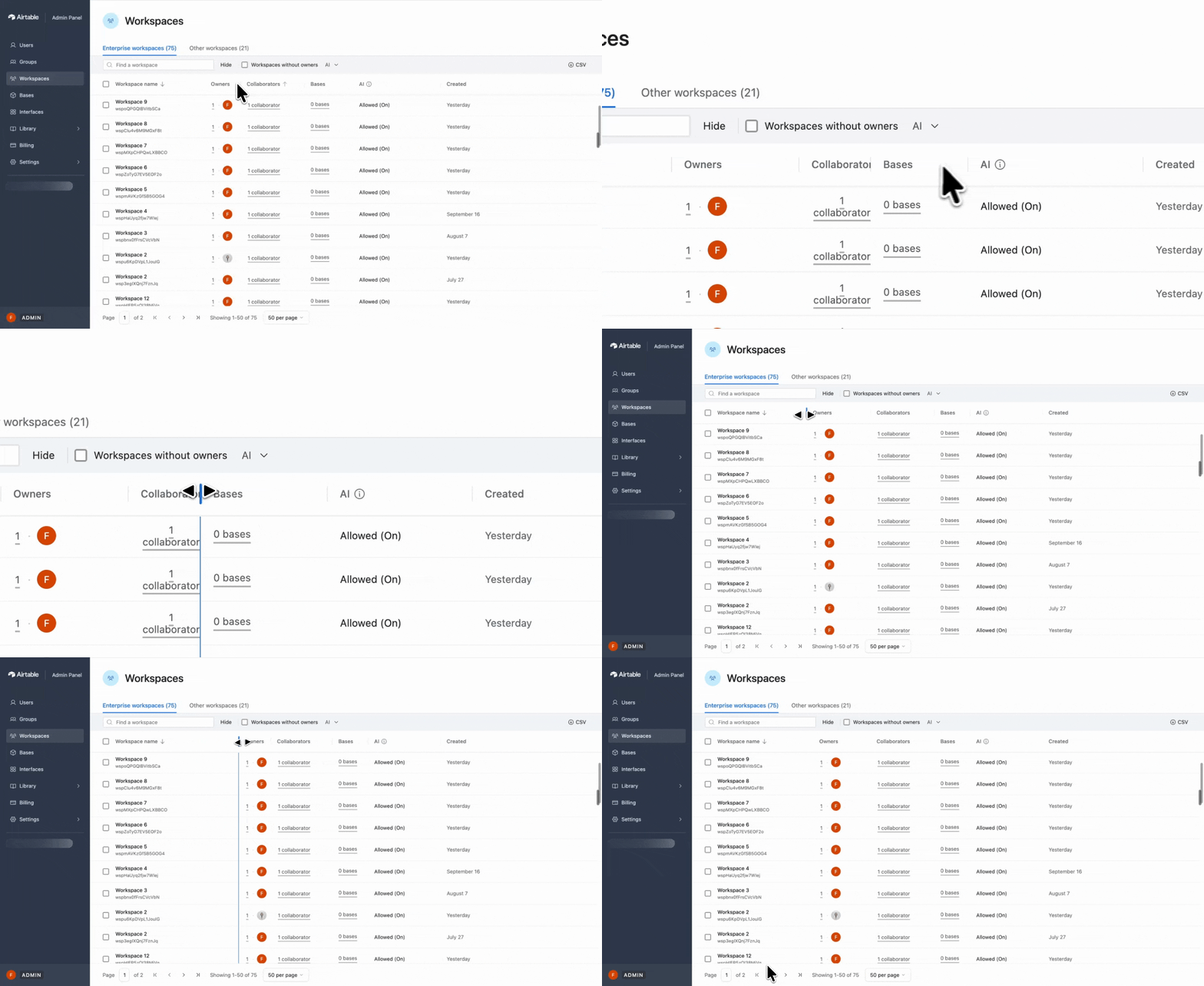
Admin panel tables now support resizable columns, with minimum widths and headers that stay aligned. So you can finally read the full context of long base names.
- Search bases by ID (admin)
You can search by base or workspace ID when creating a PAT, setting up a service account, and in the admin panel's "Add to bases" modal. Now you can choose correctly out of hundreds of similarly named bases.
Search/Edit improvements:
- Flip between lookup and rollup without losing your settings
Converting a field between lookup and rollup now preserves the relevant properties, like the linked-record field and any filters. No more need to set them up from scratch every time.
- Match fields by name when changing the connection for a lookup
Changing an existing lookup with connections to a different linked table used to reset all properties. Now, it matches the lookup's fields to the new linked records by name automatically, so the values carry over.
- Single-select filters hold your choice when you switch "Is" → "Is any of"
Switching a single-select filter between "Is" and "Is any of" (or "Is not" and "Is none of") used to wipe your chosen value. Now, it's carried across with the switch.
- Duplicated dashboard charts stay selected
When you duplicate a chart on a dashboard, the new copy is now selected automatically. So you can move or edit it straight away, instead of hunting for the newest version.
Visibility improvements:
- Add a field to an empty group in the interface record builder
If you selected an empty group in the record detail builder, there was no obvious way to add anything to it. There's now a clear "+" to drop a field straight in.
- Count numbers in dashboards now come with separators
A Count number used to read 1240. Now it reads 1,240 (or 1.240 depending on your location) making it easier to scan at a glance, and consistent with how Sum and other aggregations already display.
- Long base titles stop overlapping the "Open interface" button
A long base name could overlap the "Open interface" and open-data buttons in the header. Titles now wrap and reserve space correctly, so nothing collides.
- Stopped interface settings tooltips overlapping the row actions below
Some tooltips on disabled settings within the interface page overlapped controls in the next row. Now, they sit clear, keeping the panel readable and usable.
Experience improvements:
- Rename a field and the interface keeps up — instantly
Renaming a field from the settings menu used to leave interface elements lagging, showing previous data. They now re-render immediately, so the builder always reflects your latest change.
- The linked-records editor is now steady when empty
Opening the linked-records cell editor on a field with no visible fields caused the panel to jump in height mid-load. It now sizes cleanly.
- Enter on a Grid linked-record cell no longer shifts the cell upward
Pressing Enter inside a linked-record cell in Grid view used to shift your selection up a row unexpectedly. The focus now stays put.
- Resizing a grid header no longer drags the whole element with it
Resizing a column header's edge in interface editor mode could instead drag the entire grid element. Resizing now does only what you intended.
This is just the beginning. We can’t make Airtable the best it can be without the support of this amazing community so we’d love to hear your thoughts and feedback.
So let us know what you’d like us to work on next!