




Welcome to Change Makers, our series highlighting customer stories and builders making an incredible impact with Airtable. Today’s Change Maker is an Airtable MVP who helped his wife automate her bakery’s product tags workflow so tags are polished, have cohesive branding, and enticing to customers who visit!
About the Builder
Um Han Gyeol (
What's your go-to productivity hack or ritual?
Constantly asking myself: "Is this really the best way to do this?" I spend a lot of time questioning whether there's a better approach. In the past, turning that kind of reflection into a meaningfully better solution took a long time — and came with a lot of failures along the way. But now, through conversations with AI and tools like Airtable, I'm able to improve productivity much faster and more efficiently than ever before.
Do you have a go-to creative outlet or way to unwind after a busy day?
Rolling around on the floor and playing with my little one — who just turned 13 months old — is hands down my favorite way to recharge these days. 😄
Coffee, tea, or something else entirely to fuel your workday?
Definitely coffee — I drink more coffee than water. 😄
What's the first thing you ever built with Airtable?
An HR information database for the employees at my wife's bakery café. I was blown away by the ability to create multiple views of the same data and filter or group it in so many different ways. And the fact that the database was directly connected to a Form — so submissions instantly appeared in the database — genuinely shocked me. It was a lightbulb moment.
Where do you go for inspiration or new ideas — inside or outside your industry?
These days, AI is always my first stop for new ideas — no question. I have conversations with a variety of AI tools — Gemini, Claude, ChatGPT, Perplexity — each in different ways, and that's where most of my fresh inspiration and ideas come from. 😄
The Challenge & Airtable Solution
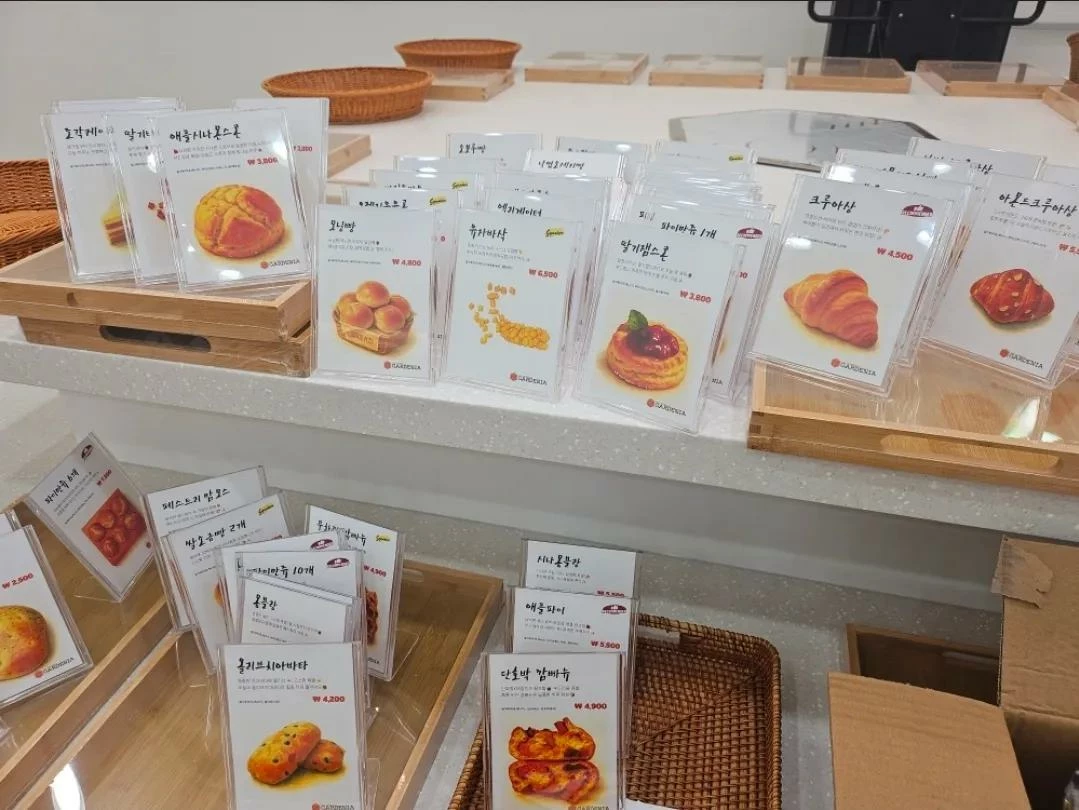
The bakery café faced a significant operational challenge: creating attractive product name tags for dozens of items, including 2-3 new products launched daily. Traditional methods using Word and PowerPoint were time-consuming and inefficient. Writing unique product descriptions and incorporating visuals for each item was creatively exhausting and impractical.
Han Gyeol built a comprehensive Name Tag Generator using Airtable's AI Field Agents to transform this process. The solution uses AI to generate polished product descriptions with emojis from simple characteristics. Even casual product photos are transformed by AI into beautiful, cohesive images that fit naturally on the name tags.
“This was my first experience witnessing the remarkable workflow transformation that Airtable Field Agents can deliver.”
Airtable Forms and Interfaces create a user-friendly experience, while the Page Designer extension handles the final print layout for each tag.
📺 Want to see it in action? Um shared a demo of his workflow here:
The Results
The impact has been transformational. What previously took over three hours to create 100 basic text-only name tags now takes under 30 minutes to produce beautifully designed tags with descriptions and visuals.
Beyond time savings, the solution delivers consistently high-quality, reusable assets that enhance the customer experience and product presentation. The name tags now feature unique descriptions that highlight each product's character alongside visually cohesive imagery—all generated with minimal manual effort.
What's Next
Han Gyeol has already expanded Airtable solutions across various areas of the bakery's operations and is just getting started!
With the success of the Name Tag Generator, he plans to explore additional AI-powered workflows to streamline other creative and operational processes. The focus will be on further reducing manual tasks while maintaining the bakery's high standards for customer experience and product presentation.
Copy & Paste AI Prompt
Here’s a look behind the curtain at what Han Gyeol is telling his agents to do!
Field Agent Prompt 1: Product Description Generator
[Verification Info]
- Product Name:
- Product Description:
- Product Photo:
[Constraints]
- Write in exactly 2 lines (1 line break included)
- Max characters per line: 30 characters (50 bytes) including emojis and spaces (approximately 25–30 characters)
- Emojis/emoticons may be used, but not excessively
- Do not include any information beyond what is provided
[Output]
- Write a punchy, trendy Gen-Z style product description! (Must be exactly 2 lines)
Field Agent Prompt 2: Image Generation
[Bakery Name Tag — Product Image Generator]
– Re-illustrate the supplied bread photo in a **warm, hand-painted Studio-Ghibli watercolor style** — delicate washes, soft edges, gentle highlights.
– **Plate rule:** If the photo shows *only one* piece of bread resting on a loose plate or tray—and the plate itself is clearly not part of the product—**omit the plate/tray and draw only the bread.**
– Otherwise, treat **any element that is part of the product or packaging—basket, paper sleeve, box, toppings, logo, etc.—as ONE item. Do NOT crop out or remove those parts.**
– **Place the final subject perfectly centred within a SQUARE canvas (1 : 1)** and rotate it to the most pleasing ¾ top-view so it looks full and well-balanced.
[Background & Margin — ABSOLUTE RULES]
1. Canvas background must be **pure #FFFFFF (RGB 255 255 255) OR full transparency** with **0 % paper texture, tint, or noise**.
2. The **outermost visible pixel of the subject—including its soft shadow—must sit at least 20 px inside every edge.**
3. Around the outer silhouette (bread + sleeve/packaging + shadow) apply a soft **10–15 px feather** that fades directly to #FFFFFF / alpha 0.
4. Ensure the blank border (top, bottom, left, right) is equal so every file has identical framing.
[Shadow Guidance]
– Add **one gentle, diffuse contact-shadow** directly beneath the subject for depth.
– Shadow opacity ≤ 15 %, fully contained within the 20 px margin, and included in the feather zone.
– No heavy drop-shadows, background wall shadows, vignettes, or gradients.
[Strict Bans]
– No extra text, logos, borders, grain, or paper texture.
– If any paper texture appears, override it: **“paper grain 0 %, canvas texture 0 %.”**
[Output]
– **PNG-24, 2048 × 2048 px** (square), alpha channel ON if possible.
– **Generate exactly ONE final image and do NOT create additional versions, retries, or revisions.**
– Fail-safe: if any pixel outside the subject-plus-shadow silhouette differs from pure #FFFFFF (or alpha 0), force it to #FFFFFF before exporting.
[Input Image]
Did this use case inspire you? Drop a comment below if you're similarly using Airtable to leverage customer feedback into proactive data, and share how you're using Airtable to change the way you work for a chance to be our next Change Maker spotlight!