


Hi everyone,
Omni, Airtable’s always-on AI expert, just got much more powerful. Omni now works faster, takes on much bigger jobs, and plans and executes the work from start to finish instead of handling one request at a time, keeping you updated on changes made along the way.
- Bring your messy data in
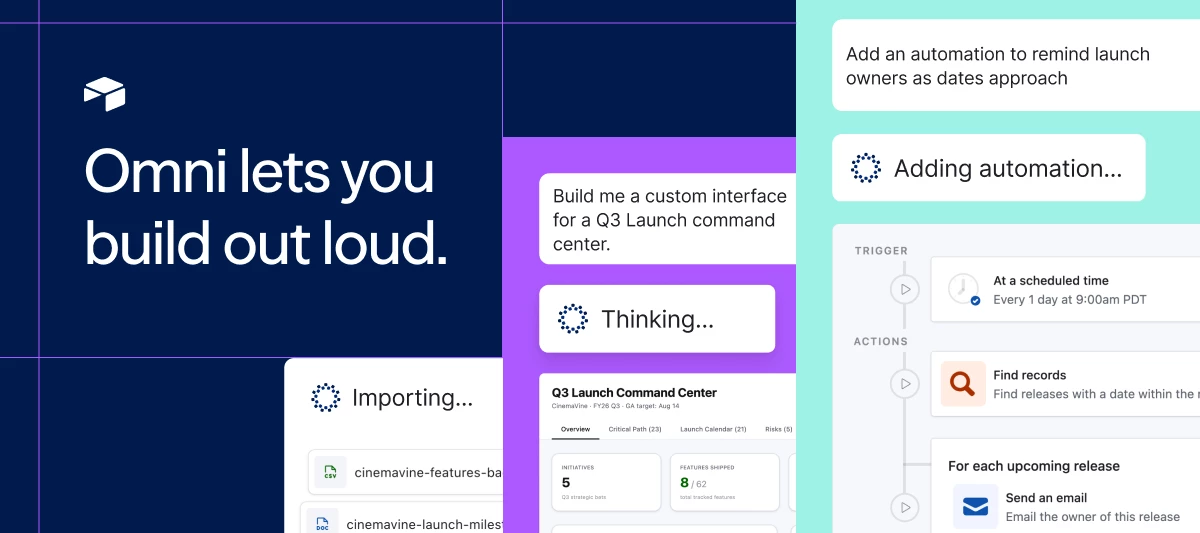
- Open Omni in an existing base, upload some files, and ask it to build your workflow based on the data you shared. It works out how your data is structured and creates the necessary tables and fields on your behalf. Omni supports CSV, Excel, TSV,and JSON along with PDFs, Word docs, PowerPoint, Google Docs and Slides, Markdown, and images. Upload up to 10 files at a time, 10 MB each.
- Open Omni in an existing base, upload some files, and ask it to build your workflow based on the data you shared. It works out how your data is structured and creates the necessary tables and fields on your behalf. Omni supports CSV, Excel, TSV,and JSON along with PDFs, Word docs, PowerPoint, Google Docs and Slides, Markdown, and images. Upload up to 10 files at a time, 10 MB each.
- Build a custom interface page
- Describe the page you want and Omni will write the code, build the page, and add it to your interface. It can go beyond Airtable's standard page types to tailor something unique to your needs. Once ready, it leaves the publishing to you.
- Describe the page you want and Omni will write the code, build the page, and add it to your interface. It can go beyond Airtable's standard page types to tailor something unique to your needs. Once ready, it leaves the publishing to you.
- Build or fix an automation end to end
- Describe your workflow and Omni wires up the whole thing: finding and updating records, sending emails, posting to Slack, even leveraging AI to generate text or structured data. It leaves the automation turned off so you can review it first.
- Have an automation that’s misbehaving? Ask Omni to diagnose it. It'll inspect the setup and the records it runs on and point you at the likely cause.
Stay in control of what matters
Omni asks before deleting records, tables, pages, or interfaces, and checks with you before making changes based on non-Airtable inputs (like a web page or file upload). If it does something you didn't want, ask it to undo it: Omni can add back or remove new records and roll back field changes. Anything that sets the work live for other people to interact with—like publishing an interface or switching on an automation is left to you.
Getting started
We’ll be rolling Omni out over the next few weeks. If your workspace has opted into AI Labs, you already have access! Open Omni in an existing base and ask it to take on a real-world job: A spreadsheet you've been meaning to get into Airtable is a good first ask, or a page you've never had time to build.
Not in AI Labs yet? An admin can turn it on from the admin panel, including on Enterprise. AI Labs isn't available for HIPAA accounts while these capabilities are still in beta.
A few things to know:
- Creating a brand new base from scratch still uses the standard Airtable flow. To leverage our powerful new Omni, simply create an empty base, then open Omni.
- Chats in AI Labs are kept for seven days.
- Anyone can turn Omni off for themselves in Omni settings under Enable enhanced Omni capabilities in new chats. It applies to that person only and takes effect on their next new chat.
- If you’re planning a very large migration,we recommend you discuss the approach with your account team first.
We'd love your feedback
You're seeing this ahead of most teams, and what you tell us shapes what ships next. Use the thumbs up and thumbs down on Omni's responses to easily give us feedback on your experience.A thumbs down opens a short form and that goes straight to the team building this. Or drop a comment below with what's working, what isn't, and what you want next.
~AP