


New: Generate Interactive Prototypes With Field Agents

  • October 29, 2025
  • 6 replies
  • 1078 views
chelseytanaka
Forum|alt.badge.img+5

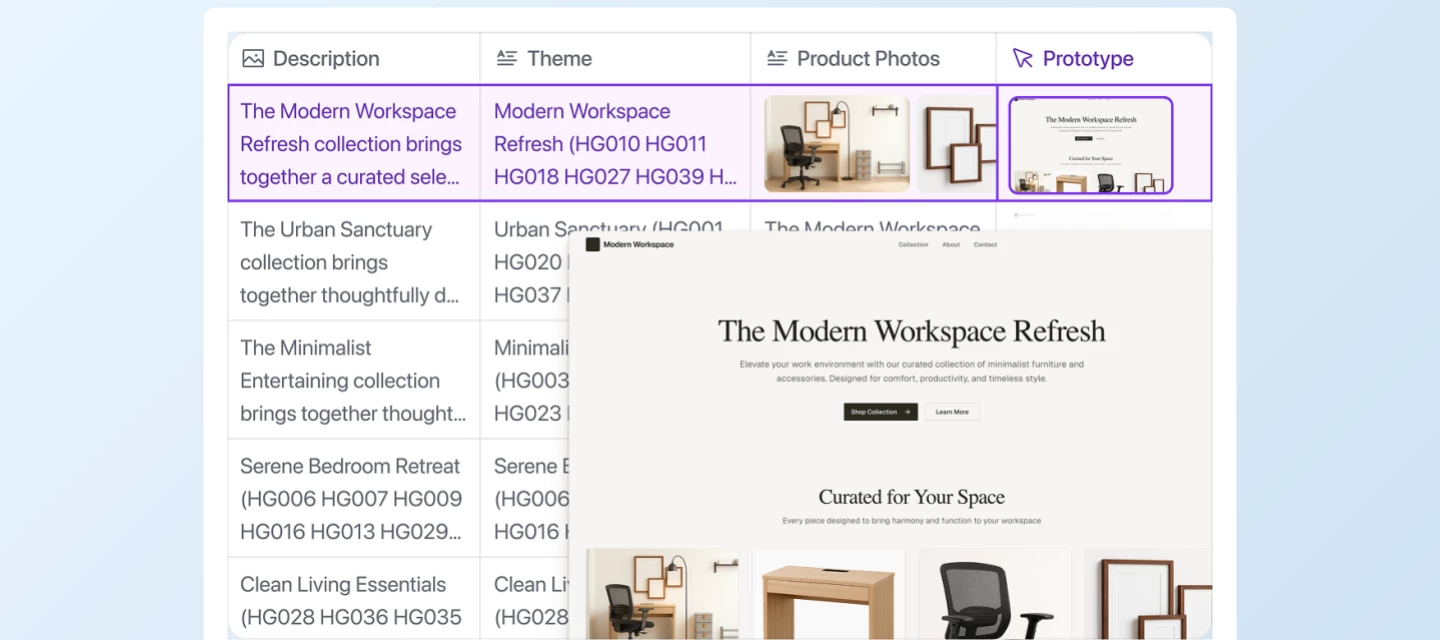
We’re excited to announce the launch of Prototypes in Field Agents, now available in AI Labs: a powerful new way to turn your Airtable data and written specifications into interactive web prototypes, all in just a few clicks.


With Prototypes in Field Agents, you can:

  • Instantly generate interactive web prototypes from written specs or rough ideas—no coding required.
  • Empower anyone to make their ideas real and tangible with working examples directly within Airtable.
  • Enable marketers and business teams to create polished, interactive reports, streamlining content creation and sharing.


What can you build?

  • Product teams can quickly mock up new features or flows, share them for feedback, and iterate—all before a single line of production code is written.
  • Designers can experiment with interface layouts and interactions, then hand off working code snippets to developers for faster implementation.
  • Marketers and analysts can transform data into interactive dashboards and reports, making insights more engaging and actionable for stakeholders.


How to get started

Workspace admins can enable AI Labs from Account > Workspace Settings. Once enabled, create a Field Agent and select Prototype. Describe the app, web page, or interactive report you want to create. Your Field Agent will generate a working web prototype, ready for review and iteration.


Important details:

  • Prototypes in Field Agents is currently in AI Labs—your feedback will help shape its future development.
  • No credits are charged while the feature is in AI Labs.

Try it today and see how fast you can go from idea to interactive prototype!


6 replies

Mike_AutomaticN
Forum|alt.badge.img+28

Hey ​@chelseytanaka,

This is both fun and interesting. Where is the landing page taking data for the collection for?

As I see from the setup, this field lives on the Themes table, and makes reference to only 2 fields: Theme Description and Instructions.

How is the “collection” determined?

Completely different matter, but would love to have you join our Airtable Hackathon! Make sure to sign up!!

Mike, Consultant @ Automatic Nation 
YouTube Channel


chelseytanaka
Forum|alt.badge.img+5
  • Author
  • Employee
  • November 10, 2025

@Mike_AutomaticN In this example, the base contains a table with products, and several of those products have been organized into a collection. The table with the web prototype field agent uses a lookup field to pull all the images for those products, as well as information about the products themselves. That data, along with instructions and brand guidelines, are used as input into the web prototype field agent.


chelseytanaka
Forum|alt.badge.img+5
  • Author
  • Employee
  • November 10, 2025

This feature is now available to all customers, with the exception of those with Data Processing Agreements (DPAs), because this feature uses a new data subprocessor. This feature will be available to all customers on December 3rd.


Mike_AutomaticN
Forum|alt.badge.img+28

Forum|alt.badge.img+1
  • New Participant
  • November 12, 2025

This is amazing! Would it be possible to download the code used for the generated web prototypes?


chelseytanaka
Forum|alt.badge.img+5
  • Author
  • Employee
  • November 12, 2025

@Thijs It’s not possible today, but I’ll add it as a feature request for our roadmap! I’d be curious to learn what you’d want to do with that code - continue to iterate on it? deploy it?

