Question

Airtable Automation to Slack — Images Not Displaying

  • December 3, 2025
  • 2 replies
  • 35 views

Forum|alt.badge.img

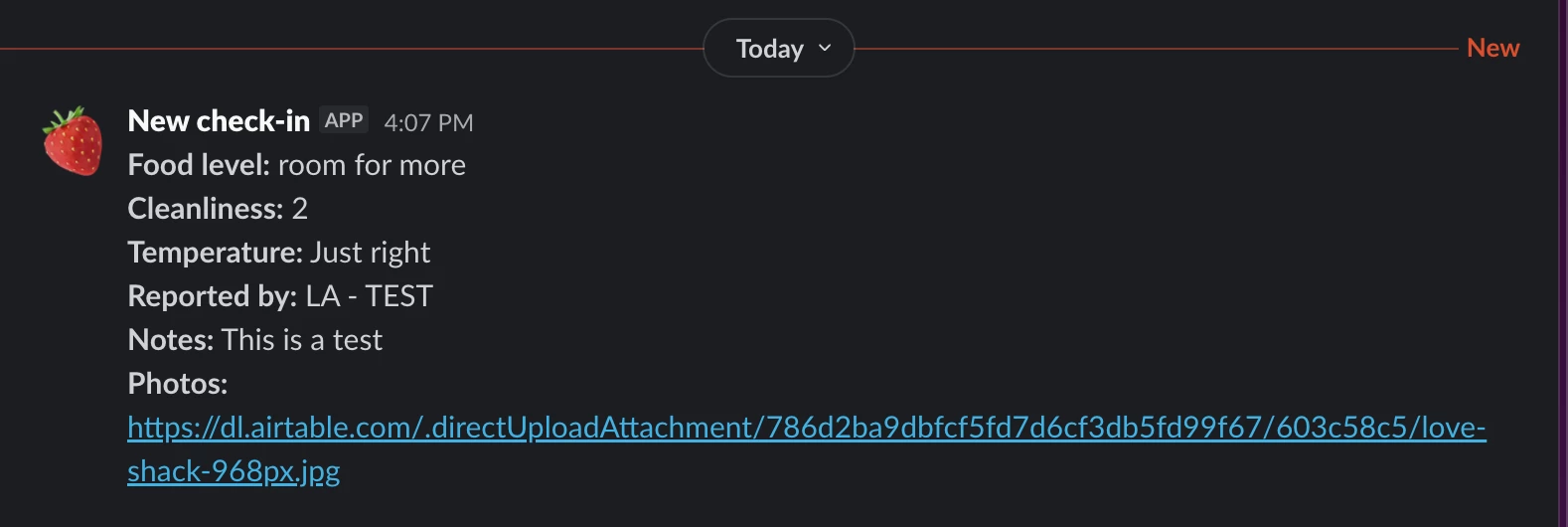
I have a base setup for a check in system. When a user checks in through the airtable form that triggers a notification to slack. Within the form users can upload an image file which I am able to see on airtable. 

The form is updating on slack but the image shows up as a url that when clicked it gives this error: “The link you're trying to visit is not available. Please visit our support center for more information.” 

Any ideas for how to troubleshoot this? 


2 replies

TheTimeSavingCo
Forum|alt.badge.img+31

Ah, try updating your automation so that it uses the Expiring Download URL instead:

When sending it, it’ll look like this:


Do note that the links will only be online for about 2 hours though as mentioned in the FAQ here, and I’m not sure if the preview image will stay visible after the 2 hour window.  I’m going to test that out and will get back to you!

Edit: The previews don’t work after the link goes offline:


If you do need the image to be stored in Slack, then you’re going to need to use a third party automation tool like Make or Zapier to handle it I’m afraid


ScottWorld
Forum|alt.badge.img+35
  • Genius
  • December 3, 2025

@larmstr7 

Unfortunately, Airtable does not support sending images to Slack, nor does it allow you to reference those images by their Airtable URL.

If you want to send an image’s URL to Slack, you would need to move the image out of Airtable and into a cloud drive like Google Drive. Then, you can send the Google Drive URL to Slack. This entire process can be automated by using Make’s Google Drive integrations along with Make’s Airtable integrations.

Alternatively, if you want to directly send the image to Slack — so people can see the image within Slack itself — you would also need to use Make for this. You would use Make’s Slack integrations along with Make’s Airtable integrations.

See screenshot below for how you would set this up in Make.

(Note that Slack can’t directly access an image from an attachment field, so you will ned to use Make’s Get A File module to download the attachment then upload it to Slack.)

If you’ve never used Make before, I’ve assembled a bunch of Make training resources in this thread. For example, here is one of the ways that you can instantly trigger a Make automation from Airtable

I also give live demonstrations of how to use Make in many of my Airtable podcast appearances. For example, in this video, I show how to work with Airtable arrays in Make.

Hope this helps!

If you’d like to hire the best Airtable consultant to help you with anything Airtable-related, please feel free to contact me through my website: Airtable consultant — ScottWorld