Any luck with adding an image in automated email send?

  • January 25, 2023
  • 2 replies
  • 271 views

Forum|alt.badge.img+19

We are trying to add our logo into the body of automated email sends. Has anyone had any luck in this area? 

2 replies

TheTimeSavingCo
Forum|alt.badge.img+31

If your image isn't hosted on Airtable, in your email automation you can do:

<img src='https://www.google.com/images/branding/googlelogo/2x/googlelogo\_color\_272x92dp.png'>

(Remember to escape the underscores)

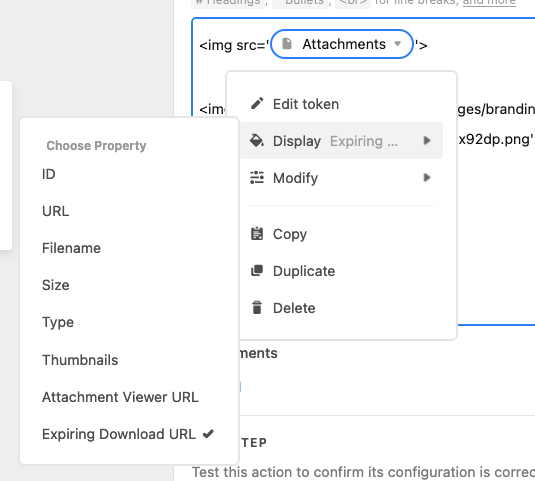
If it's hosted on Airtable, you can add it as an "Expiring Download URL" and it seems to work:

Received in Gmail:


Note that the attachment field you're referencing can only have one image in it though; more than one and it won't work I think


Forum|alt.badge.img+19
  • Author
  • Known Participant
  • January 26, 2023

If your image isn't hosted on Airtable, in your email automation you can do:

<img src='https://www.google.com/images/branding/googlelogo/2x/googlelogo\_color\_272x92dp.png'>

(Remember to escape the underscores)

If it's hosted on Airtable, you can add it as an "Expiring Download URL" and it seems to work:

Received in Gmail:


Note that the attachment field you're referencing can only have one image in it though; more than one and it won't work I think


Thank you for the suggestion. I will try this out.