Question

Autofilling in a Form

  • June 24, 2026
  • 10 replies
  • 32 views

Forum|alt.badge.img+1

Hello,

I have a form I am trying to create for clients to be able to fill out and provide their information. I currently have it set to populate a new field for “Agent” contact information when they select that the “Client” and “Agent” ARE NOT the same. When they ARE the same, I want it to autofill the “Agent” field with the same information into the “Client” fields, but I do not know if this is an option and have been unable to figure it out. Hopefully that makes sense.

10 replies

Holly Nilson-Clay
Forum|alt.badge.img+2

Hey, can you tell us a bit more about how your data is structured? Are Client and Agent contact details separate fields on the same record, or are they stored in different tables? Is there just one contact information field, or do you have separate ones for email, address, phone, for example. And is this a single form that both clients and agents fill out, or just clients? A little more info on the base setup will help us point you in the right direction/suggest the best option. 😊

Holly @Simple Stack


Forum|alt.badge.img+1
  • Author
  • New Participant
  • June 24, 2026

They are separate fields on the same record, stored in the same table. There are separate field for email, address, phone, etc. There is just one form for both, the idea is that one person fills out the form, but there is the option to enter contact information for another involved party.


Holly Nilson-Clay
Forum|alt.badge.img+2

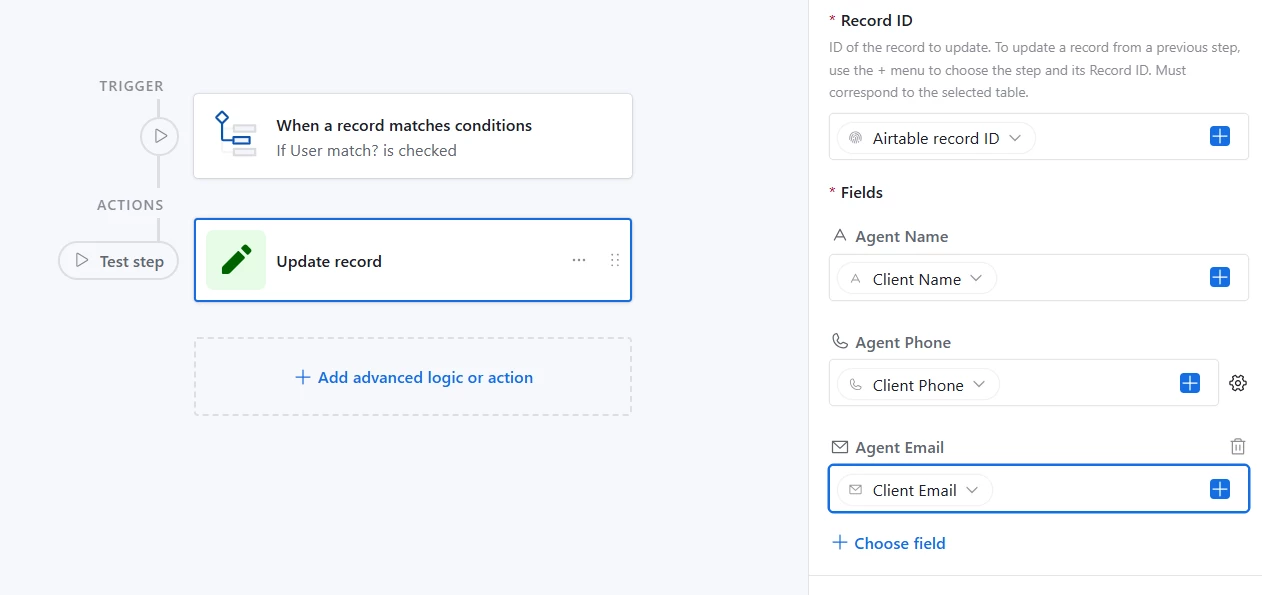
OK, so you can build an automation based on the trigger “when a record matches conditions” and the condition would be if the client and agent are marked as the same person, then the action would be to update the record and copy the data in the client fields to the agent fields. 


The on the data layer it would look like this.


Depending on your Airtable plan, you could also add a condition to the “user match” field in the form, so if it’s checked it hides the agent fields to prevent users inputting the same data twice.

Let me know if anything is unclear. :)


Forum|alt.badge.img+1
  • Author
  • New Participant
  • June 24, 2026

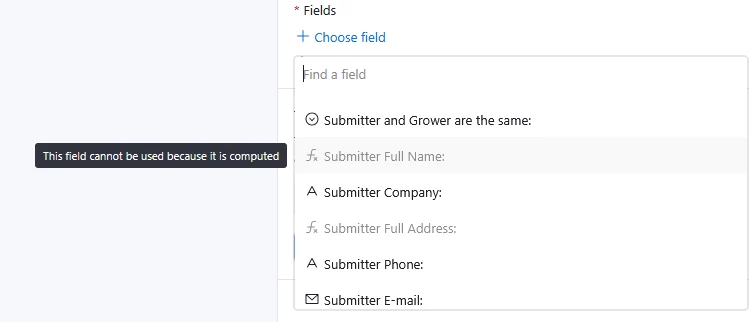
Super helpful, thank you! One more thing, under fields, some of the fields are grayed out and say “this field cannot be used because it is computed”. Any idea why this might be?


Holly Nilson-Clay
Forum|alt.badge.img+2

Would you mind sharing a screenshot of your fields? I’m guessing they’re formula, lookup or rollup field types?


Forum|alt.badge.img+1
  • Author
  • New Participant
  • June 24, 2026

This is what I’m seeing, it does look like only the formula fields are an issue.


DisraeliGears01
Forum|alt.badge.img+22

Super helpful, thank you! One more thing, under fields, some of the fields are grayed out and say “this field cannot be used because it is computed”. Any idea why this might be?

Presumably this is in reference to building a form right? As computed fields (formulas, rollups, lookups) are not editable, they are not valid to be put on a form. Same thing goes for automations. 

Depending on how your workflow is designed, one small issue with ​the proposed automation solution is just that the automation isn’t going to run until after the form is submitted, so if you checkmark the User Match box on the form, it won’t populate the Agent fields for the user to see. You can set your form to hide those fields if User Match is checked tho. 

Forms are a bit of a weird state in Airtable, they’re like a holding spot for data but they aren’t actually entered or utilized until submitted, so you can’t calculate within them.

As always, have to pitch Fillout Forms as a more powerful, deeply integrated forms solution for Airtable 


Holly Nilson-Clay
Forum|alt.badge.img+2

➕for fillout! It is far superior for forms.

There’s potentially better ways to setup your data layer with respect to how you’re storing the client/agent data, but it also depends on what you’re needing to do with the client and agent info after it’s submitted, like automated emails or maybe reports. 

But to answer your initial question, is there a way to copy the data, yes. Is it the best approach, maybe not. 


Forum|alt.badge.img+1
  • Author
  • New Participant
  • June 24, 2026

Oh interesting, I will look into this!

Thanks for the help :)


ScottWorld
Forum|alt.badge.img+35
  • Genius
  • June 25, 2026

I know that everyone has already guided you towards the best solution here — which is Fillout’s advanced forms for Airtable. (Fillout is 100% free and it offers hundreds of features that Airtable’s forms don’t offer.)

But I just wanted to give a little more context to what you can do with Fillout.

In your particular case, Fillout lets you add calculations & formula fields & lookup fields & rollup fields to your forms.

And Fillout also gives you 5 different ways of pre-filling forms, including the ability to update existing Airtable records from a form.

Fillout even offers advanced tricks like allowing you to add new linked records with a form or create custom PDF files from a form submission.

I show how to use a few of the advanced features of Fillout on these 2 Airtable podcast episodes:

Hope this helps!

If you have a budget and you’d like to hire the world’s best Airtable consultant to help you with this or anything else that is Airtable-related, please feel free to contact me through my website: Airtable consultant — ScottWorld