Question

Button to prompt user confirmation

  • June 8, 2026
  • 2 replies
  • 16 views

Forum|alt.badge.img+4

Hi, how can I use script to prompt a user to confirm an action when a button is clicked on the interface? The Button is linked to a record picker on a Blank Layout.

I tried adding this to my script:
// Ask for confirmation
let confirmed = await input.buttonsAsync(
"Are you sure you want to perform this action?",
[ {label: "Cancel", value: "cancel"}, {label: "Confirm", value: "confirm"} ]
);

if (confirmed !== "confirm") {
output.text("Action canceled.");
return;
}

But I am getting this error:
Property 'buttonsAsync' does not exist on type '{ config(): { readonly recordID: string; }; }'.(2339)


Here is my script:

let table = base.getTable("Test Log");
let view = table.getView("New");
const recordID = input.config().recordID;
let record = await view.selectRecordAsync(recordID);

// Ask for confirmation
let confirmed = await input.buttonsAsync(
"Are you sure you want to perform this action?",
[ {label: "Cancel", value: "cancel"}, {label: "Confirm", value: "confirm"} ]
);

if (confirmed !== "confirm") {
output.text("Action canceled.");
return;
}

if (record) {

// Perform action

}

2 replies

TheTimeSavingCo
Forum|alt.badge.img+32

Ah that’s not possible I’m afraid.  “input.buttonsAsync” is only available in the Scripting Extension, not via an automation script

https://support.airtable.com/docs/scripting-extension-overview
https://airtable.com/developers/scripting/api/input#buttons-async


As a workaround, what if we put a checkbox field in front of the button as confirmation?  The automation would then check whether that checkbox was ticked before running, and I’ve set it up here for you to check out


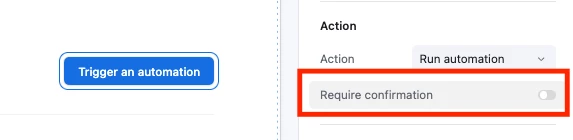
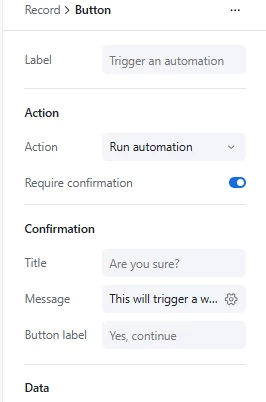
You probably already know this, but for newer users it’s worth noting that buttons on the other Interface layouts have confirmation functionality available!


Alexey_Gusev
Forum|alt.badge.img+25

Hi,

Automations designed to run without interaction with user. That’s why some input/output features, that work in Scripting Extension, will not work in Automation. 
Automation script can receive data from defined input variables, stored in “Input.config()” and output via “output.set” (available for use in further steps).

Ability to run Automation from button in interface with “Record review” layout is a bit of a compromise solution, so trying to extend it to a user dialogue is a challenging task, it wasn't originally intended that way.
Note that interface has it’s own confirmation functionality, i never used it, but maybe this can help?