Solved

Can Airtable Automation send emails from my Microsoft 365 mailbox instead of airtableemail.com?

  • October 8, 2026
  • 6 replies
  • 43 views

Forum|alt.badge.img+2

Hi Airtable Community,

I'm looking for a way to configure Airtable Automations so that emails are sent directly from my Microsoft 365 mailbox or from a shared mailbox that I have permission to use.

Currently, when I use Airtable's native Send Email automation, recipients see:

AirtableAutomations<noreply+automations@airtableemail.com>

Any guidance would be greatly appreciated.

Thanks in advance!
Best answer by bredah

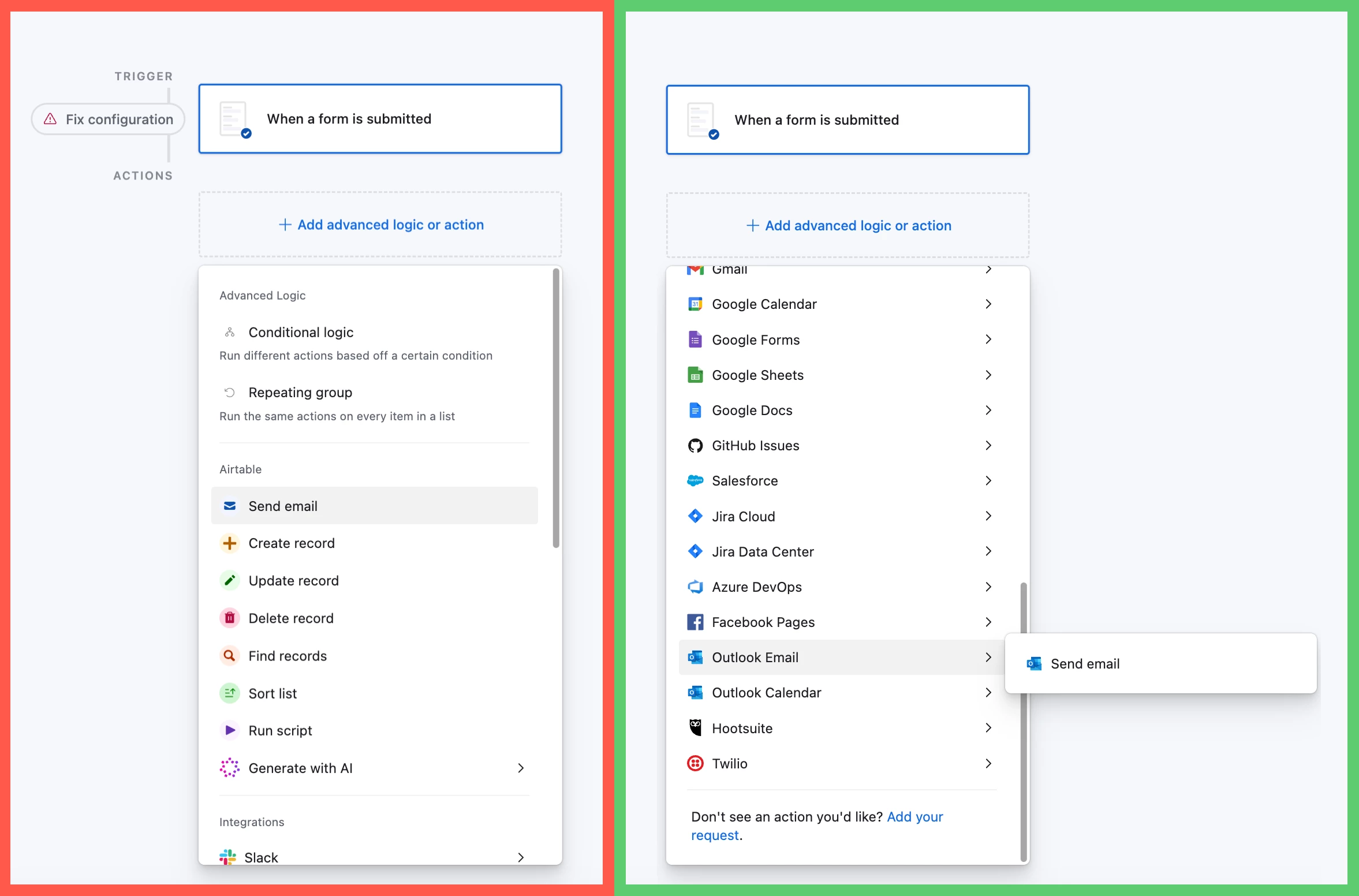
Hey, ​@Ravi Kumar Yadav! This is definitely possible 😊 When you create an automation, instead of choosing Airtable’s native “Send email” action, you’ll want to find the Outlook Email section and choose “Send email” there, then connect your Microsoft 365 account:

Airtable’s native “Send email” action (left) vs. Outlook Email’s “Send email” action (right)


Once the accounts are connected, you’ll then be able to configure the recipients, subject, message body, attachments, etc. much like you would with the native action! 

Hope this helps! Feel free to reply here if you have any other questions 😊

6 replies

ScottWorld
Forum|alt.badge.img+35
  • Genius
  • October 9, 2026

Yes, there is an automation action to Send Outlook Email. 
- ScottWorld, Expert Airtable Consultant 


bredah
Forum|alt.badge.img+11
  • Inspiring
  • Answer
  • October 9, 2026

Hey, ​@Ravi Kumar Yadav! This is definitely possible 😊 When you create an automation, instead of choosing Airtable’s native “Send email” action, you’ll want to find the Outlook Email section and choose “Send email” there, then connect your Microsoft 365 account:

Airtable’s native “Send email” action (left) vs. Outlook Email’s “Send email” action (right)


Once the accounts are connected, you’ll then be able to configure the recipients, subject, message body, attachments, etc. much like you would with the native action! 

Hope this helps! Feel free to reply here if you have any other questions 😊


Forum|alt.badge.img+2

Thank you so much ​@bredah , it is really helpful, i thought both options are same, so i used native “send email” action. do you also know, how to connect with shared mailbox? because i didn’t find the option for it. 


bredah
Forum|alt.badge.img+11
  • Inspiring
  • October 9, 2026

Thank you so much ​@bredah , it is really helpful, i thought both options are same, so i used native “send email” action. do you also know, how to connect with shared mailbox? because i didn’t find the option for it. 

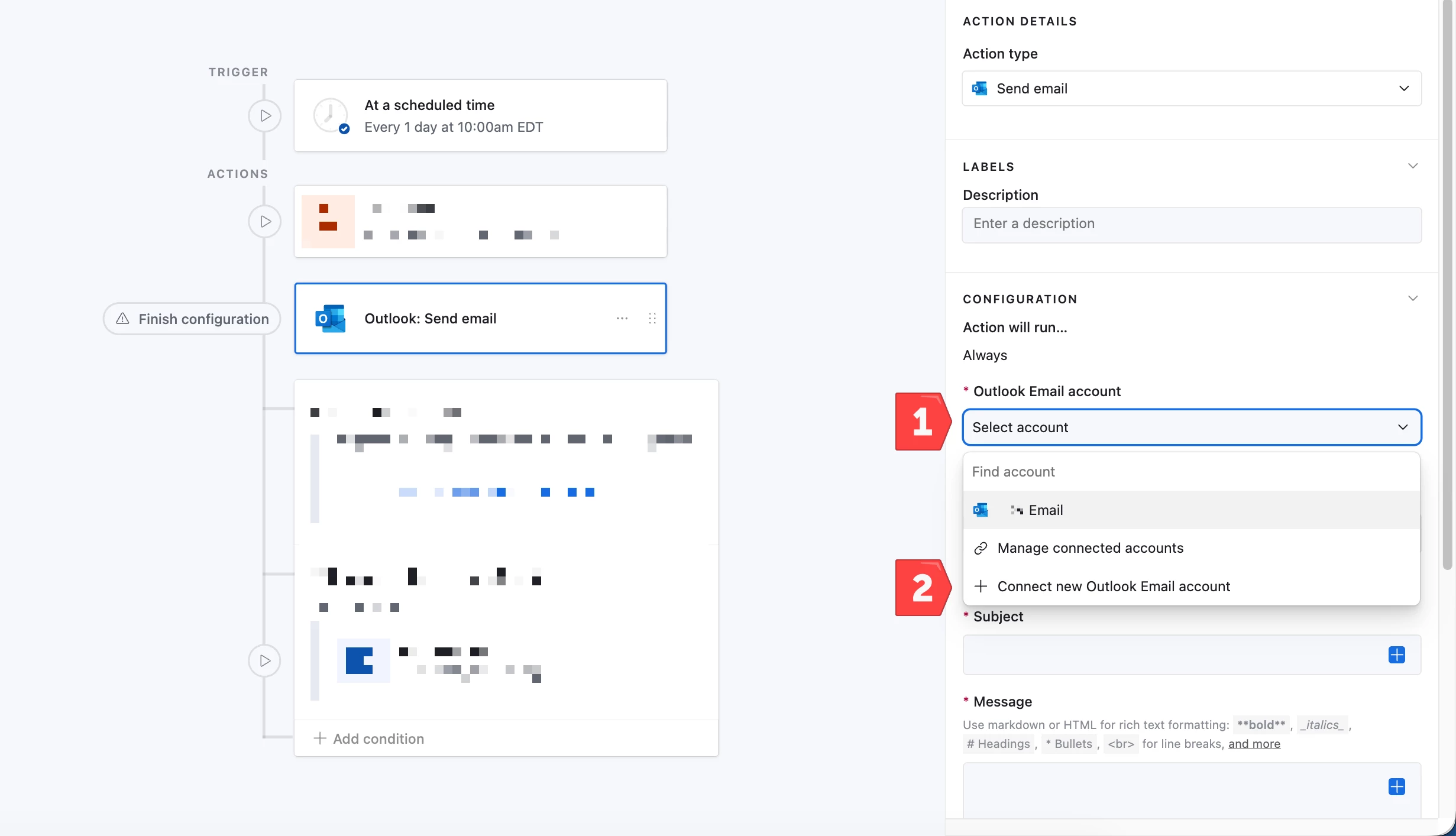
You’re welcome! Happy to help 😊 Once you’ve added the action to the automation, within the Properties pane on the right-hand side of the page, 1) find the Outlook Email account field, and 2) select Connect new Outlook Email account from the drop-down. 

Here’s an article with more information on the available Outlook automation actions: https://support.airtable.com/articles/1189463338-airtable-automation-actions-outlook 🚀


Forum|alt.badge.img+2

Thank you so much ​@bredah , it is really helpful, i thought both options are same, so i used native “send email” action. do you also know, how to connect with shared mailbox? because i didn’t find the option for it. 

You’re welcome! Happy to help 😊 Once you’ve added the action to the automation, within the Properties pane on the right-hand side of the page, 1) find the Outlook Email account field, and 2) select Connect new Outlook Email account from the drop-down. 

Here’s an article with more information on the available Outlook automation actions: https://support.airtable.com/articles/1189463338-airtable-automation-actions-outlook 🚀

​@bredah, The steps are working perfectly when I connect Airtable to my personal Outlook account. However, my other requirement is to connect and send emails from a shared mailbox also.

When I enter the shared mailbox email address, Airtable prompts me for a password. Since a shared mailbox does not have a dedicated password and is typically accessed through delegated permissions, we do not have any password that can be used for authentication. As a result, we are unable to connect the shared mailbox.

If you come across any solution, documentation, or article that explains how to connect a shared mailbox and send emails from it through Airtable, I would greatly appreciate it if you could share it with me.

Thank you very much for your time and assistance. I really appreciate your efforts and support.


bredah
Forum|alt.badge.img+11
  • Inspiring
  • October 9, 2026

Hey ​@Ravi Kumar Yadav! Glad to hear the Outlook connection is working for your personal mailbox, at least! I actually reached out to Airtable Support about this exact shared mailbox scenario back in July, and unfortunately they confirmed that shared mailboxes aren’t currently supported with the Outlook: Send Email automation action. Here’s the explanation they provided:

Unfortunately, this is not currently supported. Airtable's Outlook: Send Email automation action connects via OAuth to an individual user's Microsoft account and can only send from that user's personal mailbox. Shared mailboxes (those accessed through delegated permissions rather than their own sign-in credentials) cannot be connected as the automation account.

The reason for this is that Airtable uses the Microsoft Graph API's /me/ endpoints, which are scoped exclusively to the authenticated user's own mailbox. There is no mechanism to target a shared mailbox through the current integration.

There is a "From address" field available under "Show more options" in the Send Email action, but this only works with email aliases that the connected account owns. It does not extend to shared mailboxes.

I understand this may be a blocker for your project timeline, and I'm sorry we don't have a built-in solution for this. If you have any other questions or need help with a different aspect of your Airtable setup, please don't hesitate to reach out.


So unfortunately, it sounds like there isn’t a native way to send from a Microsoft 365 shared mailbox through Airtable Automations right now. Hopefully this is something Airtable expands support for in the future! 🤞