Question

Email Digest, Filter Out Updated Columns

  • July 22, 2026
  • 4 replies
  • 34 views

Forum|alt.badge.img+2

Hi all,

Working on creating a daily digest email to summarize changes made in the past 24 hours. I’ve been able to set the scheduled time, find records to grab only those modified yesterday, and sort the list by our event date, but then I’m hitting a wall.

I want the email to show what the changes are, not just that that record has been updated. Is there a way to run a script to specifically flag which column has been updated or would I need a whole series of “last modified” columns to catch it? Or is there another workaround here, such as through DocsAutomator or another add-on?

4 replies

Ac_dvlp
Forum|alt.badge.img+1
  • New Participant
  • July 22, 2026

Hi- the “last modified” field has an option to track by multiple specific fields at once.  


Forum|alt.badge.img+2
  • Author
  • New Participant
  • July 22, 2026

Hi- the “last modified” field has an option to track by multiple specific fields at once.  

Hiya, correct! And I have it monitoring the important columns that I would like to be updated on. Problem is in making the grid of records to send out in email format, the information is all sent out but you can’t actually see what was changed, just every column that I’ve selected to include. 


Ac_dvlp
Forum|alt.badge.img+1
  • New Participant
  • July 22, 2026

when a field in a record is changed that change is logged in the all activity section that is available for each record. but the record itself only shows the new data. If you need to see historical data it would be best to not overwrite the previous data. you can accomplish this using linked records with date, time,user  fields to see each update when it was done and who did it. 


TheTimeSavingCo
Forum|alt.badge.img+32

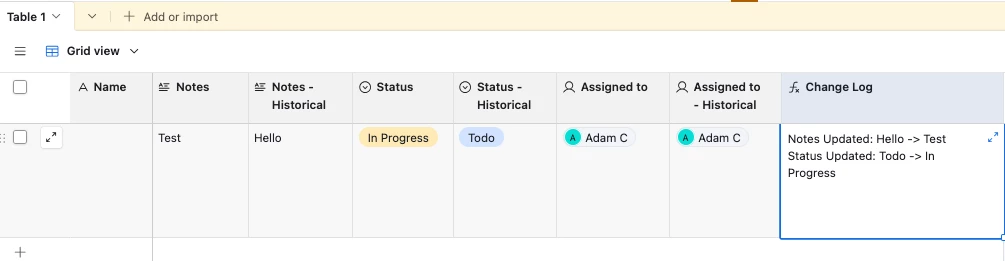
Hm, what if you created a ‘Historical’ version of each field that only gets updated when the email gets sent out?  Then you could use a formula field to output a changelog of sorts, and I’ve set it up here for you to check out!

IF(
Notes != {Notes - Historical},
'Notes Updated: ' & {Notes - Historical} & ' -> ' & Notes & '\n'
) &

IF(
Status != {Status - Historical},
'Status Updated: ' & {Status - Historical} & ' -> ' & Status & '\n'
) &

IF(
{Assigned to} != {Assigned to - Historical},
'Assigned to Updated: ' & {Assigned to - Historical} & ' -> ' & {Assigned to}
)

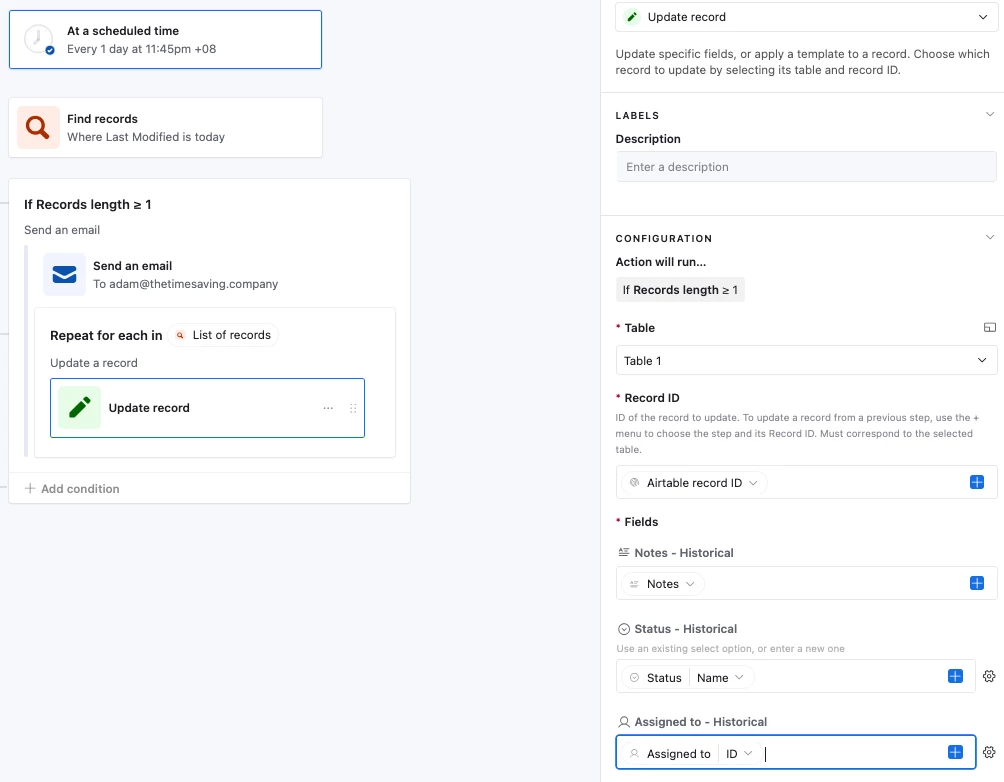
And so the workflow would be:

  1. User updates fields
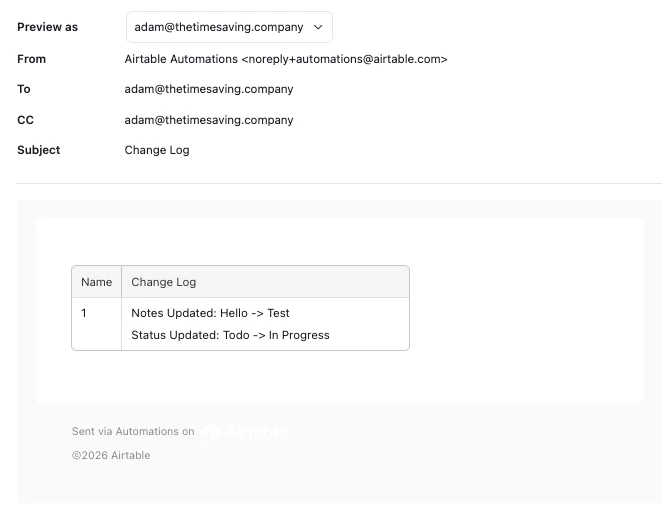
  2. Automation looks for any records that have a Last Modified Time that’s today (or yesterday depending on how your automation’s set up) and sends out the record name + change log field:

  3. The automation then updates the ‘Historical’ field with the new value so that the ‘Change Log’ formula field outputs the correct info:
    1.