Solved

"Find records" conditions in wrong order to perform required "contains" search

  • June 26, 2026
  • 2 replies
  • 42 views

Forum|alt.badge.img+18

Hi,

I’m pondering how to build an automation’s “Find records” step when the “contains” direction is seemingly wrong. Apologies for the perhaps convoluted question, this was difficult to write :).

I trigger the automation from a Project with a button and want to find the Contact linked to that Project, using linked RecordIDs. One Contact can have many Projects, but one Project only one Contact.

The Find step now has “Contacts” as its table, I think obviously. But then the order of my conditions is that the first variable refers to “Contacts”, and the second to “Projects” where the trigger button is.

I wanted to look for the Contact that would contain the Project’s RecordID (I have linked that data), but instead I can only look for the Project which contains (or “is”) the Contact’s RecordID. But since there may be many Projects to one Contact, “contain” would not work I guess.

I want to reverse this logic or somehow look for the Contact that contains the given Projects ID.

How could I go about that?

Gratefully,

Björn
Best answer by DevonK

If the project always contains one contact, you should be able to do it by the contact record id rather than the project record id.


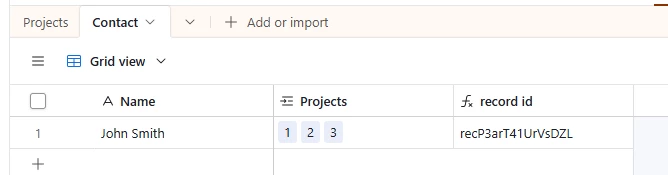
Add a record id to the contact table:


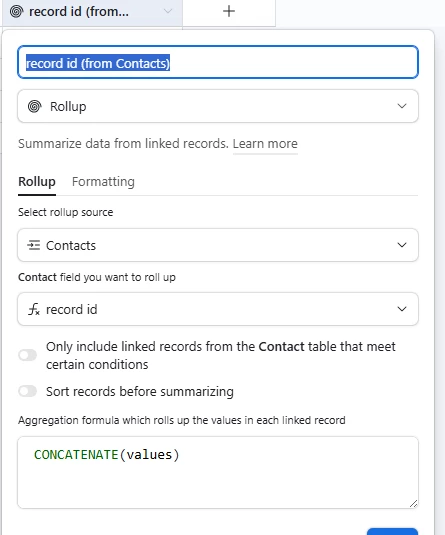
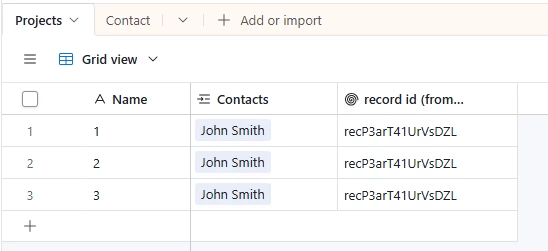
Roll up that record id to the projects table (use CONCATENATE to make it a string):


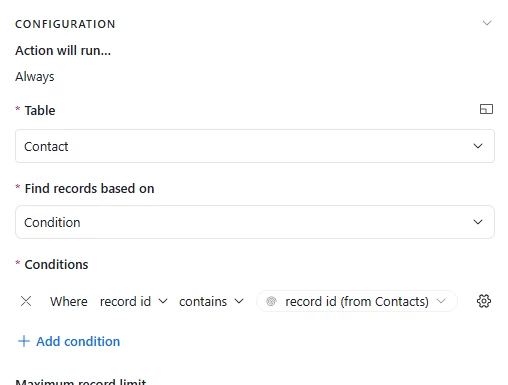
Find records where record id contained record id (from Contacts):


2 replies

DevonK
Forum|alt.badge.img+17
  • Inspiring
  • Answer
  • June 26, 2026

If the project always contains one contact, you should be able to do it by the contact record id rather than the project record id.


Add a record id to the contact table:


Roll up that record id to the projects table (use CONCATENATE to make it a string):


Find records where record id contained record id (from Contacts):


Forum|alt.badge.img+18
  • Author
  • Known Participant
  • June 27, 2026

Thank you ​@DevonK :)!

Björn