Question

Free Plan - Google form limits

  • September 5, 2026
  • 8 replies
  • 179 views

Alexandra
Forum|alt.badge.img+1


Hi!

I need to set up an automation for a solution I'm developing that allows volunteers to log their hours via a Google Form, which will then populate the tables. There will be around 100 volunteers. Is it possible to do this using Airtable's free plan?

Thank you

Alexandra

8 replies

ScottWorld
Forum|alt.badge.img+35

​@Alexandra 

Yes, that would be fine. However, on the free plan, you can only have 1,000 records per base, which means that you would only be able to accept up to 1,000 form submissions.

By the way, most of us in the Airtable community have moved away from Google Forms and we are now using Fillout’s advanced forms for Airtable instead.

The reason for this is because Fillout is 100% free (for up to 1,000 form submissions per month), and because it is designed from the ground up to work specifically with Airtable.

Unlike Google Forms, Fillout offers hundreds of advanced features that neither Google Forms nor Airtable’s native forms offer, including the ability to:

I show how to use a few of the advanced features of Fillout on these 2 Airtable podcast episodes:

Hope this helps!

If you’d like to hire the best Airtable consultant to help you with anything Airtable-related, please feel free to contact me through my website: Airtable consultant — ScottWorld


TheTimeSavingCo
Forum|alt.badge.img+32

Hm, I think this’ll depend on two things:

1. How you’re getting the data from the Google Form into Airtable

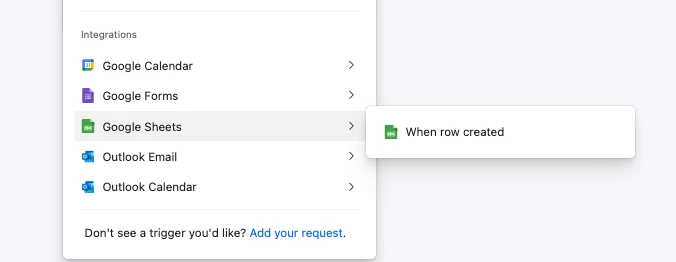
If you’re using a third party integration tool like Make or Zapier or something then you’re good to go.  If you’re relying on Airtable automations to do this via the ‘When Google Sheets row created’ trigger then you’ll have to be mindful that the free plan can only do 100 automation runs per month

You mentioned you’ll have around 100 volunteers, so if it’s only one submission per month per volunteer that’d work, but >100 volunteers or >1 submission you’d have a problem


2. How many records you’d expect

The Airtable free plan only lets you do 1000 records per base, and so if you’re doing >10 submissions over the lifetime of this project then the free plan wouldn’t be sufficient I’m afraid


Alexandra
Forum|alt.badge.img+1
  • Author
  • Participating Frequently
  • September 7, 2026

Hi!


Thanks very much for your help.

What I want is for volunteers to log their attendance on their mobile phones so the data can be integrated into Airtable. I didn't want them to have to log in when using the Airtable form; the only identification solution I found involved them selecting their name from a list, which I didn't like.

That’s why I was considering Google Forms—can you help me with another solution?


TheTimeSavingCo
Forum|alt.badge.img+32

Hm, any chance we could convince them to key in their email every time?  Then each submission would have an email address and you could tie it to each volunteer

To help with this, we could create a custom prefilled form link for each volunteer that they can then bookmark and use, and so when they opened the form the email would automatically be filled out?

If you need the identification functionality of Google Forms, then you could try using Make for this too, and their free plan would let you do 500 or so submissions I think (assuming a two step automation which triggers when a Google Form gets submitted and creates a record in Airtable for you)

---

I take it the record limits aren’t an issue then?


DisraeliGears01
Forum|alt.badge.img+22

Throwing in my two cents here, you’ve got two primary issues

  • Free plan limitations (on records and automations most specifically)
  • Submission identification

Free plan limitations are the first thing to consider, which is why Adam and Scott both brought it up. Unless your 100 volunteers each only log an entry like once a month or less, you’ll end up hitting base/automation limits rapidly (I know of volunteer bases that are wide and infrequent, so maybe that’s you 🤷‍♂️). Airtable does have a pretty sweet non-profit discount ($144/year for 1 seat) that would make those limitations go away (or there are alternative online database systems out there with varying features). 

The other issue is submission identification. There are some issues with GForm integration as ​@TheTimeSavingCo laid out, but it’s certainly achievable. One other potential issue on the GForm thing is that people have multiple Gmail accounts, so you might still get some goofy entries that don’t line up.

I would definitely not do prefilled form solution, with 100 volunteers it’s a lot of prefills to manage and in my experience with volunteers not everybody knows or uses bookmarks even.

That said I’d probably lean toward his suggestion of some kind of identification key. Often this is email address, but it can be an ID number, phone number, or even first name/last name if your volunteers are consistent and unique enough, i.e. you don’t have 3 different John Smiths, and Diana doesn’t occasionally write her name as Diane (a problem I’ve had lol). 

My very first Airtable system was a museum docent tour registration build (we only had 20ish volunteers) and I had email as a required field to act as the identifier (and send an auto-response email to) and just had a simple Airtable form as the input.


nroshak
Forum|alt.badge.img+11
  • Brainy
  • September 8, 2026

100 volunteers.

1,000 records per base


I do have a suggestion for you here. Create a Volunteers table with 1 row per volunteer, and a separate Form Responses table. When a form is submitted to the Form Responses table, have an automation increment the volunteer’s hours in the Volunteers table, with whatever granularity you need (total, hours for this week, hours for this day… you can have up to 500 fields per table), then remove the row from the Form Responses table. 

I didn't want them to have to log in when using the Airtable form


With Google Forms, won’t they just have to log in to Google instead? 

You can have unlimited read-only users in Airtable on Free plan. What if you created a read-only user for every volunteer? The volunteers would log in to Airtable (which they can do with Google if they prefer), then fill out the Airtable form. You just have to make sure the Airtable form is public (not only for base users), or the read-only users won’t be able to submit it :) 

-Natalka


Matt_Shepherd
Forum|alt.badge.img+2
  • Participating Frequently
  • September 9, 2026

100 volunteers.

1,000 records per base


I do have a suggestion for you here. Create a Volunteers table with 1 row per volunteer, and a separate Form Responses table. When a form is submitted to the Form Responses table, have an automation increment the volunteer’s hours in the Volunteers table, with whatever granularity you need (total, hours for this week, hours for this day… you can have up to 500 fields per table), then remove the row from the Form Responses table. 

I didn't want them to have to log in when using the Airtable form


With Google Forms, won’t they just have to log in to Google instead? 

You can have unlimited read-only users in Airtable on Free plan. What if you created a read-only user for every volunteer? The volunteers would log in to Airtable (which they can do with Google if they prefer), then fill out the Airtable form. You just have to make sure the Airtable form is public (not only for base users), or the read-only users won’t be able to submit it :) 

-Natalka


wouldn’t that quickly hit the 100 automation run limit on the free plan?


nroshak
Forum|alt.badge.img+11
  • Brainy
  • September 9, 2026

> wouldn’t that quickly hit the 100 automation run limit on the free plan?

Oh, my bad, I forgot about that! Thanks for pointing that out. - Natalka