Solved

Gmail Formatting in Airtable Automation via HTML

  • April 21, 2026
  • 5 replies
  • 42 views

Forum|alt.badge.img+2

Hi guys,
I have been trying to format my gmail body using html tags but i am not getting my desired output. The formatting looks awfl when sent to customer. Extra spaces have been added above & below the text despite setting the padding to 0. Here’s the formatting i have been using:


<table role="presentation" width="100%" border="0" cellpadding="0" cellspacing="0">

<tr>

<td align="center" style="padding:0;background-color:#ffffff;">


 <table role="presentation" width="100%" border="0" cellpadding="0" cellspacing="0" style="max-width:520px;">


  <tr><td style="padding:0px 16px 14px 16px;"><span style="font-family:Georgia,serif;font-size:10px;color:#aaaaaa;letter-spacing:4px;text-transform:uppercase;">Faisal Silk &nbsp;&middot;&nbsp; Order Update</span></td></tr>


  <tr><td style="padding:0 16px 0 32px;"><span style="font-family:Arial,sans-serif;font-size:9px;color:#aaaaaa;letter-spacing:2px;text-transform:uppercase;">Order No.</span></td></tr>

  <tr><td style="padding:0 16px 24px 32px;"><span style="font-family:Georgia,serif;font-size:26px;color:#111111;letter-spacing:2px;line-height:1.0;"></span></td></tr>


  <p><tr><td style="padding:0 16px 0 32px;"><span style="font-family:Georgia,serif;font-size:15px;color:#555555;font-style:italic;">Heyyo Salam,</span></td></tr></p>

  <tr><td style="padding:0 16px 20px 32px;"><span style="font-family:Georgia,serif;font-size:16px;color:#111111;font-weight:700;"></span></td></tr>


  <tr><td style="padding:0 16px 8px 32px;"><span style="font-family:Arial,sans-serif;font-size:13px;color:#333333;line-height:1.8;">Here's a quick update on your order - we've just finished <strong style="color:#111111;"></strong>. Your piece is beautifully on its way.</span></td></tr>

  <tr><td style="padding:0 16px 28px 32px;"><span style="font-family:Arial,sans-serif;font-size:13px;color:#777777;line-height:1.8;">We'll keep you in the loop as it reaches its next milestone.</span></td></tr>


  <tr><td style="padding:0 16px 32px 32px;">

   <a href="https://myorders.faisalsilk.com/" style="display:inline-block;font-family:Arial,sans-serif;font-size:10px;letter-spacing:3px;text-transform:uppercase;color:#ffffff;background-color:#111111;padding:6px 28px;text-decoration:none;border:2px solid #ffffff;outline:2px solid #111111;">Track Your Order &#8599;</a>

  </td></tr>


  <tr><td style="padding:0 32px 16px 32px;">


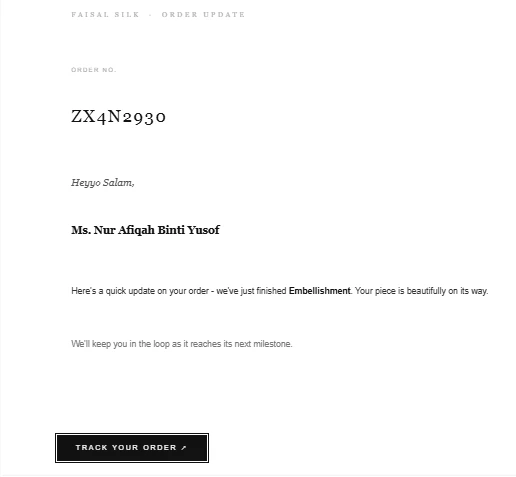
And here’s how it displays when sent. The button isn’t aligned with the text. Extra space above texts like the space between Order No. heading & Order No. The extra spae between Heyyo Salam & customer name, the extra space between the last line & Button.

Does anyone know what’s wrong with the html i am using to remove these extra spaces? 
 

   <table role="presentation" width="100%" border="0" cellpadding="0" cellspacing="0"><tr><td height="1" style="background-color:#eeeeee;font-size:0;line-height:0;">&nbsp;</td></tr></table>

  </td></tr>


  <tr><td style="padding:0 32px 2px 32px;"><span style="font-family:Arial,sans-serif;font-size:11px;color:#aaaaaa;">With care &nbsp;&middot;&nbsp; <strong style="color:#111111;">Faisal Silk</strong></span></td></tr>

  <tr><td style="padding:0 32px 32px 32px;"><a href="mailto:info@faisalsilk.com" style="font-family:Arial,sans-serif;font-size:11px;color:#aaaaaa;text-decoration:none;">info@faisalsilk.com</a></td></tr>


 </table>


</td>

</tr>

</table>
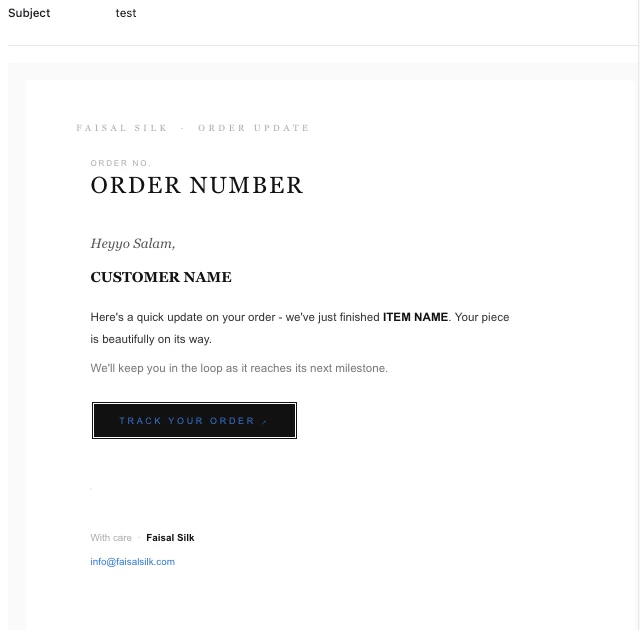
Best answer by TheTimeSavingCo

Hm, how does this look?

<table role="presentation" width="100%" border="0" cellpadding="0" cellspacing="0"><tr><td align="center" style="padding:0;background-color:#ffffff;"><table role="presentation" width="100%" border="0" cellpadding="0" cellspacing="0" style="max-width:520px; margin-top:-75px;"><tr><td style="padding:0px 16px 14px 16px;"><span style="font-family:Georgia,serif;font-size:10px;color:#aaaaaa;letter-spacing:4px;text-transform:uppercase;">Faisal Silk &nbsp;&middot;&nbsp; Order Update</span></td></tr>  <tr><td style="padding:0 16px 0 32px;"><span style="font-family:Arial,sans-serif;font-size:9px;color:#aaaaaa;letter-spacing:2px;text-transform:uppercase;">Order No.</span></td></tr><tr><td style="padding:0 16px 24px 32px;"><span style="font-family:Georgia,serif;font-size:26px;color:#111111;letter-spacing:2px;line-height:1.0;">ORDER NUMBER</span></td></tr><tr><td style="padding:0 16px 0 32px;"><p><span style="font-family:Georgia,serif;font-size:15px;color:#555555;font-style:italic;">Heyyo Salam,</span></td></tr></p> <tr><td style="padding:0 16px 20px 32px;"><span style="font-family:Georgia,serif;font-size:16px;color:#111111;font-weight:700;">CUSTOMER NAME</span></td></tr>  <tr><td style="padding:0 16px 8px 32px;"><span style="font-family:Arial,sans-serif;font-size:13px;color:#333333;line-height:1.8;">Here's a quick update on your order - we've just finished <strong style="color:#111111;"> ITEM NAME</strong>. Your piece is beautifully on its way.</span></td></tr> <tr><td style="padding:0 16px 28px 32px;"><span style="font-family:Arial,sans-serif;font-size:13px;color:#777777;line-height:1.8;">We'll keep you in the loop as it reaches its next milestone.</span></td></tr>  <tr><td style="padding:0 16px 32px 32px;">  <a href="https://myorders.faisalsilk.com/" style="display:inline-block;font-family:Arial,sans-serif;font-size:10px;letter-spacing:3px;text-transform:uppercase;color:#ffffff;background-color:#111111;padding:6px 28px;text-decoration:none;border:2px solid #ffffff;outline:2px solid #111111;margin-left:-4px;">Track Your Order &#8599;</a> </td></tr>  <tr><td style="padding:0 32px 16px 32px;"> <table role="presentation" width="100%" border="0" cellpadding="0" cellspacing="0"> <tr>  <td height="1" style="background-color:#eeeeee;font-size:0;line-height:0;">&nbsp;</td></tr></table> </td></tr> <tr><td style="padding:0 32px 2px 32px;"><span style="font-family:Arial,sans-serif;font-size:11px;color:#aaaaaa;">With care &nbsp;&middot;&nbsp; <strong style="color:#111111;">Faisal Silk</strong></span></td></tr> <tr><td style="padding:0 32px 32px 32px;"><a href="mailto:info@faisalsilk.com" style="font-family:Arial,sans-serif;font-size:11px;color:#aaaaaa;text-decoration:none;">info@faisalsilk.com</a></td></tr> </table></td></tr></table>


5 replies

ScottWorld
Forum|alt.badge.img+35
  • Genius
  • April 21, 2026

Hi ​@FS Tech Support,

Airtable’s automations only natively support a small subset of HTML tags. For example: <b>, <i>, <u>, <a href>, <img src>, and possibly a few more.

Some of the tags that you are using are likely not supported by Airtable.

There used to be a list somewhere of the HTML tags that are supported by Airtable, but I can’t seem to find that list at the moment.

For full HTML support, I would recommend using Make’s Airtable automations alongside Make’s Gmail integrations.

You can use the full set of HTML tags with Make.

If you’ve never used Make before, I’ve assembled a bunch of Make training resources in this thread. For example, here is one of the ways that you can instantly trigger a Make automation from Airtable

I also give live demonstrations of how to use Make in many of my Airtable podcast appearances. For example, in this video, I show how to work with Airtable arrays in Make.

Hope this helps!

If you’d like to hire the best Airtable consultant to help you with anything Airtable-related, please feel free to contact me through my website: Airtable consultant — ScottWorld


TheTimeSavingCo
Forum|alt.badge.img+32

Ah that’s because Airtable tries to be helpful and renders newlines as linebreaks.  With detailed HTML I usually end up not using new lines at all and just using <br>s instead, and here’s what your code renders as after the newlines are removed.  (I also added a margin-left:-4px; to the tracking button to make it line up with the text)

<table role="presentation" width="100%" border="0" cellpadding="0" cellspacing="0"><tr><td align="center" style="padding:0;background-color:#ffffff;">  <table role="presentation" width="100%" border="0" cellpadding="0" cellspacing="0" style="max-width:520px;">   <tr><td style="padding:0px 16px 14px 16px;"><span style="font-family:Georgia,serif;font-size:10px;color:#aaaaaa;letter-spacing:4px;text-transform:uppercase;">Faisal Silk &nbsp;&middot;&nbsp; Order Update</span></td></tr>   <tr><td style="padding:0 16px 0 32px;"><span style="font-family:Arial,sans-serif;font-size:9px;color:#aaaaaa;letter-spacing:2px;text-transform:uppercase;">Order No.</span></td></tr>ORDER NUMBER<tr><td style="padding:0 16px 24px 32px;"><span style="font-family:Georgia,serif;font-size:26px;color:#111111;letter-spacing:2px;line-height:1.0;"> </span></td></tr> <tr><td style="padding:0 16px 0 32px;"><p><span style="font-family:Georgia,serif;font-size:15px;color:#555555;font-style:italic;">Heyyo Salam,</span></td></tr></p>  <tr><td style="padding:0 16px 20px 32px;"><span style="font-family:Georgia,serif;font-size:16px;color:#111111;font-weight:700;">CUSTOMER NAME</span></td></tr>   <tr><td style="padding:0 16px 8px 32px;"><span style="font-family:Arial,sans-serif;font-size:13px;color:#333333;line-height:1.8;">Here's a quick update on your order - we've just finished <strong style="color:#111111;"> ITEM NAME</strong>. Your piece is beautifully on its way.</span></td></tr>  <tr><td style="padding:0 16px 28px 32px;"><span style="font-family:Arial,sans-serif;font-size:13px;color:#777777;line-height:1.8;">We'll keep you in the loop as it reaches its next milestone.</span></td></tr>   <tr><td style="padding:0 16px 32px 32px;">   <a href="https://myorders.faisalsilk.com/" style="display:inline-block;font-family:Arial,sans-serif;font-size:10px;letter-spacing:3px;text-transform:uppercase;color:#ffffff;background-color:#111111;padding:6px 28px;text-decoration:none;border:2px solid #ffffff;outline:2px solid #111111;margin-left:-4px;">Track Your Order &#8599;</a>  </td></tr>   <tr><td style="padding:0 32px 16px 32px;">  <table role="presentation" width="100%" border="0" cellpadding="0" cellspacing="0">  <tr>    <td height="1" style="background-color:#eeeeee;font-size:0;line-height:0;">&nbsp;</td></tr></table>  </td></tr>  <tr><td style="padding:0 32px 2px 32px;"><span style="font-family:Arial,sans-serif;font-size:11px;color:#aaaaaa;">With care &nbsp;&middot;&nbsp; <strong style="color:#111111;">Faisal Silk</strong></span></td></tr>  <tr><td style="padding:0 32px 32px 32px;"><a href="mailto:info@faisalsilk.com" style="font-family:Arial,sans-serif;font-size:11px;color:#aaaaaa;text-decoration:none;">info@faisalsilk.com</a></td></tr> </table></td></tr></table>


Forum|alt.badge.img+2

@TheTimeSavingCo Thank you so much. Also, is there a way to remove the space from above “Faisal Silk - Order Update” text? If you could help in this regard, that’d be great.


TheTimeSavingCo
Forum|alt.badge.img+32

Hm, how does this look?

<table role="presentation" width="100%" border="0" cellpadding="0" cellspacing="0"><tr><td align="center" style="padding:0;background-color:#ffffff;"><table role="presentation" width="100%" border="0" cellpadding="0" cellspacing="0" style="max-width:520px; margin-top:-75px;"><tr><td style="padding:0px 16px 14px 16px;"><span style="font-family:Georgia,serif;font-size:10px;color:#aaaaaa;letter-spacing:4px;text-transform:uppercase;">Faisal Silk &nbsp;&middot;&nbsp; Order Update</span></td></tr>  <tr><td style="padding:0 16px 0 32px;"><span style="font-family:Arial,sans-serif;font-size:9px;color:#aaaaaa;letter-spacing:2px;text-transform:uppercase;">Order No.</span></td></tr><tr><td style="padding:0 16px 24px 32px;"><span style="font-family:Georgia,serif;font-size:26px;color:#111111;letter-spacing:2px;line-height:1.0;">ORDER NUMBER</span></td></tr><tr><td style="padding:0 16px 0 32px;"><p><span style="font-family:Georgia,serif;font-size:15px;color:#555555;font-style:italic;">Heyyo Salam,</span></td></tr></p> <tr><td style="padding:0 16px 20px 32px;"><span style="font-family:Georgia,serif;font-size:16px;color:#111111;font-weight:700;">CUSTOMER NAME</span></td></tr>  <tr><td style="padding:0 16px 8px 32px;"><span style="font-family:Arial,sans-serif;font-size:13px;color:#333333;line-height:1.8;">Here's a quick update on your order - we've just finished <strong style="color:#111111;"> ITEM NAME</strong>. Your piece is beautifully on its way.</span></td></tr> <tr><td style="padding:0 16px 28px 32px;"><span style="font-family:Arial,sans-serif;font-size:13px;color:#777777;line-height:1.8;">We'll keep you in the loop as it reaches its next milestone.</span></td></tr>  <tr><td style="padding:0 16px 32px 32px;">  <a href="https://myorders.faisalsilk.com/" style="display:inline-block;font-family:Arial,sans-serif;font-size:10px;letter-spacing:3px;text-transform:uppercase;color:#ffffff;background-color:#111111;padding:6px 28px;text-decoration:none;border:2px solid #ffffff;outline:2px solid #111111;margin-left:-4px;">Track Your Order &#8599;</a> </td></tr>  <tr><td style="padding:0 32px 16px 32px;"> <table role="presentation" width="100%" border="0" cellpadding="0" cellspacing="0"> <tr>  <td height="1" style="background-color:#eeeeee;font-size:0;line-height:0;">&nbsp;</td></tr></table> </td></tr> <tr><td style="padding:0 32px 2px 32px;"><span style="font-family:Arial,sans-serif;font-size:11px;color:#aaaaaa;">With care &nbsp;&middot;&nbsp; <strong style="color:#111111;">Faisal Silk</strong></span></td></tr> <tr><td style="padding:0 32px 32px 32px;"><a href="mailto:info@faisalsilk.com" style="font-family:Arial,sans-serif;font-size:11px;color:#aaaaaa;text-decoration:none;">info@faisalsilk.com</a></td></tr> </table></td></tr></table>


Forum|alt.badge.img+2

@TheTimeSavingCo That’s amazing. Thank you so much.