Solved

Google Docs: Create Doc intermittent failure

  • June 4, 2026
  • 8 replies
  • 250 views

nroshak
Forum|alt.badge.img+11

Hi all. I have an automation that creates a doc in Google Docs as one of its steps. It’s triggered by a button press in an interface. We run it 20-30 times a day. 90% of the time, no problem. However, 5-10% of the time it randomly fails to create the doc with a very nonspecific error:
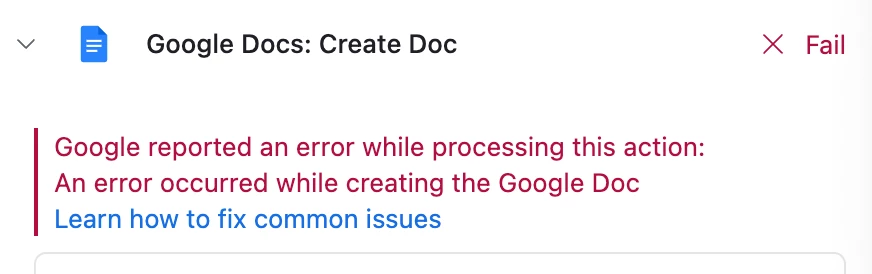
 When we re-run it with the same data and so on, it runs successfully.

The workaround is simply pressing the button again, which is fine, but I’d still like to know what is going wrong. Is there any way to see more information on this error? Or, has anyone else encountered a similar issue?

-Natalka

Best answer by Jonghyun_Oh

I would treat this as a transient downstream API failure, not bad record data. The fact that the same data succeeds on rerun is the main clue.

The most reliable Airtable-side workaround I have used for this kind of document step is to make the button idempotent and add explicit generation state fields:

- doc_status: Queued / Generating / Generated / Needs retry
- generated_doc_url or generated_attachment
- attempt_count
- last_attempt_at
- last_error_notes

Then have the interface button only set doc_status = Queued. The automation runs from that state, sets Generating, creates the doc, then writes the URL/attachment and sets Generated. If it fails, it leaves enough information for a retry view instead of the user having to guess what happened.

Airtable still will not give you perfect Google-side error detail, but this pattern makes the failure recoverable and prevents duplicate docs if someone presses the button multiple times.

If the final business artifact is a PDF, it is also worth asking whether Google Docs needs to be in the middle at all. Fewer API hops usually means fewer intermittent failure points.

8 replies

TheTimeSavingCo
Forum|alt.badge.img+32

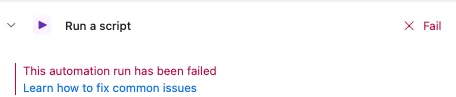
Sigh I feel your pain.  I have this but for the ‘Run Script’ action instead, and the error is just ‘This automation run has been failed’.  I couldn’t get any additional error details about this either and just ended up slapping a retry system on top of it


ScottWorld
Forum|alt.badge.img+35
  • Genius
  • June 5, 2026

I would report it to support@airtable.com to see if they can fix the problem.

If they’re unable to solve the problem, this could be a good opportunity to use a different Google Docs creation app that is more reliable, more customizable, and more powerful than Airtable’s native Google Docs automation.

The top 2 tools for this are Make’s Google Docs integrations and DocsAutomator.

I’ve never had any reliability issues — nor any error messages — when creating Google Docs with either of these tools.

If you’ve never used Make before, I’ve assembled a bunch of Make training resources in this thread.

For example, here is one of the ways that you can instantly trigger a Make automation from Airtable. You can also trigger a Make automation instantly by triggering a custom webhook (with optional webhook response).

Hope this helps!

If you’d like to hire the best Airtable consultant to help you with anything Airtable-related, please feel free to contact me through my website: Airtable consultant — ScottWorld


Matt_Shepherd
Forum|alt.badge.img+1
  • Participating Frequently
  • June 5, 2026

This is almost definitely a failed request to google’s API:

Various issues can cause these errors, including a request's timing overlapping with another request or a request for an unsupported action, such as attempting to update permissions for a single page in Google Sites instead of the entire site.

https://developers.google.com/workspace/drive/api/guides/handle-errors#5xx-errors


Their prescribed solution is to retry the request until it goes through (using an “exponential backoff” approach), but Airtable doesn’t support this kind of retry. Other apps like Make support this out of the box, so it’s a combo of Airtable’s limitation, and Google’s slightly dodgy API.

You could solve this natively using a second automation that checks for failed attempts and retries them, but it sounds like you’re already comfortable with pressing the button again :) 


Forum|alt.badge.img+6
  • Participating Frequently
  • June 8, 2026

This is most likely a transient Google API issue more so than anything wrong with your automation setup.  The fact that it succeeds immediately on retry is the telltale sign.

Here is what is likely causing it:

  • Google API hiccups: Google’s API can occasionally throw short-lived errors that resolve on their own.  There isn’t much visibility into these from Airtable’s side, which is why the error message is so vague.
  • OAuth token refresh timing: Sometimes the Airtable and Google connection needs to refresh its auth token mid-run, occasionally this can cause a one-off failure.

There isn’t much more detail than what you’re seeing for Google-side failures.  The best way to fix this is built right into your workflow.  Use retry on failure.

If you become annoyed with the manual retry, another option is to add a second automation that watches for failed runs and alerts you, this prevents manual checks.  It won’t fix it but reduces the friction.


ScottWorld
Forum|alt.badge.img+35
  • Genius
  • June 8, 2026


There isn’t much more detail than what you’re seeing for Google-side failures.  The best way to fix this is built right into your workflow.  Use retry on failure.

If you become annoyed with the manual retry, another option is to add a second automation that watches for failed runs and alerts you, this prevents manual checks.  It won’t fix it but reduces the friction.


@anthonyXRay 

Your AI-generated response is incorrect, because there is no “retry on failure” in Airtable’s automations, and there is also no automation that can “watch for failed runs”.  

As I previously mentioned above, the solution for the problem is to either use Make’s Google Docs integrations or DocsAutomator.

- ScottWorld, Expert Airtable Consultant 


Matt_Shepherd
Forum|alt.badge.img+1
  • Participating Frequently
  • June 8, 2026

@ScottWorld I agree although when you say “there is also no automation that can “watch for failed runs””, whilst there’s no native trigger, you could feasibly build something using a status field if you needed to.


Jonghyun_Oh
Forum|alt.badge.img+2
  • Inspiring
  • Answer
  • June 14, 2026

I would treat this as a transient downstream API failure, not bad record data. The fact that the same data succeeds on rerun is the main clue.

The most reliable Airtable-side workaround I have used for this kind of document step is to make the button idempotent and add explicit generation state fields:

- doc_status: Queued / Generating / Generated / Needs retry
- generated_doc_url or generated_attachment
- attempt_count
- last_attempt_at
- last_error_notes

Then have the interface button only set doc_status = Queued. The automation runs from that state, sets Generating, creates the doc, then writes the URL/attachment and sets Generated. If it fails, it leaves enough information for a retry view instead of the user having to guess what happened.

Airtable still will not give you perfect Google-side error detail, but this pattern makes the failure recoverable and prevents duplicate docs if someone presses the button multiple times.

If the final business artifact is a PDF, it is also worth asking whether Google Docs needs to be in the middle at all. Fewer API hops usually means fewer intermittent failure points.


Forum|alt.badge.img+12
  • Known Participant
  • June 23, 2026

As an alternative to Make and DocsAutomator, you can try TypeFlow. It connects directly to Airtable via the Airtable Marketplace extension or automation scripts.

For your use case (button press → Google Doc → PDF), TypeFlow handles the Google API calls server-side with automatic retries and token refresh, so intermittent failures don't reach you. It also saves
the generated PDF back to an attachment field on the record automatically.

If you want to remove Google Docs from the workflow entirely, TypeFlow has a built-in HTML/CSS template builder with drag-and-drop. Same merge variables, same line items support, but no Google dependency. The PDF generates directly without any external API call.

Both options work with Airtable button fields, automations, or the TypeFlow Automation trigger (generates on status field change - no script needed). E-signatures are also included if you ever need
documents signed.