Question

Help with script to combine multiple columns into one list

  • June 9, 2026
  • 7 replies
  • 73 views

Forum|alt.badge.img+1

Hi all - I’m fairly new to Airtable and hitting a roadblock… I have a form where people submit a list of activities they’ve participated in over a period of time. To avoid burdening the user with repeat submissions, I’ve set up my form/table with Activity 1, Activity 2, Activity 3, Activity 4, etc for all the different fields. However, I’d like to create a clean view where the data in all of those fields wraps up into one list of activities, as different records (i.e., if John Doe submits details for Activity 1, Activity 2, and Activity 3 all in one record, how can I get a list where John Doe has 3 records, one for each activity?).

I’m struggling with how to make this happen. I tried nesting the records but it only works for 3 and I have 10 activity fields in my form. Does anyone have experience writing a script for an automation for something like this? I’ve never written a script and have no idea where to even start, so any guidance would be helpful!


7 replies

Mike_AutomaticN
Forum|alt.badge.img+29

Hey ​@md123,

I’m missing a lot of context, so…. I’d HIGHLY suggest you have this back and forth, and share field names with wither ChatGPT or Claude, and have such AI write the script for you :D

You can also connect the Airtable MCP to claude, to make sure it has all info needed from your current architecture.

Once you’ve started working with that, do reach out for specific questions! I’d be happy to help.

Mike, Consultant @ Automatic Nation


TheTimeSavingCo
Forum|alt.badge.img+32

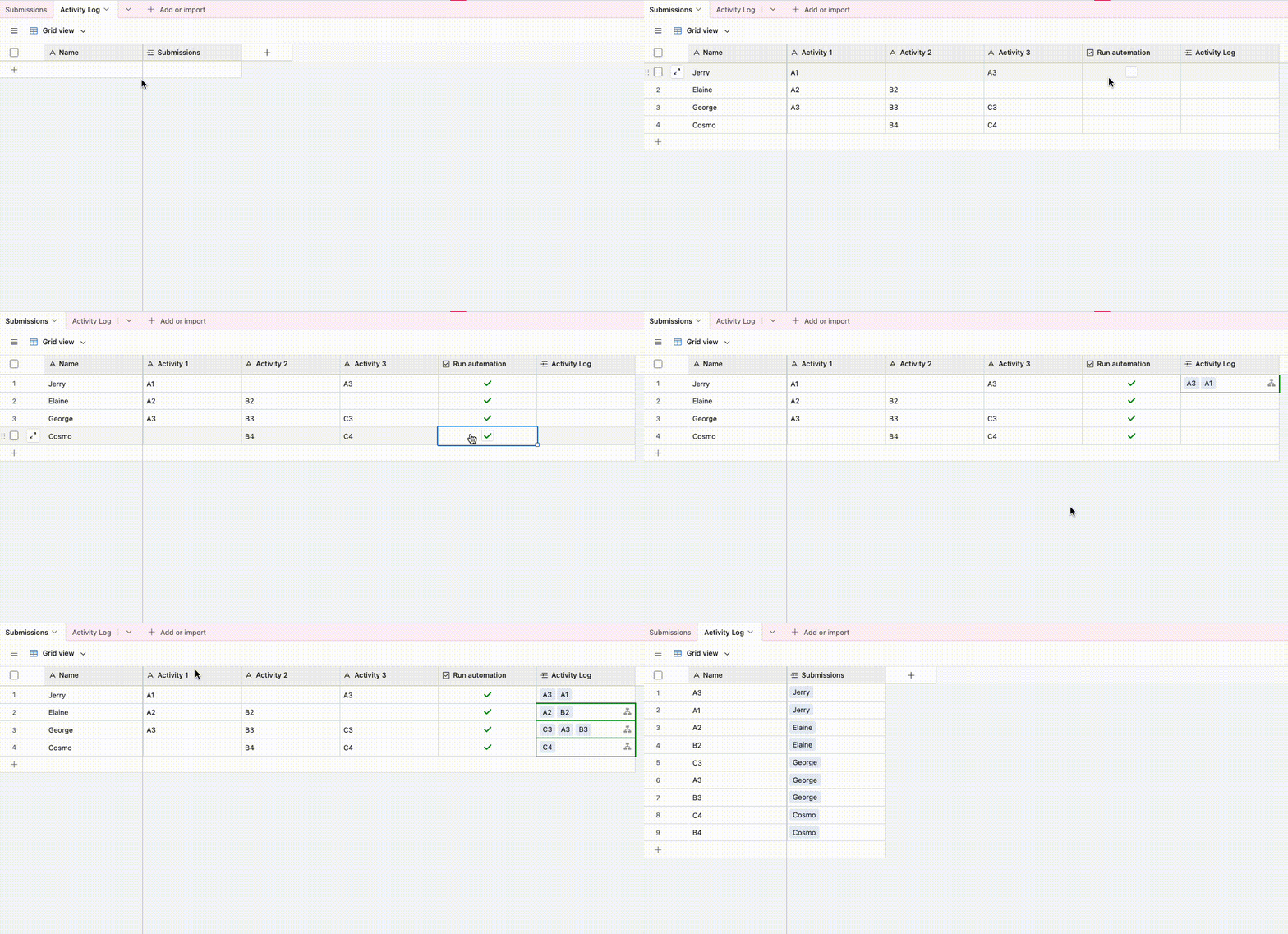
Does this look right?  If so I’ve set it up here for you to check out!  You can duplicate it into your own workspace and play with the settings there too

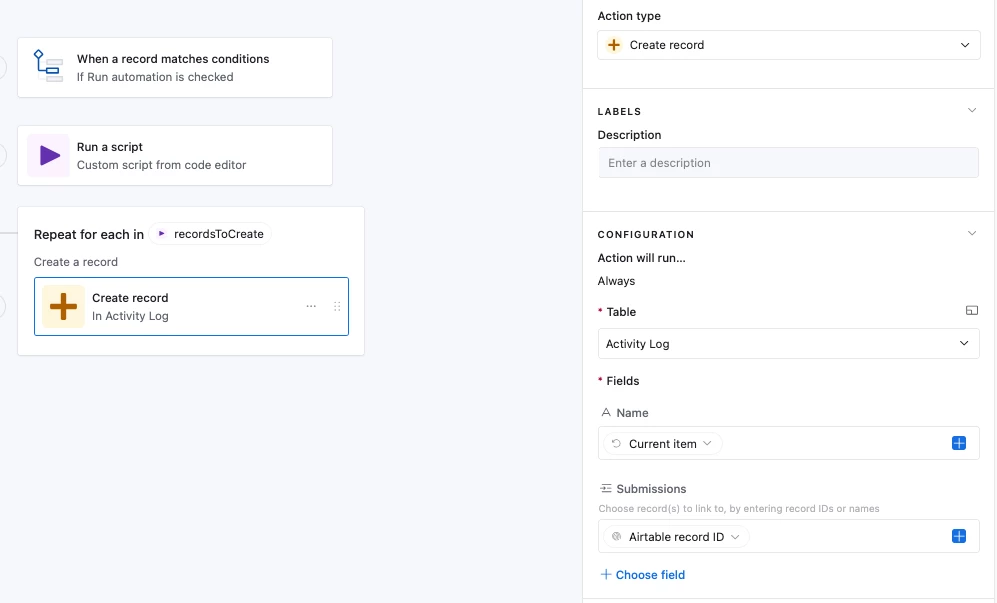
The idea is to use a script to grab data from each of the fields you want and then output them as an array.  We then use a Repeating Group to create one record in ‘Activity Log’ per field value, linked to the original record

 Automation setup:


In the script below you’ll need to customize it by filling in your table name and field names.  Let me know if you have any issues setting it up and I’ll do what I can to help!


Script:

let { recordId } = input.config()

// Customize this: replace 'Submissions' with the name of your table
let table = base.getTable('Submissions')

// Customize this: add, remove, or rename fields here
// These should match the Airtable field names exactly
// Note: If the field names are changed later this script will error. To prevent this you can use field IDs instead too and those can be accessed by going to 'Manage fields' at the top right
let fieldNames = [
'Activity 1',
'Activity 2',
'Activity 3'
]

let recordData = await table.selectRecordAsync(recordId)

let activities = []

for (let fieldName of fieldNames) {
let value = recordData.getCellValue(fieldName)

if (value) {
activities.push(value)
}
}

output.set('recordsToCreate', activities)


Forum|alt.badge.img+1
  • Author
  • New Participant
  • June 10, 2026

Wow, thank you so much Adam, this is incredibly helpful! It looks like exactly what I want to do but I’m struggling to mechanize it. Could you answer a few follow-up questions for me?


  1. What kind of field should the activity log column be set up as?
  2.  I am getting this error message with the script: Syntax error: Unexpected identifier 'recordData' [script.js:19:5]  - here is the code as I updated it - am I missing anything to customize?

    let { recordId } = input.config()

    let table = base.getTable('Raw Time Tracking Responses')

    let fieldNames = [

        'Activity #1', 

        'Activity #2',

        'Activity #3',

        'Activity #4',

        'Activity #5',

        'Activity #6',

        'Activity #7',

        'Activity #8',

        'Activity #9',

        'Activity #10',

    let recordData = await table.selectRecordAsync(recordId)

    let activities = []

    for (let fieldName of fieldNames) {

        let value = recordData.getCellValue(fieldName)

        if (value) {

            activities.push(value)

        }

    }

    output.set('recordsToCreate', activities)


ScottWorld
Forum|alt.badge.img+35
  • Genius
  • June 10, 2026

@md123 

The solution above will definitely work, but there is another way of solving this problem which keeps your base in the proper structural format from the very beginning, and doesn’t require any extraneous activity fields in your base.

You”ll notice that Adam actually solved the underlying structural data problem with your base, which is that you didn’t originally have a linked record field in your base.

Using a linked record field is the proper way to add multiple related “child records” (i.e. multiple activities) to a single “parent record”.

You would ideally want to restructure your database to only use a linked record field for activities instead of having all of those extraneous activity fields per record (i.e. you would completely remove activity 1, activity 2, activity 3, etc.).

Then, you wouldn’t need any scripts nor automations… and each person could have any number of activities (more or less than 10) with no additional clutter on your form and no need to build in all the activity fields onto your form.

The only real change is that you would need to setup your form with Fillout’s advanced forms for Airtable (which is 100% free) and which allows your users to add any number of linked activity records that they would like from the same form.

Fillout also offers hundreds of other advanced features that Airtable’s forms don’t offer, such as the ability for your users to update their own records using a form, after they’ve already submitted the original form.

Hope this helps!

If you have a budget and you’d like to hire the world’s best Airtable consultant to help you with this or anything else that is Airtable-related, please feel free to contact me through my website: Airtable consultant — ScottWorld


Forum|alt.badge.img+1
  • Author
  • New Participant
  • June 10, 2026

Thanks, Scott - unfortunately my institution doesn’t have Fillout so I’ll need a manual workaround


TheTimeSavingCo
Forum|alt.badge.img+32

@md123 Yeap no problem!

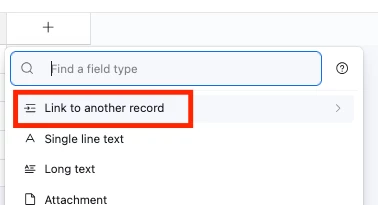
What kind of field should the activity log column be set up as?

You’ll need to set this up as a linked field!


I am getting this error message with the script: Syntax error: Unexpected identifier 'recordData' [script.js:19:5]  - here is the code as I updated it - am I missing anything to customize?

Ah, looks like you’re missing a closing bracket after ‘Activity #10’!  Try this:

let { recordId } = input.config()

let table = base.getTable('Raw Time Tracking Responses')

let fieldNames = [
'Activity #1',
'Activity #2',
'Activity #3',
'Activity #4',
'Activity #5',
'Activity #6',
'Activity #7',
'Activity #8',
'Activity #9',
'Activity #10'
]

let recordData = await table.selectRecordAsync(recordId)

let activities = []

for (let fieldName of fieldNames) {
let value = recordData.getCellValue(fieldName)
if (value) {
activities.push(value)
}
}

output.set('recordsToCreate', activities)

If you’re having issues setting it up feel free to DM me a link to your base and I can do it for you, or you can also schedule a free half hour call and we can do it together via screenshare!


Jonghyun_Oh
Forum|alt.badge.img+2
  • Inspiring
  • June 13, 2026

Adam is right that the immediate syntax error is because the `fieldNames` array never closes after `Activity #10`. You need `];` before `let recordData...`.

If you want the automation to actually create one Activity Log record per non-empty activity field, I would set it up like this:

- Raw Time Tracking Responses: one row per form submission.
- Activity Log: one row per activity.
- Activity Log should have a linked record field back to Raw Time Tracking Responses, plus an Activity/Name text field.

Automation setup:

- Trigger: when the form submission record is created.
- Input variable: `recordId` = the Airtable record ID from the trigger.
- Script:

```js
let { recordId } = input.config();

let responsesTable = base.getTable("Raw Time Tracking Responses");
let activityLogTable = base.getTable("Activity Log");

let response = await responsesTable.selectRecordAsync(recordId);

let activityFields = [
  "Activity #1",
  "Activity #2",
  "Activity #3",
  "Activity #4",
  "Activity #5",
  "Activity #6",
  "Activity #7",
  "Activity #8",
  "Activity #9",
  "Activity #10"
];

let recordsToCreate = activityFields
  .map((fieldName) => {
    let activity = response.getCellValueAsString(fieldName).trim();
    if (!activity) return null;

    return {
      fields: {
        "Activity": activity,
        "Raw Time Tracking Response": [{ id: response.id }]
      }
    };
  })
  .filter(Boolean);

while (recordsToCreate.length > 0) {
  await activityLogTable.createRecordsAsync(recordsToCreate.slice(0, 50));
  recordsToCreate = recordsToCreate.slice(50);
}
```

You will probably need to adjust the two field names inside `fields` to match your actual Activity Log table. The linked field is the important part: that is what lets each created activity record point back to the original form submission.

If you are using Adam's repeating group approach instead of directly creating records in the script, the same fixed `fieldNames` array is still the key thing. The direct-create version above just keeps the whole transformation inside the script.