Question

How can clients and our business receive an emailed copy of a completed and signed intake form?


LisaGSVMS
Forum|alt.badge.img

I have built a standalone Airtable intake form for my supervised visitation business. After submission, both the client and GSVMS need to receive an emailed copy of the completed intake and signed agreement.

My test submission successfully created an Airtable record. It saved the typed legal name, signed date and acknowledgement checkboxes. However, the Electronic Signature Status field remained blank, no signed document was attached, and the person submitting did not receive a completed copy.

I need a workflow that:

• Captures the client’s electronic signature and signing information.
• Creates a complete PDF containing the questions, submitted answers, agreement wording, acknowledgements and signature/date.
• Automatically emails that completed, signed PDF to the submitting client and sends a copy to GSVMS at info@gsvms.com.
• Saves the same PDF with the Airtable record and in the client’s Google Drive folder.

A generic “submission received” email would not meet this need. Both the client and GSVMS need a permanent copy of exactly what was completed and agreed to.

Can this be done using Airtable’s native features, or would it require a separate form/e-signature service and document-generation automation?

If you have implemented something similar, I would appreciate the simplest reliable approach and details of any additional subscriptions required.

Thank you,
Lisa

4 replies

TheTimeSavingCo
Forum|alt.badge.img+32

This isn’t possible with Airtable natively I’m afraid

If I were you I’d use Fillout for this (affiliate).  It has a thing that generates PDFs whenever a form is submitted and also has some rudimentary PDF template editing stuff built in, and would handle the saving into Airtable as well as automatically emailing the PDF to both you and the client

https://www.fillout.com/help/pdfs

You’d need to have a paid account though and would cost $15 per month for 2000 form submissions

---

I’ve created a step by step guide for how to set up the sending and signing below, and here’s a link to the live form too which’ll send you the generated PDF on submission!

  1. Create the PDF you wanted
  2. Create the Form in Fillout
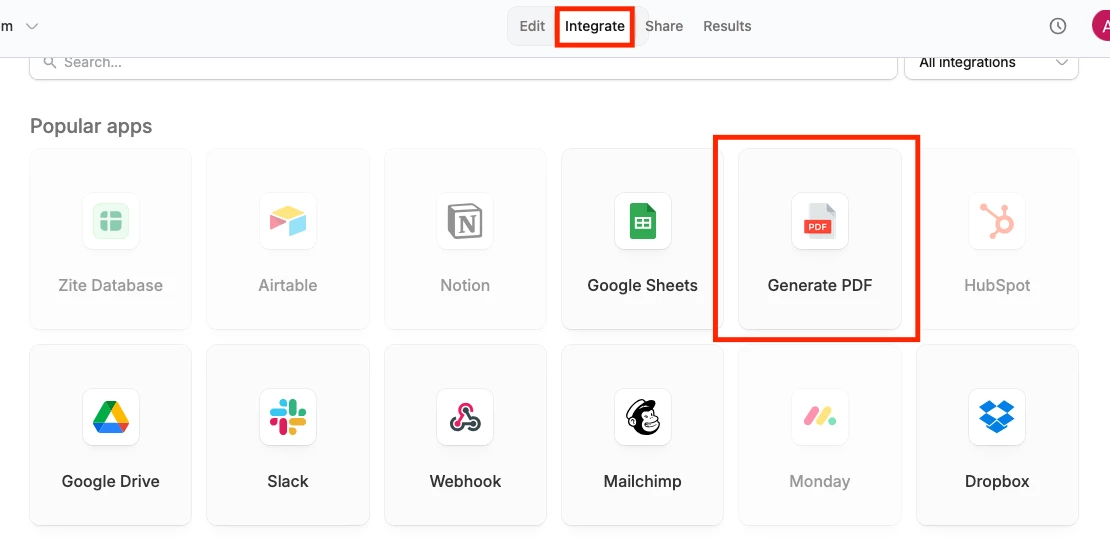
  3. Click ‘Integrate’ at the top then ‘Generate PDF’:


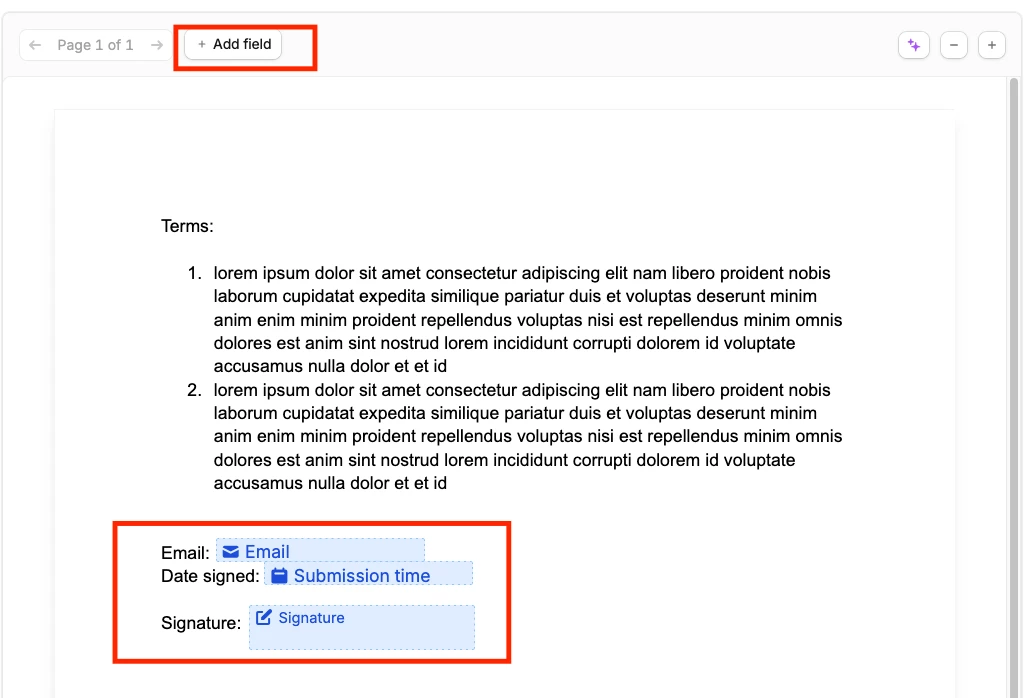
  4. Upload the PDF and add the data you want to display on the PDF as fields, then drag and drop them where you want.  This bit is kind of fiddly but it works:
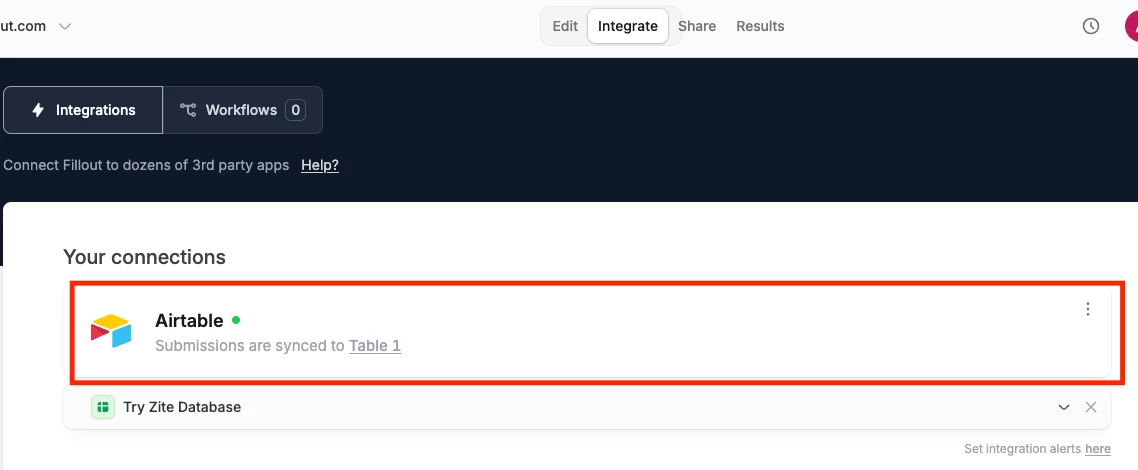
  5. After that’s set up, click into the Airtable connection: 


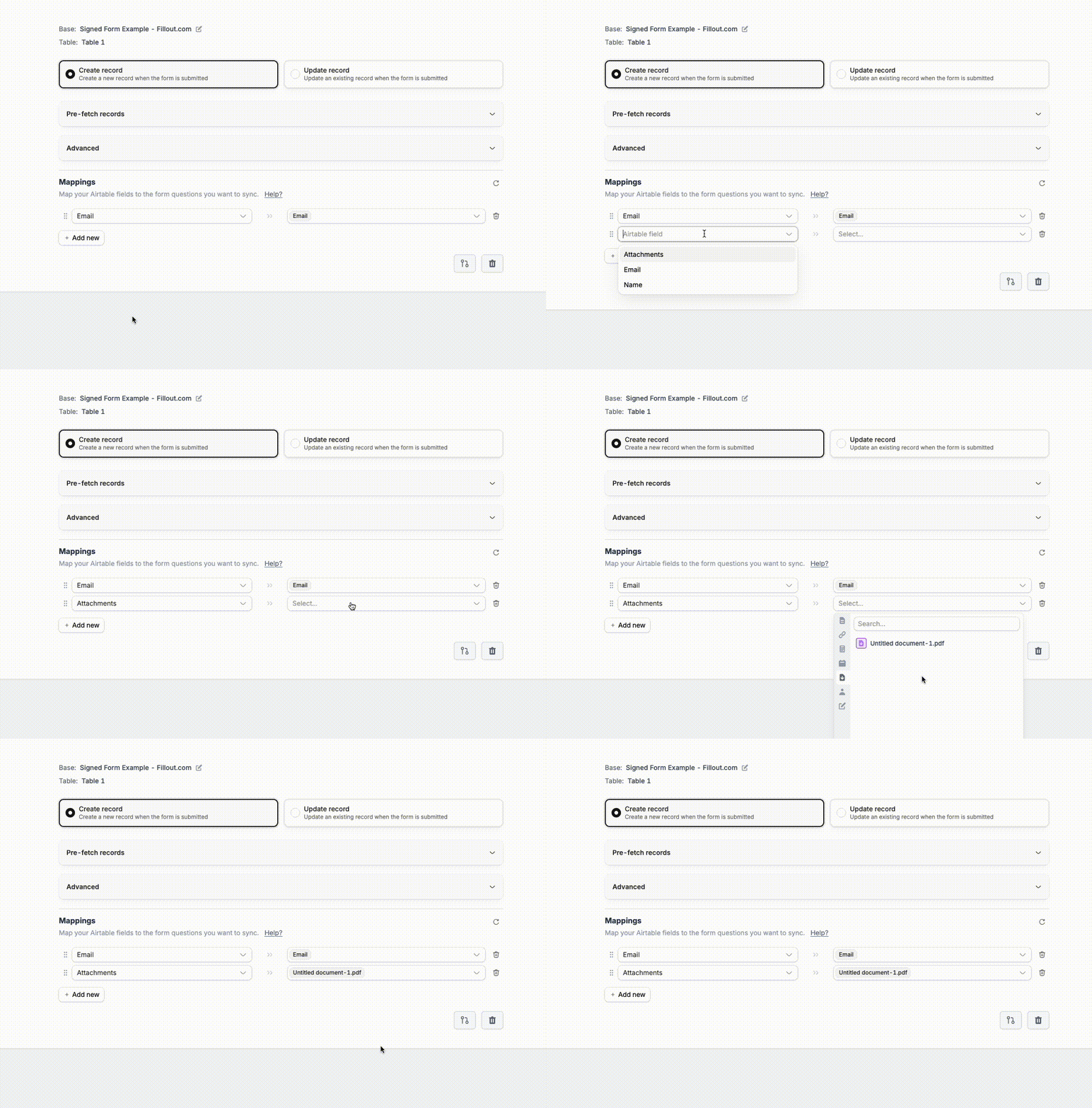
  6. Select an Attachment field in Airtable for Fillout to place the generated PDF into:


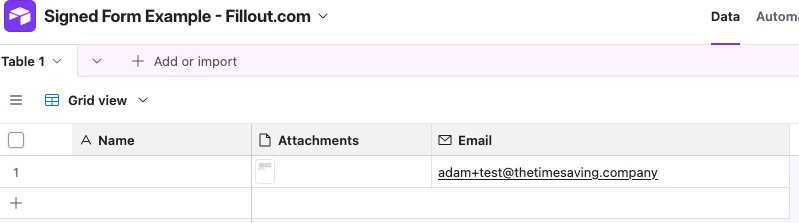
    1. And here’s how it’d look after submission:


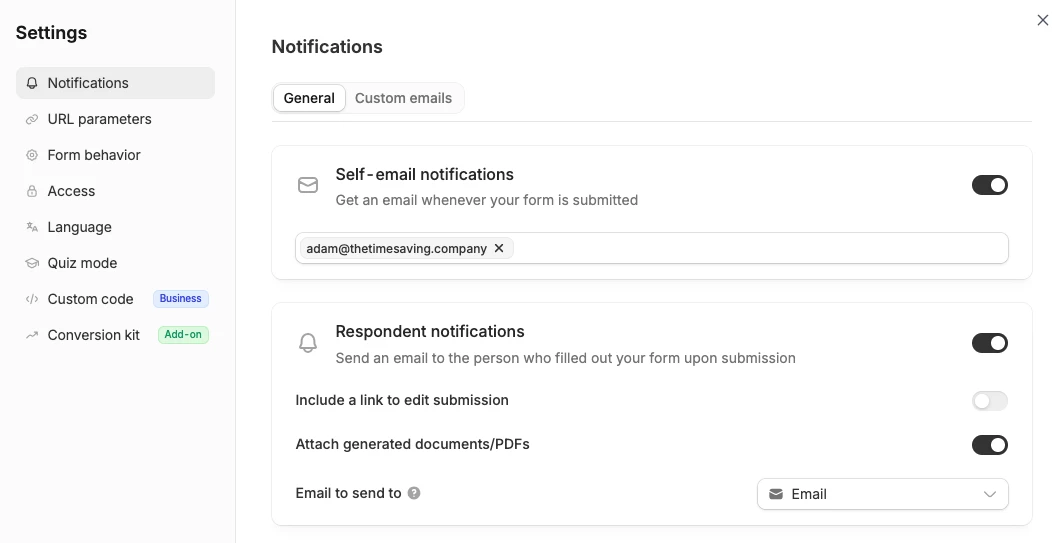
  7. And finally for the automatic emails, click the gear icon at the top right and you’ll see Notification settings, and here you can get it to send the PDF and submission details to a custom address as well as the user’s submitted email address


You also mentioned wanting it to go into Google Drive, but that part’s a bit trickier.  I think you’d need upload access to their Google Drive and I’m not sure how that’d work?  Fillout does have an integration to Google Drive and can upload it as long as we’ve got it connected though!

Happy to jump on a quick free call to get the form created together too and you can schedule a call here!


LisaGSVMS
Forum|alt.badge.img
  • Author
  • New Participant
  • October 20, 2026

i have spent a couple of weeks building my form/agreement in Airtable it even gave me a signature field - i finally finished it today and when i did a live test and at the end i did not get a copy i was and am devastated - what good is a database form that you invite people to fill in and sign and neither one of you can get a copy of it.  I love the database part of it and it helps populate my internal docs that reside in my google drive i love the integration it has with google automation and after spending 4 days setting it up it works like a charm and i went back to my form/agreement and found out all the time i have wasted in producing this form - I don’t understand what Airtable was thinking the form feature would be used for not logical at all - i am a small business and these fees are killing me.


ScottWorld
Forum|alt.badge.img+35

​@LisaGSVMS 

Here are a few different ways of solving this problem:

  1. One way of doing this is to use DocsAutomator for Airtable, which has this feature built into it.
  1. Another way of doing this is to use Fillout’s advanced forms for Airtable, which is 100% free.

    I show how to do this step-by-step on this Airtable podcast episode:
    Using Fillout to create an eSignature approval process with PDF file creation.

    Fillout also offers hundreds of features that Airtable’s native forms don’t offer, including the ability to update Airtable records using a form, accept payments on forms, customize the style and branding of your form, customize a theme for your form, display Airtable lookup fields on forms, create new linked records on a form, control access to a form via SSO or email domains or a list of email addresses stored in Airtable, and more.
     
  2. Alternatively, you can use any eSignature platform that you’d like, and automate it with Make’s advanced automations & integrations,

    For example, you can automate the communication between eSignatures.com and Airtable by using Make’s eSignatures integrations along with Make’s Airtable integrations.

    But you can choose from any eSignature platform that you would like, and automate it with Make.

    If you’ve never used Make before, I’ve assembled a bunch of Make training resources in this thread. For example, here is one of the ways that you could instantly trigger a Make automation from Airtable.

Hope this helps!

If you have a budget and you’d like to hire the best Airtable consultant to help you with this or anything else that is Airtable-related, please feel free to contact me through my website: Airtable consultant — ScottWorld


TheTimeSavingCo
Forum|alt.badge.img+32

Hm could you provide some screenshots of the form you created with the signature field?  Would love to help you troubleshoot that but could use more information!