Question

How Can I Automatically Update Records Based on Changes in Another Table?

  • Oct 18, 2026 2:00 PM UTC
  • 6 replies
  • 112 views

davidrosalie89
Forum|alt.badge.img

Writing

Hi everyone,
I'm working with two related tables in Airtable and trying to automate record updates.
When a value changes in one table, I want the corresponding linked record in another table to update automatically without creating duplicate records.
Is there a simple way to achieve this using Airtable Automations, or would a formula or lookup field be more effective?
I'd appreciate any suggestions or examples. Thanks in advance!


6 replies

TheTimeSavingCo
Forum|alt.badge.img+32

Lookups / rollups would generally be recommended, hard to say without understanding what you’re trying to do though.  Can you provide screenshots of your tables and talk a bit about your workflow?


Jasmine_Ruth1
Forum|alt.badge.img+9
  • Known Participant
  • Oct 20, 2026 5:37 PM UTC

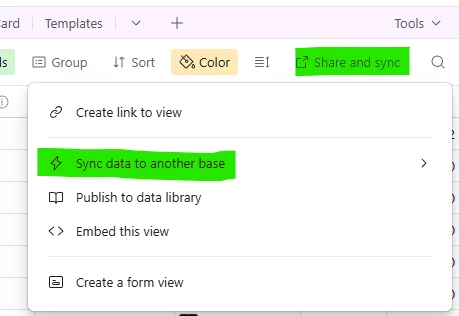
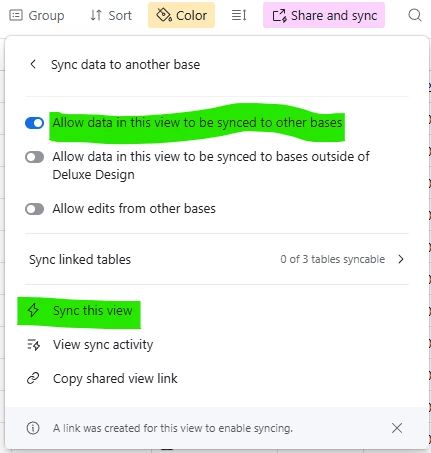
You need create a synced view in the bases that will do exactly this, any time one record updates the other will. It’s the only way to have one base update while the other does. This is available on Teams plans and above. Pictures below, hope this helps!


jills
Forum|alt.badge.img+9
  • Inspiring
  • Oct 22, 2026 10:03 PM UTC

Ah, now based on the previous responses, I’m wondering... Are you talking about two tables that are in the same base? Or two tables in different bases? And then, I’m also wondering the type of update you’re trying to make. In most cases, I think lookup/rollups will probably work for you, but I could make a better recommedation with a little more detail. 


anthonyXRay
Forum|alt.badge.img+6
  • Participating Frequently
  • Oct 26, 2026 1:39 PM UTC

If both of the tables are in the same base, an automation can handle this.  Set the trigger to “When record updated” and watch the field that changes.  Then add an “Update record” action that is pointed at the linked record, using the link field from the trigger record to pick which record gets updated.  Because it will update an existing record rather than creating one, you won’t get duplicates.

Though a lookup field could be easier if you only need to display the value in the other table as it will update on its own.  Automations make more sense when you actually need to write a value into the other record.


neerajbhakta
Forum|alt.badge.img
  • Participating Frequently
  • Oct 28, 2026 10:38 AM UTC

It depends on whether the two tables are in the same base. If they are, you usually don’t need an automation: link the records, then use a lookup or rollup field in the second table to pull the changing value, so it updates itself with no duplicates. If you need to write a value into a field (not just display it), use an automation triggered “When record updated” on the first table, add a “Find records” step in the second table, and an “Update record” step on the match, so it updates instead of creating. If it is across bases, you’d need a synced table or a script.


Leo Luo
Forum|alt.badge.img+1
  • Participating Frequently
  • Oct 30, 2026 6:15 AM UTC

The choice between a Lookup field and an Automation depends on whether you need live reflection or a point-in-time snapshot.

  1. Use Lookup

If Table B only needs to display the current state from Table A (such as client address, phone number, or project stage), do not use an automation. Add a Lookup field pointed at your linked record. It updates instantly, consumes zero automation runs, and avoids duplicate records.
 

  1. Use Automation

If Table B needs to lock historical data (such as capturing an item price on an invoice that must not change when catalog prices update next month), use an automation:

  • Trigger: When record updated (watch specific fields in Table A).
  • Action: Update record (target the Linked Record ID in Table B).
     

Do pay attention NOT to use "Create Record" instead of "Update Record". The Update Record action would ensures only that specific row is modified.