Question

How do I automate deleting a full record from a table after the record has been duplicated in another table?

  • April 17, 2026
  • 9 replies
  • 31 views

Forum|alt.badge.img+1

I have a table (“Active”) with thousands of records, each with at least one photo, the table is refreshing more slowly everyday (we upload small file images). To help speed things up I have created a copy of the table (without data) and setup an automation to copy any given record to a new table (“Archive”) when two field values are met ( “status”=SOLD, and “Archive” checkbox is ticked). This is working now that I’ve mapped all of the fields from one table to the other. I want to continue the automation to delete the record (from the “Active” table) that has been duplicated from the “Active” table to the “Archive” table. Tutorials say to add an additional action, “Delete Record”, but I find no such choice when adding an additional action. It seems this should be an evident action, but I’m stuck. We have a “Team” level subscription so I’ve read the option should be available. We’re using Safari on Macs. All advice appreciated. 

9 replies

Forum|alt.badge.img+4
  • Known Participant
  • April 17, 2026

Table A row A (as source)

Table B row A (as destination)


Assuming you copy from Table A to Table B

  1. Create a field on Table A as checkbox, something like “marked to be deleted”, checkbox not enabled by default.
  2. Copy from A to B, assuming you use an automation.
  3. Within the same automation, after the content is copied, update record on table A, enable the checkbox mentioned on step 1.
  4. Use third party tool to run over table A and look up for rows with that checkbox enabled, then delete them. I guess it can be done with a free account somehow somewhere Zapier or similar platforms. Definitely it can be done with n8n

That is the first idea it comes to my mind.


Mike_AutomaticN
Forum|alt.badge.img+29

Hey ​@TwoMaisons,

A couple of comments:
1. There is no native “delete record” action on Airtable automations.
2. As mentioned by ​@luismi  above, you could potentially get that done with a third party tool as Zapier, Make or n8n (more on these here).
3. However, ideally you would get this handled via script (unfortunately these are only available under paid plans).
4. Either way if performance is your issue, I don’t think that creating a new table for archives is the best solution. My take: Create a new VIEW for non-archives and only load this view instead. You can read more on views here.

Hope this helps! Feel free to reach out as needed if you need any help, happy to hop on a brief call.

Best,
Mike, Consultant @ Automatic Nation


Forum|alt.badge.img+4
  • Known Participant
  • April 17, 2026

Yep, I forgot about the script idea, that is an option.

That would be my first choice in this scenario.


coderkid
Forum|alt.badge.img+6
  • Inspiring
  • April 17, 2026


For automation scripting, I would go with this approach, but…. make sure to test your script in a sandbox environment and create a copy of your table before deleting anything.


Forum|alt.badge.img+1
  • Author
  • New Participant
  • April 17, 2026

Thank you all for your quick replies! I Agree simply setting up a new view would be easy (we use this capability regularly) but will it speed up the refreshing and saving? This is a huge distraction when the table stops working mid task, only to reset itself when it comes back to life. My thought was; smaller table=faster refresh, less scrolling. On another note, we have a paid subscription (Team), so is scripting a possibility? This would be new territory for me, but interesting all the same.


ScottWorld
Forum|alt.badge.img+35
  • Genius
  • April 17, 2026

@TwoMaisons 

I would highly recommend keeping everything in one table. This is really the best path forward.

You shouldn’t see any major slowdowns with your views, as long as you’re filtering them to show only your Active records. And it could potentially be even faster if you use Interfaces for your views.

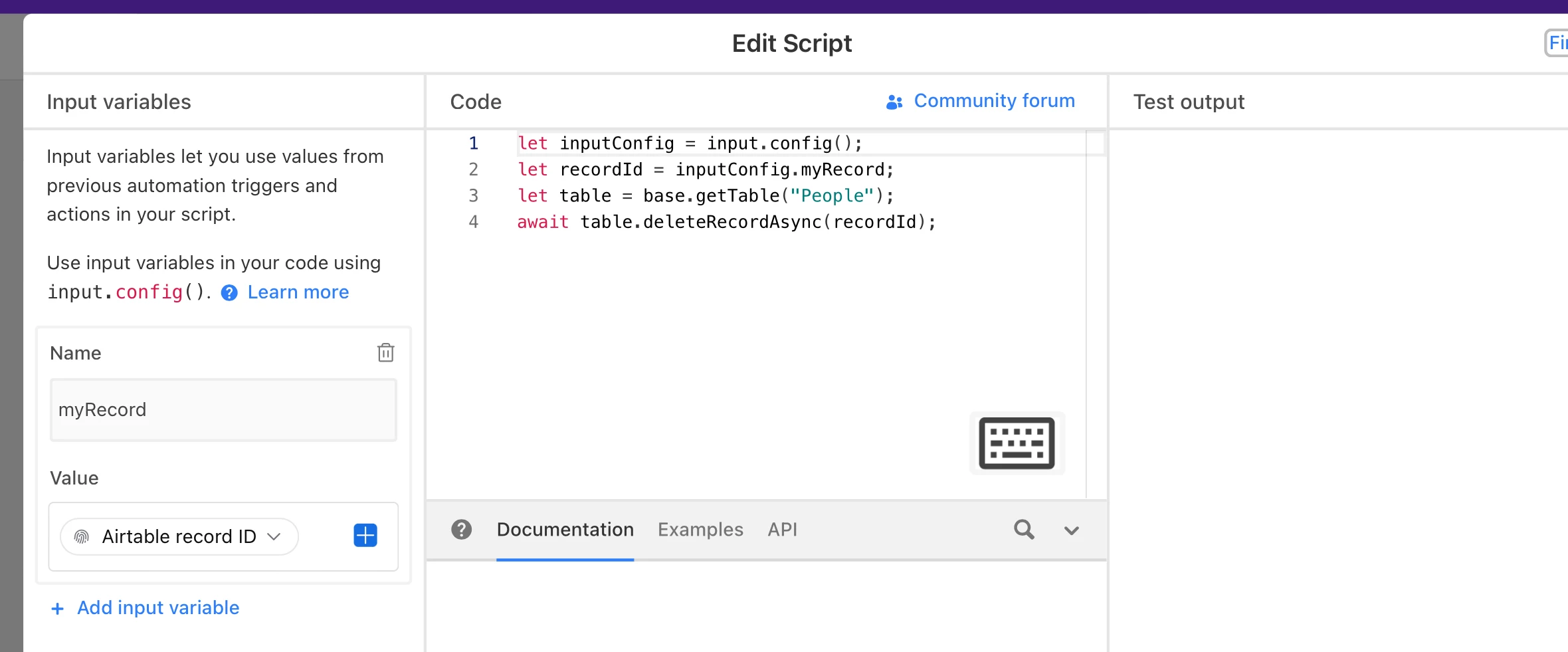
However, if you do stick with a separate table for Archives (not recommended), below is the script that you can use for deleting an individual record from Airtable, in conjunction with the screenshot below. (And yes, this will work on the Teams plan.)

let inputConfig = input.config();
let recordId = inputConfig.myRecord;
let table = base.getTable("Table Name Here");
await table.deleteRecordAsync(recordId);


Hope this helps!

If you have a budget and you’d like to hire the best Airtable consultant to help you with this or anything else that is Airtable-related, please feel free to contact me through my website: Airtable consultant — ScottWorld


coderkid
Forum|alt.badge.img+6
  • Inspiring
  • April 17, 2026

Yes, team plan has scripting… here a sample script to delete the record  after it’s copied :


const { recordId } = input.config();

const table = base.getTable("Active");

await table.deleteRecordAsync(recordId);


coderkid
Forum|alt.badge.img+6
  • Inspiring
  • April 17, 2026

Oops, ​@ScottWorld  …  I didn’t realize you had already replied.


ScottWorld
Forum|alt.badge.img+35
  • Genius
  • April 17, 2026

@coderkid 

Haha, no worries! I know, the screen doesn’t automatically refresh when somebody else replies above us. It’s happened to me a zillion times! 😜

- ScottWorld, Expert Airtable Consultant