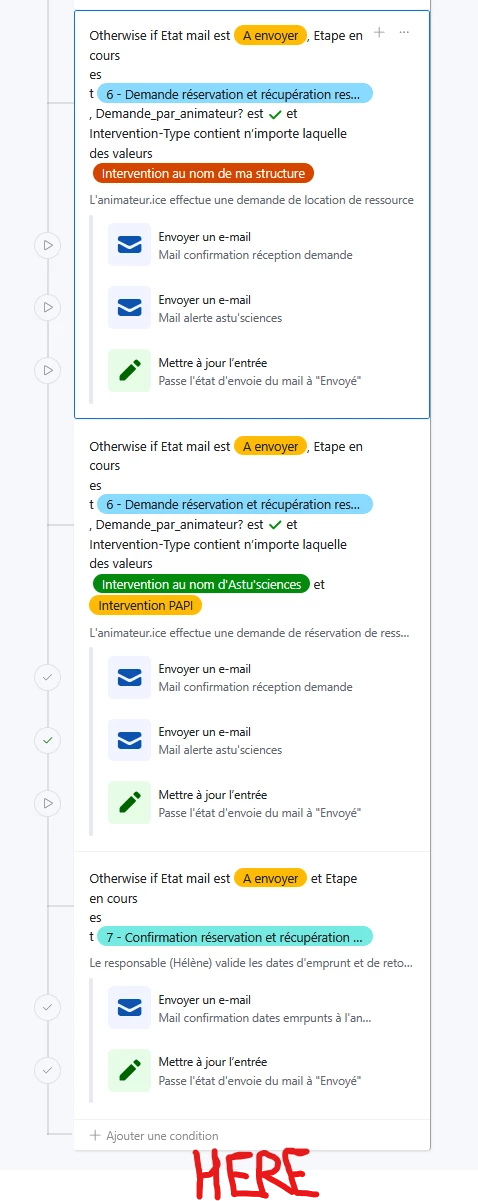
Filter participation records based on the type of participation.
Send a recap email with details specific to each type.
Currently, I want to update the record to mark the email as sent. Right now, I need to include the “Update record” action in every conditional block, because Airtable executes actions only inside the branch that matches.
Question: Is there a way to have a single “Update record” action at the end of the automation, regardless of which conditional branch was executed (ex : where I wrote HEREon the picture), instead of duplicating it in every branch?
I’m looking for a faster, cleaner solution to handle this “final step” without repeating it multiple times.
I always recommend that every Airtable customer should outsource their advanced automations to Make, because Make solves every limitation that Airtable’s automations have, and Make’s automations are infinitely more customizable & infinitely more powerful than Airtable’s automations. Make also lets you communicate with any app on the web that has an API.
I always recommend that every Airtable customer should outsource their advanced automations to Make, because Make solves every limitation that Airtable’s automations have, and Make’s automations are infinitely more customizable & infinitely more powerful than Airtable’s automations. Make also lets you communicate with any app on the web that has an API.
Yes, thanks a lot @ScottWorld for all your help and the direct link, I submitted a request :)
Still the same as our last exchange, the person I work with prefer to use only one tool even though going through Make and not Fillout this time would be a whole lot easier… 😶
Thanks for your answer and advice ! And thanks for all your answers on this community 😊