Question

Instagram grid preview for Airtable - IG grid preview in content calendars

  • September 6, 2026
  • 7 replies
  • 213 views

Airtablenewbie1
Forum|alt.badge.img+4

Is there a way to see an Instagram grid/preview when using Airtable for social media content calendars? 

7 replies

ScottWorld
Forum|alt.badge.img+35

There is no native ability for Airtable to display previews of Instagram feeds.

You would need to use Airtable’s Omni AI agent to build you a custom interface  that displays instagram feeds.

However,  Airtable’s Omni AI is limited in its understanding & its functionality, so after trying for a long time, I couldn’t get Omni to successfully build this for me… it would refuse to show me any more than one record’s instagram profile.

Maybe someone else below will have better luck than me.

In my personal opinion, your much better bet would be to use a mature & robust AI interface builder like Zite, which can even use Airtable as its backend if you’d like. (And it even has its own Zite database engine as well.)

- ScottWorld, Expert Airtable Consultant 


TheTimeSavingCo
Forum|alt.badge.img+32

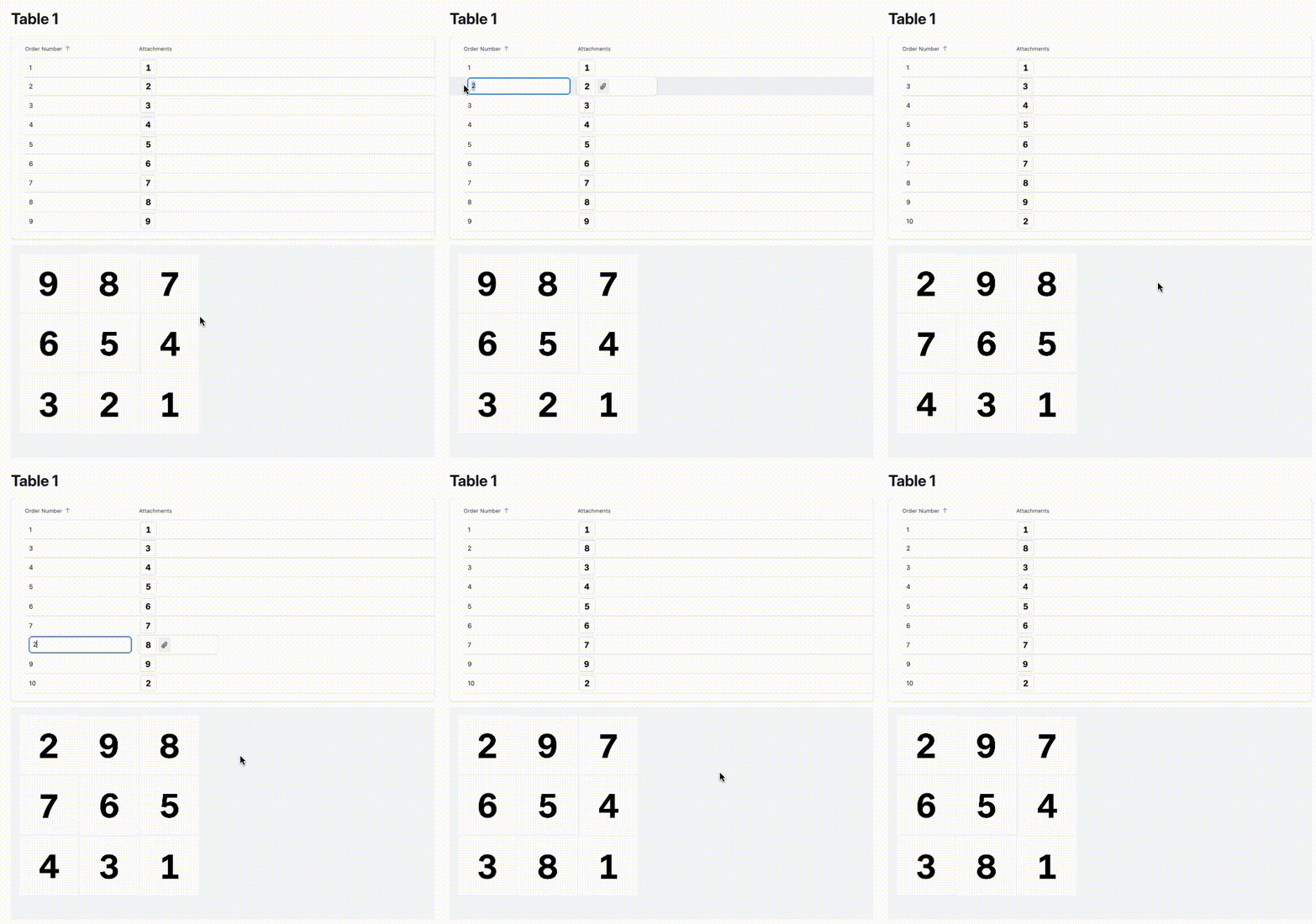
I managed to get this with Omni!  Here’s a link to the base so you can duplicate it into your own workspace

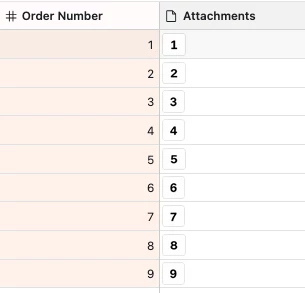
And here’s the data:

And here’s the prompt

Build an Instagram-style grid preview for this Airtable table.

Each record represents one Instagram post.

Use these fields:

* `Attachment`: the post image
* `Order number`: controls the position of the post in the grid

What to build:

* Display all records in a 3-column grid that looks like an Instagram profile preview
* Sort records by `Order number` descending, so the highest number appears in the top-left
* Place records left to right, then top to bottom
* Show only the image tiles, with no record names, labels, borders, or other Airtable UI metadata
* Use square thumbnails
* Crop images with `object-fit: cover`
* Keep spacing between tiles very small, similar to Instagram
* Always maintain exactly 3 columns
* Add a custom property for tile size in pixels, so the grid’s tile height and width can be adjusted easily
* If a record has no attachment, show a simple gray placeholder tile
* If the attachment field contains multiple images, use only the first image
* Clicking a tile should open or select the corresponding Airtable record

Implementation notes:

* The tile size custom property should control both width and height so every tile stays perfectly square
* The grid should render consistently and not collapse to fewer than 3 columns

Goal:
Create a visual Instagram feed preview so someone managing a social media content calendar in Airtable can instantly see how their planned grid will look based on the current post order.


Airtable_Pro
Forum|alt.badge.img+3

ohh cool, does it integrate directly to instagram? or it just previews the images


TheTimeSavingCo
Forum|alt.badge.img+32

It just previews the images!  

For integrating directly with Instagram I’d probably recommend using a third party integration tool like Make or Zapier to push new posts directly into Instagram / grab all the previous posts if needed

You could code it into the Custom Interface but it feels like more trouble than it’d be worth, really


Airtable_Pro
Forum|alt.badge.img+3

Thank you ​@TheTimeSavingCo 
I was able to find a solution. Ninecast works for this


Airtablenewbie1
Forum|alt.badge.img+4

​@Airtable_Pro Thanks for your reply. What does Ninecast do?


Airtablenewbie1
Forum|alt.badge.img+4

​@Airtable_Pro How does it work