Solved

Issues on combining scheduled time automations with a condition

  • September 21, 2026
  • 3 replies
  • 37 views

Victor L
Forum|alt.badge.img+1

Hey there,


Thank you for your time helping me :)


I’m trying to do a rather easy automation. Every last day of a month at 4pm I’d like to send an email to every person who fulfill conditions (a field date is past today), see below
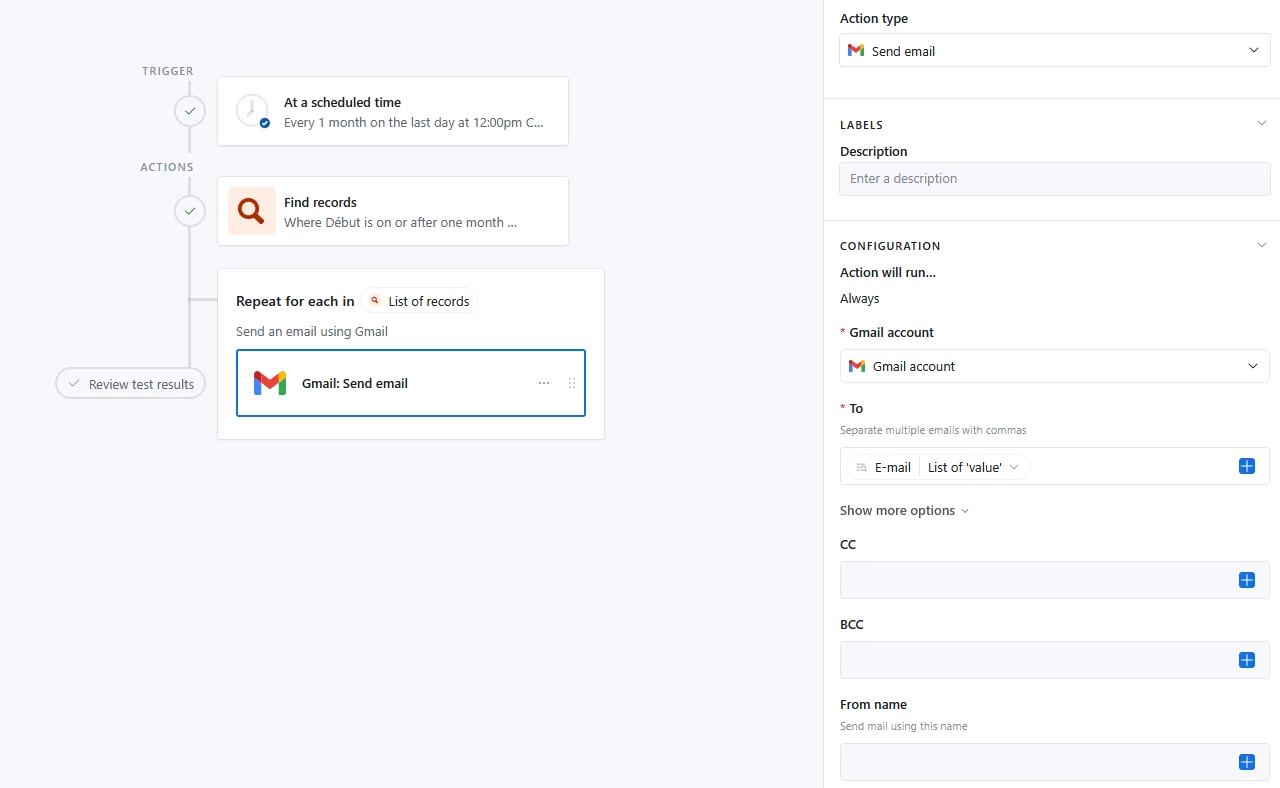


When configuring the “send email” part, I can chose to “use data from” :

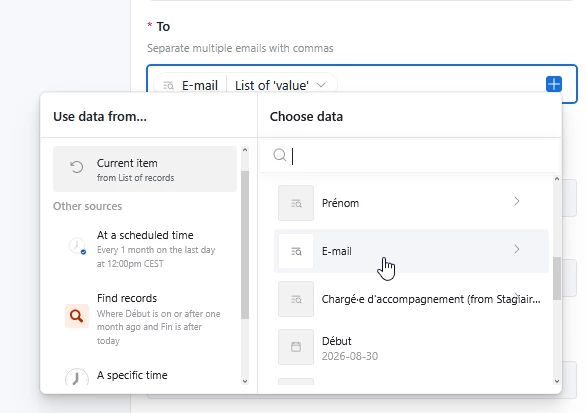
  • current item (here the list of record but treated individually if I understand it correctly)
  • Find records (all the records found) 


If I chose current item it gives me blank value. (even though on the finding trigger part I get different records found and with email displayed)
If I chose “find records” it’ll put every values of the list (all emails matching conditions) and I want to send each mail individually with dynamic values in it (Hey “insert name”, ...)


Do you have any idea why it’d give me no value when choosing current items ? It gives me blank value for mail but also all other fields


Thank you for your time, have a nice day !
Victor

Best answer by Philip_Ade

Hey Victor!

The reason you are seeing a blank or a "List of 'value'" token is because the loop needs to be tested first so Airtable knows what a single "Current item" looks like.

To fix this:

  1. Test your "Find records" step to ensure it returns test data.
  2. Click on the outer "Repeat for each in" block in your canvas and hit Test action on the right side panel to pull in a preview record.
  3. Map the specific field: Go back to your email action. Under Current item, navigate to E-mail (and Prénom for the greeting) and click the arrow to select the individual text value instead of the whole list.

Once tested, the fields will stop showing up as blank arrays and will send individually as intended!

3 replies

Philip_Ade
Forum|alt.badge.img+5
  • Inspiring
  • Answer
  • September 21, 2026

Hey Victor!

The reason you are seeing a blank or a "List of 'value'" token is because the loop needs to be tested first so Airtable knows what a single "Current item" looks like.

To fix this:

  1. Test your "Find records" step to ensure it returns test data.
  2. Click on the outer "Repeat for each in" block in your canvas and hit Test action on the right side panel to pull in a preview record.
  3. Map the specific field: Go back to your email action. Under Current item, navigate to E-mail (and Prénom for the greeting) and click the arrow to select the individual text value instead of the whole list.

Once tested, the fields will stop showing up as blank arrays and will send individually as intended!


Victor L
Forum|alt.badge.img+1
  • Author
  • New Participant
  • September 21, 2026

Hey Philip,


Thank you for the quick answer, it now works as intended, thanks a lot ;)


Philip_Ade
Forum|alt.badge.img+5
  • Inspiring
  • September 21, 2026

I’m glad it worked for you Victor