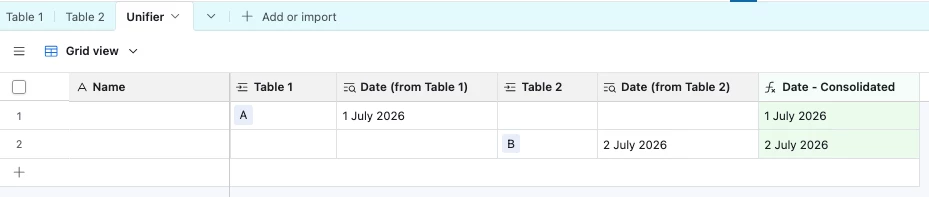
Question

Lookup dates from two table sources without losing formating

  • July 22, 2026
  • 3 replies
  • 39 views

I have a business account but not enterprise level (I’m a sole trader).
I have two tables, each with dates (one was made using a Make connector to Outlook up to this month and the other a direction connection to Outlook going forwards) and a name as a unique identifier.
I’ve tried pulling both sets of data into a unifier table but I then lose the date format and just have text. The date is key so I can then create a field with a specific timeline reminder for the unique name.

I am VERY new to this and can only find moving to enterprise an option to then use synced tables but this is costly.
I could backtrack so that I connect Outlook from an earlier date but I’ve spent a lot of time removing old data I wouldn’t want in my database.
I’m finding I’m going through AI credits very quickly and not achieving my goal. If I need to start again, it’s an option :-)
Anyone have any ideas? Thank you for any time you have to spare.


3 replies

TheTimeSavingCo
Forum|alt.badge.img+32

Hm, how are you unifying the dates?  Could you provide some screenshots of your tables?  

If you’re doing it via lookup fields and a formula field, that should work fine and would keep the date type?

IF(
{Date (from Table 1)},
IF(
{Date (from Table 2)},
{Date (from Table 2)}
)
)


Stephen_Biegner
Forum|alt.badge.img+3
  • Participating Frequently
  • July 22, 2026

Yeah - some screenshots of what you’re working with would be helpful to see how you’re pulling in the dates. You should be able to use a formula to consolidate the two separate date lookups in the unifier table, and the DATETIME_FORMAT formula should help display your date as you need (e.g. 7/22/2026 vs. July 22, 2026, etc.)

You could also possibly create an automation so that every time a record is added to the unifier table, it could look at the date lookups and plug it into a date field. But seeing some examples/screenshots would be great.


DisraeliGears01
Forum|alt.badge.img+22

Another potential solution would be using a DATETIME_PARSE() formula on your text field to convert it back into a date function in Airtable. That’s a bit of kludge because something definitely seems wrong in your structure or implementation to be losing the date string, but hard to exactly diagnose without screenshots.