Question

Multiple Select & Automation

  • April 21, 2026
  • 2 replies
  • 24 views

Forum|alt.badge.img+8

Hi all, I am running into a challenge again related to automations and multiple select fields.


I have a table where locations are input as “city, province” (I live in Canada). For example, “Toronto, ON”. When a record is approved, an automation kicks in and has to populate the location field in another table.


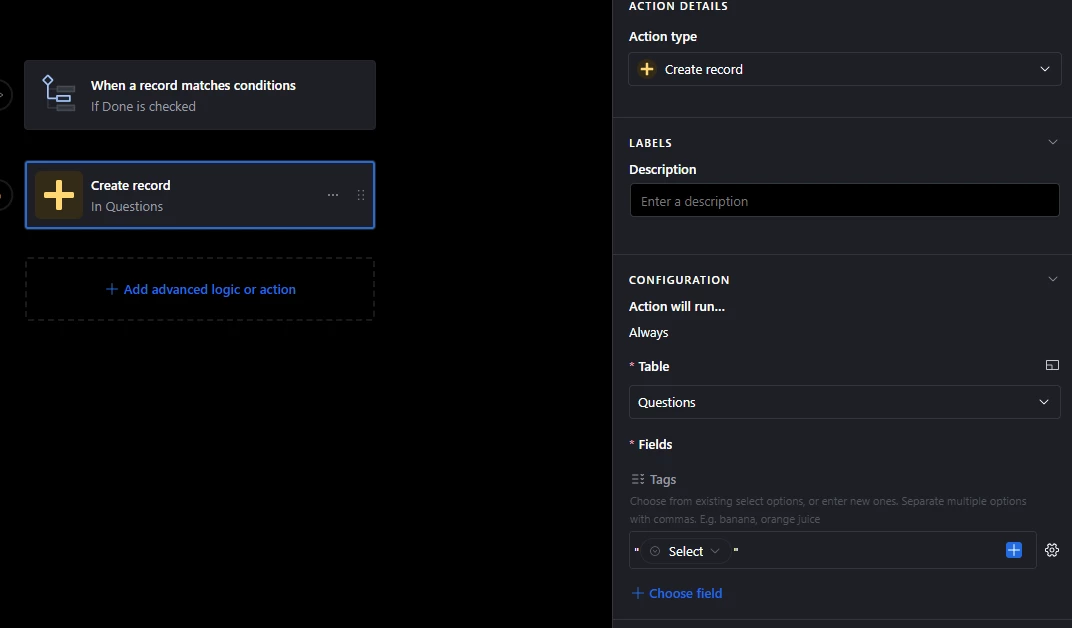
The problem is that when I assign the location field in the 2nd table as a multiple select, the automation splits the city and province (“Toronto”, “ON”). I tried making the location field in the 2nd table as a single line text but still the problem exists.


I have spent so much time trying to figure this out but am unable to. Is there a way around it?


Thanks so much.

I am attaching screenshots showing how the location is populated in both tables.

 

2 replies

DisraeliGears01
Forum|alt.badge.img+22

The automation is reading your comma in the single select as the sign to add another multi-select. You can either use something other than a comma (i.e. Mississauga-ON) or in the automation wrap the field with quotation marks. 


Forum|alt.badge.img+4
  • Participating Frequently
  • April 22, 2026

The comma is what is causing the issue here.  When it sees Toronto, ON the multiple select thinks there needs to be separate entries.  You could just use a different separator like “Toronto-ON” but if you want/need to keep the format you could do something like use a Single Line Text field in your second table and the automation will keep it as a plain string and not try to do any splitting work.  If you need to use a Multiple Select field you would have create two separate multi-select fields, one for City and one for Province.  Perhaps use a formula field later if you need to connect them.