Need assistance for grouping

  • November 14, 2023
  • 2 replies
  • 29 views

Forum|alt.badge.img

Is it possible to do a header / group each section? I am looking to put a few points under different sections but I cant seem to find the option to add a heading or a divider. Kindly assist.

2 replies

stevendasilva
Forum|alt.badge.img+9

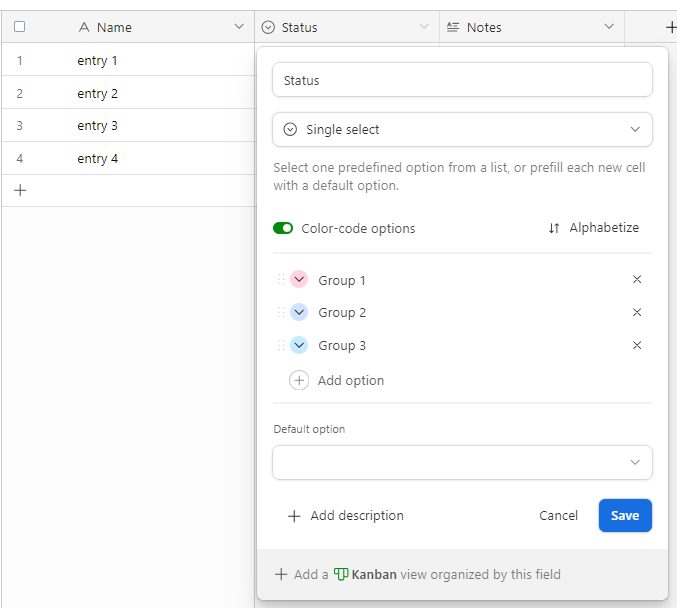
Hey @MeganC  in order to group items. You have to set up a single-select field. As shown here:

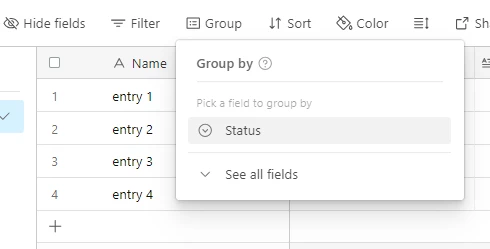
Once this is set up, you can group by this field. 

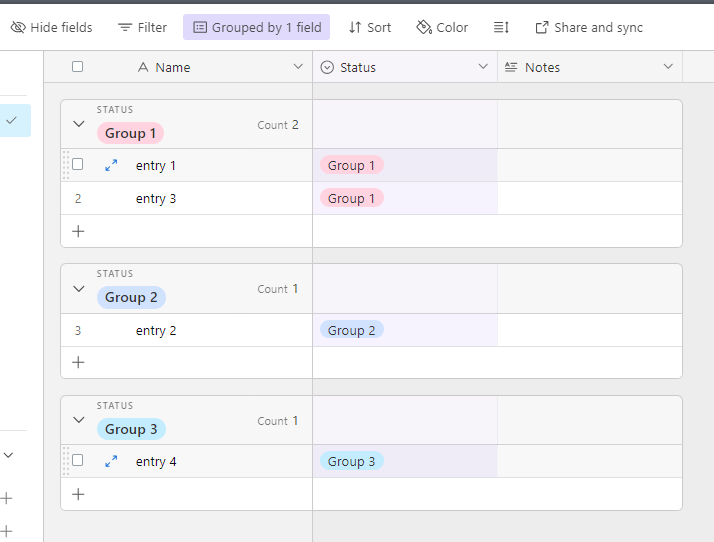
Once you set this up it will look something like this 

Steven Da Silva

Systems With Steve


kuovonne
Forum|alt.badge.img+29
  • Brainy
  • November 15, 2023

Are you looking to add a header section to a grid view, similar to a header section in a spreadsheet, including a title and some free-form text?

I’m afraid that is a fundamental difference between a spreadsheet and a database like Airtable. 

As Steven has pointed out, you can group records in a grid view. You can actually group records on any field, not just single-select fields. However, you cannot give the grouping a title and free-form text like you could with a spreadsheet.

You could try building an interface with multiple grids. You can add free-form text above each grid. However, that might not be whar you are looking for.