

Solved

Need help building an automation based on a linked record field


ScottPhillips
Forum|alt.badge.img+8

Hello!


My automation skills are pretty basic and I’ve struggled to build an automation to suit this specific need.

I’ve built out a hierarchy where I have a parent record table (deliverables) and another table that is my tasks and subtasks. The tasks and subtask records are created through a form in the interface page for my “deliverables.”

I basically need the automation to look at the task record, see the deliverable record that it is linked to and apply that to the subtask that is created. I’m adding the task record (via the form) and then I’m adding the linked subtask (also through the form).

The process of creating the task record via the form automatically links it to the deliverable record. But once I go another step down in the hierarchy to the subtask, it only links to the task.

So I’d like an automation that can link it up to the same deliverable record that the task is linked to. Hopefully this makes sense. Thanks!

Best answer by anthonyXRay

The simplest route is probably a lookup field, no automation needed.  In your subtasks table, add a Lookup field that goes through the Task link and pulls the Deliverable.  That gives you the deliverable on every subtask for filtering and grouping.

If you need it as a real linked record, use an automation with the trigger “When a record matches conditions” make sure the Task is not empty but the Deliverable is empty.  Then add an “Update record” action that sets the subtask’s Deliverable field to the value from that lookup.  Using “matches conditions” instead of “record created” avoids firing before the form has finished linking the task.

View original

4 replies

DisraeliGears01
Forum|alt.badge.img+22

Just to make sure I have in mind what you described, you have two tables (deliverables and tasks) but in the task table you have a linked record field connecting Tasks and Subtasks right? One thing that would make this easier would be to add a lookup field showing in the Subtask record  the Deliverable record linked to the parent task.

Since you’re going all this through forms (where the data enters all at once) it should be pretty simple to create an automation that fires when the record is created. It should be something like When Record in Task table create -->Conditional Logic If Type =Subtask, Update Record (so that it doesn’t run on your parent task record). Then update the record so the linked record field to deliverables is the same as the lookup field.

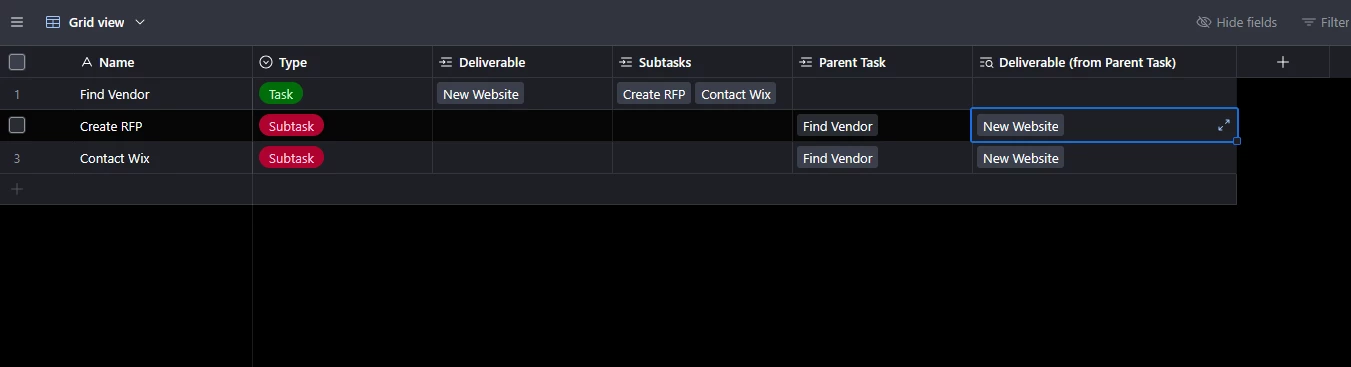
Here’s a shot of a basic tasks table showing the fields I mean 


Depending on how your information is used/displayed, you might not even need to bother with the automation, you could just use lookups (so over in the deliverable’s table you add a lookup of the subtasks field). If there’s something in your interfaces or whatnot that doesn’t make that viable, then basically your just making the automation write the Deliverable (from Parent Task) field to the Deliverable field for the subtasks.


anthonyXRay
Forum|alt.badge.img+6
  • Participating Frequently
  • Answer
  • October 13, 2026

The simplest route is probably a lookup field, no automation needed.  In your subtasks table, add a Lookup field that goes through the Task link and pulls the Deliverable.  That gives you the deliverable on every subtask for filtering and grouping.

If you need it as a real linked record, use an automation with the trigger “When a record matches conditions” make sure the Task is not empty but the Deliverable is empty.  Then add an “Update record” action that sets the subtask’s Deliverable field to the value from that lookup.  Using “matches conditions” instead of “record created” avoids firing before the form has finished linking the task.


ScottPhillips
Forum|alt.badge.img+8
  • Author
  • Known Participant
  • October 13, 2026

ahh, yes. I think the lookup table was the missing piece. Let me explore that!


ScottPhillips
Forum|alt.badge.img+8
  • Author
  • Known Participant
  • October 13, 2026

Thanks all--that did the trick!