Solved

replacing empty end date with start date +30 mins

  • March 23, 2026
  • 7 replies
  • 42 views

Forum|alt.badge.img+1

I am very new to airtable so excuse me if I misunderstand some things.

I am trying to use airtable to create a calendar of my bookings.

I have two types of bookings. One that lasts exactly 30 minutes and one that lasts several days and start and end time are customizable.

Because its a chore to pick a date and time exactly 30 minutes past the start time for my short bookings Im trying to run an automation so that anytime I create a record with no end date it will set the end date field to exactly 30 minutes past the start date.

Is this possible?



Best answer by DisraeliGears01

Automations can’t calculate, so it takes a bit to make this work for an automation.

It would have to be integrated with a DATEADD Formula field, so essentially you’d have a start date and some kind of single select field (“Check-in” v “In-Depth”) and the formula field ls basically IF(SingleSelect= “Check-in”, DATEADD(Startfield, 1800, ‘seconds’), BLANK()). Then you'd add an automation that fires when that formula field is not empty, copy the formula field result over to your editable end time field. You can hide the formula field after it’s all setup so it’s basically running in the background.

One other quick tip, you say anytime I create a record but if you’re editing in the data layer, you’re creating the record the moment the row is created, and inevitably that means that there’s no information in there on creation. If you’re using record templates or forms, then information starts in the record at creation, but it’s easy to get tripped up on that when you’re starting out 😎👍

7 replies

DisraeliGears01
Forum|alt.badge.img+21

Automations can’t calculate, so it takes a bit to make this work for an automation.

It would have to be integrated with a DATEADD Formula field, so essentially you’d have a start date and some kind of single select field (“Check-in” v “In-Depth”) and the formula field ls basically IF(SingleSelect= “Check-in”, DATEADD(Startfield, 1800, ‘seconds’), BLANK()). Then you'd add an automation that fires when that formula field is not empty, copy the formula field result over to your editable end time field. You can hide the formula field after it’s all setup so it’s basically running in the background.

One other quick tip, you say anytime I create a record but if you’re editing in the data layer, you’re creating the record the moment the row is created, and inevitably that means that there’s no information in there on creation. If you’re using record templates or forms, then information starts in the record at creation, but it’s easy to get tripped up on that when you’re starting out 😎👍


TheTimeSavingCo
Forum|alt.badge.img+31

+1 for what ​@DisraeliGears01’s said and I’ve created a base here with the automation set up in case that’s helpful!


anmolgupta
Forum|alt.badge.img+3
  • Participating Frequently
  • March 24, 2026

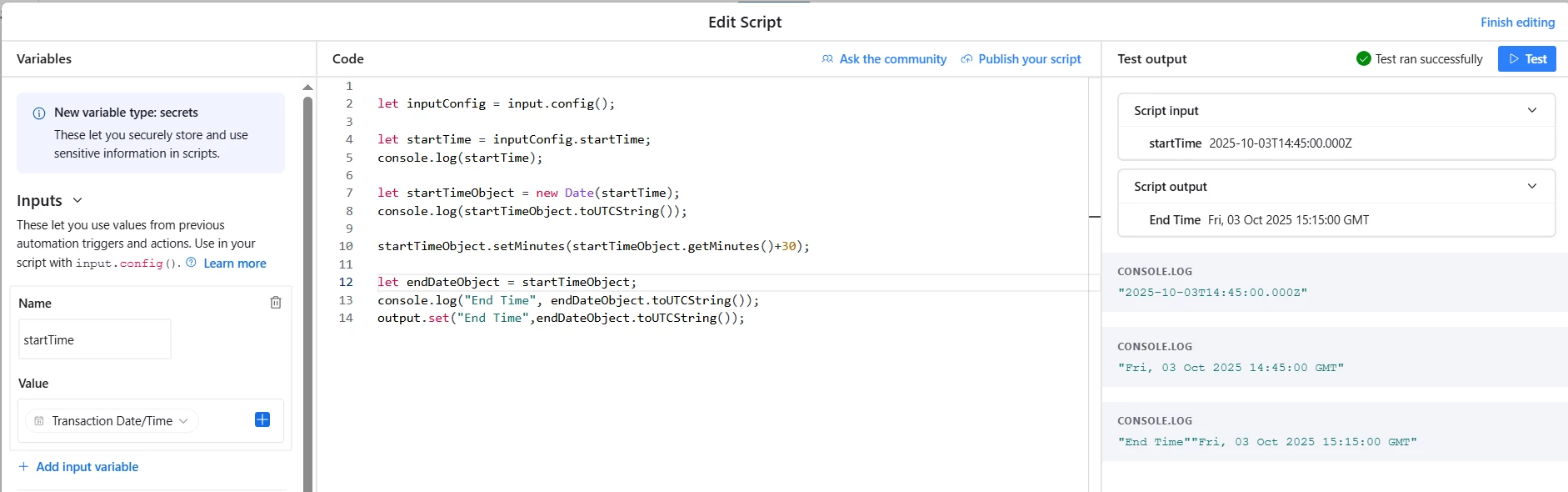
You can accomplish this with a simple 3 step automation. You’ll need to use a scripting block however. Here is how to do it:

  1. Set trigger to watch updates ‘Start Date’
  2. Add a conditional block to check if your booking type is 30 minute or the other one. If its 30 minute booking, proceed further
  3. Add a “Run script” step which will look something like the attached image:

    You will add the start time as input variable in the left side input tab and output the end time after calculation for it to be used in next steps

  4. Use the output of script step to update your record and set the end date

    Hope this helps.


Forum|alt.badge.img+1
  • Author
  • New Participant
  • March 25, 2026

I created the formula field, however it is adding 4.5 hours instead of the 30 minutes I told it too. I was using 24hr format and thought maybe this was causing the problem as the output was in 12hr format. I changed it to 12hr format and the issue persists.

This is the formula used in the field (created via ai)

IF(

  OR({Service} = "Checkin", {Service} = "Checkout"),

    DATEADD({Start Date}, 30, 'minutes'),

    BLANK()

)


I tried using 1800 seconds instead of 30 minutes and result was exactly the same.


DisraeliGears01
Forum|alt.badge.img+21

I bet this is a timezone conflict issue, Airtable loves to keep stuff in UTC/GMT. In your date field settings, expose timezones and see if there’s a difference, if so then then mark “Use same time zone for all collaborators”. 


Forum|alt.badge.img+1
  • Author
  • New Participant
  • March 25, 2026

That resolved the issue! Can’t believe that didn’t occur to me!

Thank you so much


DisraeliGears01
Forum|alt.badge.img+21

It happens to us all, timezones are one of the banes of my Airtable existence. If a date comes out funny, my first thought is timezones and then I start troubleshooting elsewhere haha.