Question

Send calendar invite and getting acceptance/rejection responses

  • August 14, 2026
  • 5 replies
  • 43 views

Graham Reed
Forum|alt.badge.img+9

I’m fairly certain the answer is going to be no, but is it possible to get/collect the accepted/rejected responses to calendar invites when sent via Automations?

We have a meeting planner, we will send out invites using an automation (fairly standard) - can we accept the responses in some way to then use that information (for example, a manager declines, so we can invite their deputy)?

Anyone done anything like this?

5 replies

DevonK
Forum|alt.badge.img+17
  • Inspiring
  • August 14, 2026

Are they Outlook events? If so, you could set up a second automation triggered when an Outlook email is received.

  1. On the Outlook side, create a folder that you will move all event responses to. Then set up an Outlook rule to move all event responses to that folder.
  2. Set up an Airtable automation with the trigger “Outlook: when an email is received”. Choose the folder you created.
  3. Create whatever action you want at that point - create a record, update a record, send an email, etc.

Unfortunately I don’t think this works for Gmail because I don’t see any trigger for “when an email is received” for Gmail. 


ScottWorld
Forum|alt.badge.img+35
  • Genius
  • August 14, 2026

To automatically monitor calendar events when they get updated with acceptance/rejection responses, you may want to consider automatically monitoring all of this with a 3rd-party app like Make’s Google Calendar integrations or Make’s Outlook Calendar integrations (and then tie it all together with Make’s Airtable integrations).

However, if you’ve never used Make before, it could be quite the challenge to figure out how to set it all up. One reason for this is because every time the calendar event gets updated, the entire list of guests comes in to you as an array with the full list of names & full list of accepted statuses, so you may need to use Make’s array tools to parse through the array, and do what you want to do with each attendee.

In this video, I chat a little bit about how to work with Airtable arrays in Make.

I’ve also assembled a bunch of Make training resources in this thread. For example, here is one of the many different ways that you can instantly trigger a Make automation from Airtable. You can even instantly trigger a Make automation by having a button or URL link trigger a custom webhook (with optional webhook response). In this video, I show how to use custom webhooks.

Hope this helps!

If you’d like to hire the best Airtable consultant to help you with anything Airtable-related, please feel free to contact me through my website: Airtable consultant — ScottWorld


TheTimeSavingCo
Forum|alt.badge.img+32

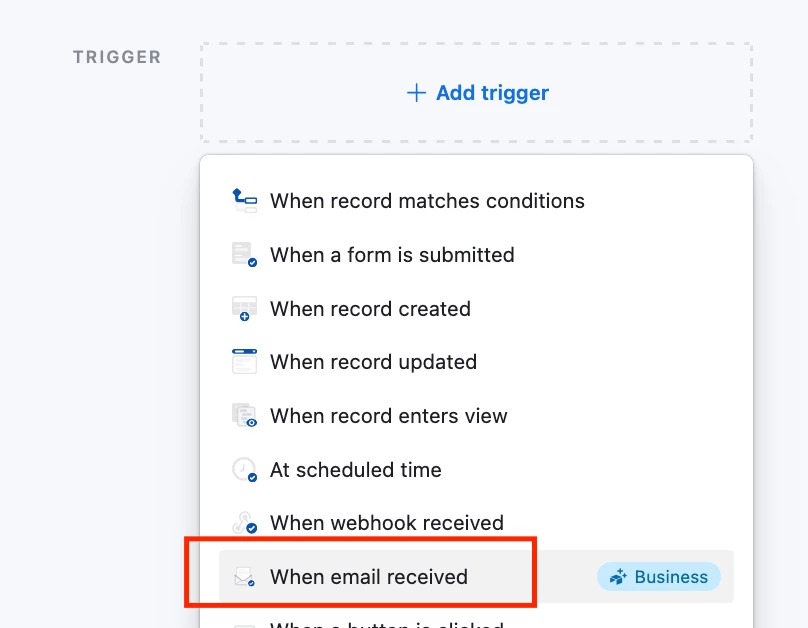
Adding on to ​@DevonK’s solution, if you’re on Gmail and on the Airtable Business plan, you could use the ‘When email received’ automation and set up a filter to auto forward the GCal responses to that email address


If not, I usually just create a free Outlook account and then get Gmail to forward the emails there and use the ‘When Outlook email received’ trigger, works fine!


danielm
Forum|alt.badge.img
  • New Participant
  • August 15, 2026

I think the key challenge is that sending the calendar invite and receiving RSVP changes are two separate processes. You could potentially use the calendar provider's API or webhook to monitor event responses, then write the attendee status back into Airtable. Once a manager is marked as declined, an Airtable automation could trigger the next step, such as notifying or inviting their deputy. The exact approach would depend on whether you're using Google Calendar or Outlook, but this should be possible with an integration layer rather than Airtable's standard automation alone.


Forum|alt.badge.img
  • New Participant
  • August 16, 2026

Interesting use case! A few thoughts from someone who builds these automations regularly:

Short answer: out of the box, Airtable Automations can't read the accept/decline responses back from calendar invites — once the invite goes out via email, Airtable doesn't get the RSVP callback. So relying purely on native automations for that loop won't work.

What does work well in practice: route the invite through an integration that captures responses — e.g. Calendly if the meeting is a simple scheduling flow, or a service like Microsoft Graph / Google Calendar API (via a script/extension or Make/Zapier) to poll attendees and write their status back into an Airtable field. That's a more robust path and gives you the "manager declined, so invite their deputy" logic you described as a follow-up automation.

Happy to share a concrete setup if you'd like — the pattern (send → poll RSVP → trigger follow-up) is reusable. What tool are you currently sending invites from?