Question

When a record matched condition, not firing.

  • May 19, 2026
  • 5 replies
  • 76 views

Using an automation to assign a part number to any part who does not have a part number. Since this database is needing to retroactively run this script one at a time due it is nature of how it assigns part numbers. 

The best way to do this is to have the script run once, then identify the next record this script needs to run on (next record without a part number) and run again.

However as it stands, the second automation run will not happen even when the conditions of the second record are changes to meet the conditions of the automation.

Is this a known bug/limitation of airtable automations?

5 replies

TheTimeSavingCo
Forum|alt.badge.img+32

Could you provide screenshots of the automation set up and details on what the script does to make the new record meet the condition?

Something to watch out for is that if the trigger is set up with ORs then it won’t trigger if it goes from one matching OR condition to another.  For example, if the automation is set to trigger if a single select field is Option A or Option B, then this would happen:

  1. Field set to Option A
  2. Automation triggers, Field remains at Option A
  3. Field set to Option B
  4. Automation will not trigger as the record matches the trigger condition in both scenarios

And a potential workaround would be to update the record so that it no longer matches the trigger condition:

  1. Field set to Option A
  2. Automation triggers, updates the field to Option C
  3. Field set to Option B
  4. Automation triggers

DevonK
Forum|alt.badge.img+17
  • Inspiring
  • May 19, 2026

In addition to what ​@TheTimeSavingCo said, the “when record matches a condition” trigger also won’t fire if the record always matches the condition. In your example, if your trigger is “when Part Number is empty”, and Part Number is empty at the time of record creation, the automation will never trigger. In these scenarios I usually use “when a record enters a view” instead.


Forum|alt.badge.img
  • New Participant
  • June 2, 2026

I agree with what has been said, and I think there’s one more option that could work.

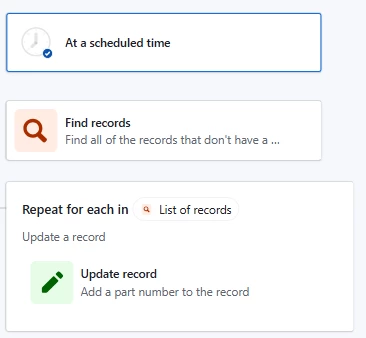
If you’re needing an automation to run on a set of records that don’t currently have a part number, you could use the trigger of “At a Scheduled Time”. Then, you could find all records that don’t currently have a part number using “Find Records”, and set the conditions to only return records where the Part Number is blank. Finally, using the “Repeating Group” option for the list you created in “Find Record”, you could update each record in the list to assign a part number. It could look something like this:
 

There may need to be a slight adjustment in the “Update Record” depending on how you’re currently assigning part numbers, but the structure looks largely the same.

Also, if you needed to have this update regularly, you can change how often this automation runs in the “At a Scheduled Time” trigger.


VikasVimal
Forum|alt.badge.img+12
  • Inspiring
  • June 3, 2026

use a Find node.
‘when record matches condition’ only fires at the moment when the record first matched the condition. Not for records already matching condition at the time the automation was last turned on.


anmolgupta
Forum|alt.badge.img+6
  • Inspiring
  • June 3, 2026

@andrew_soulier It won’t run restrospectively automatically. If the records had their part number empty prior to you switching on your automation, it won’t trigger.

@Olivia B’s solution is a good one as it will also poppulate multiple part numbers in one automation run instead of one automation run per part. 

If you do want it to run once per part, ​as @DevonK suggested, trigger then automation “when record enters a view” and create a view with a condition that part number is empty.