Question

When Email is Received Automation Attachments

  • May 15, 2025
  • 8 replies
  • 226 views

Forum|alt.badge.img+10

I have setup an automation so when someone emails a purchase request, it makes a record and notifies me in Airtable, however it doesn’t look like there is away to email an attachment and have it populate the attachment field. Is this possible?


8 replies

ScottWorld
Forum|alt.badge.img+35
  • Genius
  • May 15, 2025

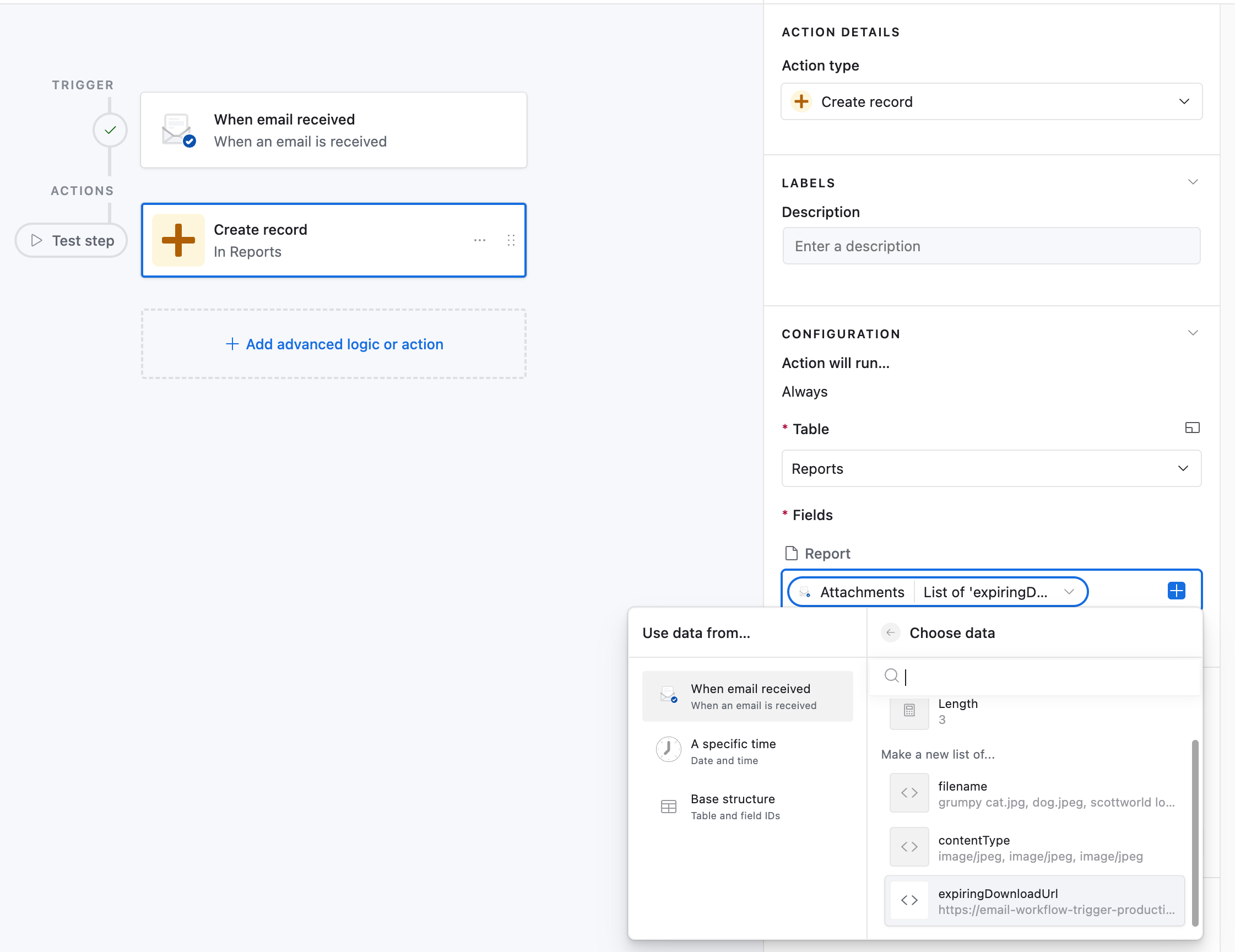
Yes, you can receive the attachment into an attachment field by choosing the “expiring attachment URL”.

See screenshot below for how this looks in Airtable’s automations.

If you want even more advanced control for watching emails & more customization for your automations, check out Make’s advanced automations.

Make can watch your existing email addresses for emails, or you can setup a special email address with its custom mailhooks.

If you’ve never used Make before, I’ve assembled a bunch of Make training resources in this thread. For example, here is one of the ways that you could instantly trigger a Make automation from Airtable.

Hope this helps! If you’d like to hire the best Airtable consultant to help you with anything Airtable-related, please feel free to contact me through my website: Airtable consultant — ScottWorld


Mike_AutomaticN
Forum|alt.badge.img+28

Hey ​@Ringthebells86,

You’ll want to follow ​@ScottWorld‘s advice on this one! He is the man!
If you still have issues making that work, just get back to this post and we’ll help you out step by step.

Mike, Consultant @ Automatic Nation


ScottWorld
Forum|alt.badge.img+35
  • Genius
  • May 16, 2025

Haha, thank you, ​@Mike_AutomaticN! 😀🙌


Forum|alt.badge.img+2
  • New Participant
  • August 27, 2025

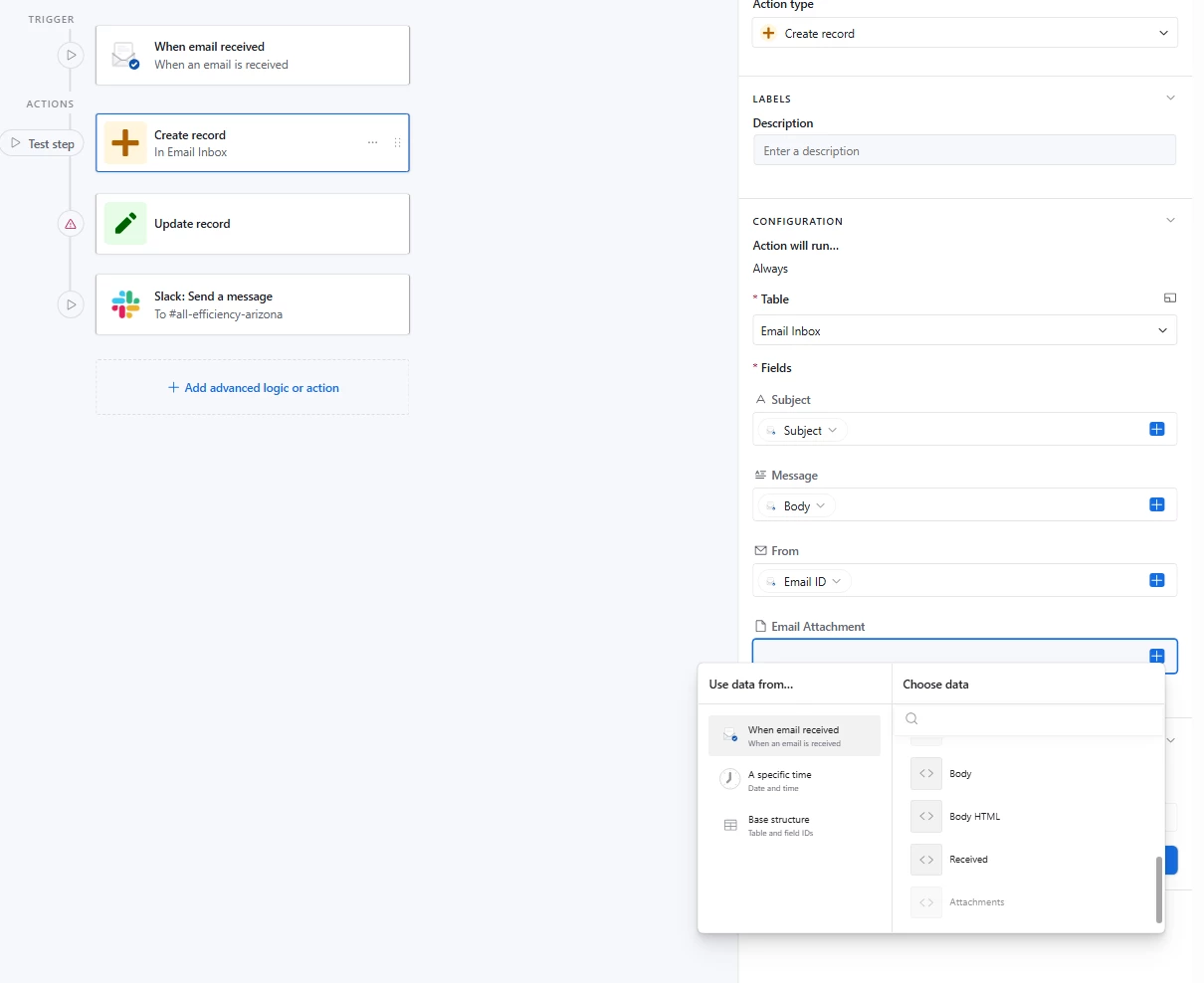
I’m trying to solve for this same issue as it’s important that I be able to receive attachments. I have the automation set up the same way as best I can tell, but it doesn’t give the option for expiring DownloadUrl, it just says Attachments and the field is grayed out giving me the error of No Valid Nested Options. 


Tests have worked fine for text only emails, but I tried sending one with an attachment and it’s nowhere to be found


ScottWorld
Forum|alt.badge.img+35
  • Genius
  • August 27, 2025

After you send your email with the attachment, you’ll need to retest the trigger step to load that email into your automation. Then, you can configure your action steps down below.

Hope this helps!

If you have a budget and you’d like to hire the best Airtable consultant to help you with this or anything else that is Airtable-related, please feel free to contact me through my website: Airtable consultant — ScottWorld


Forum|alt.badge.img+2
  • New Participant
  • January 15, 2026

Hello! I’m having the same issue as JZ-Mousketeer.. my attachments option is greyed out and when I hover over it says no valid nested options. Any ideas? Thanks!


DisraeliGears01
Forum|alt.badge.img+21

I suspect the answer is the same as what Scott already provided, but set up the automation and make sure to send the email address an email with an attachment. Then re-test the initial trigger and it should allow you to add the attachment. 

When you’re just building it without a proper sample, it doesn’t know how to populate the attachment field, so you’ve got to give it some examples.


Forum|alt.badge.img
  • New Participant
  • January 27, 2026

Email-based automations sound simple until attachments enter the picture. I’ve bumped into this too, and the trick is usually how the attachment array gets passed through the automation step. Sometimes a script action or intermediary table makes life easier. Native tools work, but they’re picky, so a small workaround often saves a lot of trial and error.