Question

איך אני עושה עיצוב מותנה לכל קובייה בטבלא בנפרד

  • Oct 14, 2026 7:37 PM UTC
  • 2 replies
  • 99 views


Subject: Step-by-step setup for Option A (Tenant-Month linked table for conditional formatting)

Hi Team,

I have a table where debts and payments are recorded as separate rows per tenant and month. I want the paid/unpaid status color to show directly on the debt rows (and optionally on the monthly summary).

Could you please provide step-by-step instructions on how to set up Option A (using a Tenant-Month summary table with linked records, rollups, and lookup fields) so that debt rows can be conditionally formatted based on payment status?

Thank you!

2 replies

TheTimeSavingCo
Forum|alt.badge.img+32

Does this look right?  If so I’ve set it up here for you to check out and you can duplicate it into your own workspace to play with it!

The ‘Remaining’ field is a formula field that deducts the ‘Amount Paid’ from the ‘Amount’

Amount - {Amount Paid - Amount Rollup (from From field: Debts)}

The ‘Payment Status' field will show ‘Paid’ once the ‘Remaining’ field has a value of 0

IF(
Remaining = 0,
'Paid',
'Pending'
)

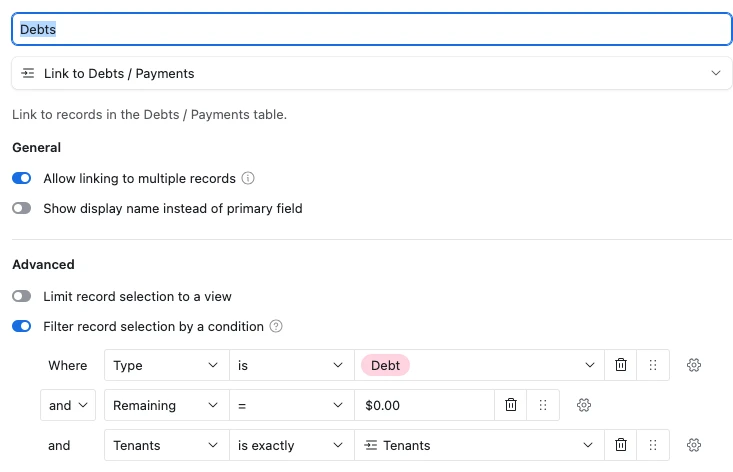
The linked field ‘Debts’ has a conditional filter on it that only allows users to select ‘Debt’ records that have a ‘Remaining’ amount > 0, and are for this tenant, which makes it easier for users to select the correct Debt record:


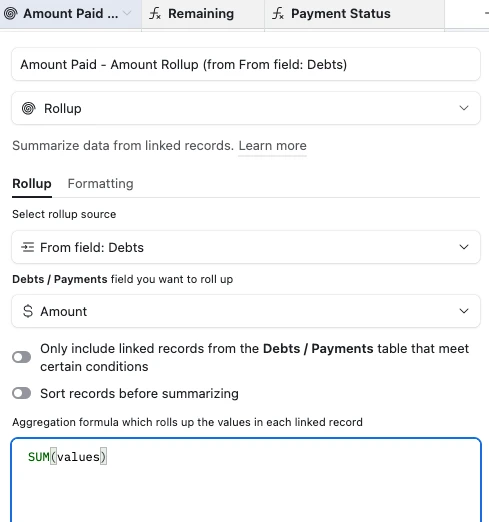
And the ‘Amount Paid’ field is a rollup field that sums up the ‘Amount’ for the linked records:


Let me know if you have any questions and I’ll see what I can do to help!


Hello, I’d create a Tenant-Month summary table, link each debt and payment record to the matching tenant and month, then use rollups to calculate the balance  and payment status. A lookup field can bring that status back to each debt row for conditional coloring.