Question

Analyze the evolution of skills

  • June 2, 2026
  • 7 replies
  • 106 views

Alexandra
Forum|alt.badge.img+1


I need to perform some calculations on the evolution of the skills of all participants individually, using the Airtable interface. For this, I need your help to create the data model.This is the information flow:1- At the beginning of the program, participants must fill out a Google form with 36 questions (never, rarely, sometimes, frequently, always) to assess their skills. The key is their email address.2- At the end of the course, they answer another Google form with the same 36 questions to assess the development of their skills. I already have a table with the participants' data, where the key is the email address.What is the simplest solution to implement this?I've already asked for help, but I haven't been able to implement the solution. :-)


7 replies

TheTimeSavingCo
Forum|alt.badge.img+32

Ah, could you talk a bit about what you’ve tried so far and what issues you’ve faced?

If you could tell me what problems you had with the suggestion from the previous thread I could also try to help there


I also do free half hour calls, feels like it might be useful to do a screenshare to talk through it and you can grab a time here if you’d like!


Alexandra
Forum|alt.badge.img+1
  • Author
  • Participating Frequently
  • June 3, 2026
Thank you very much for your help.My first difficulty is the number of questions I didn't mention in my initial request for help. The skill assessment form (initial and final) has 35 questions, and the solution you suggested is limiting. Each skill is assessed through several questions.The questions should probably be in a different table.
How can I ensure that when a form response is entered, that information appears in the "submissions" field linked to the "Submission" table?
Another issue is that I need the data to be prepared to analyze the development of skills from participant to participant and from competency to competency within the interface.
 

TheTimeSavingCo
Forum|alt.badge.img+32
How can I ensure that when a form response is entered, that information appears in the "submissions" field linked to the "Submission" table?

Hm, what’s the Submissions field in this context?  Could you provide a screenshot of the table setup?

---

Another issue is that I need the data to be prepared to analyze the development of skills from participant to participant and from competency to competency within the interface.

Ah how you want the analysis displayed can heavily influence the data structure, and so if you could provide a mockup (maybe using Figma or Sheets or something) that would be really helpful


Alexandra
Forum|alt.badge.img+1
  • Author
  • Participating Frequently
  • June 3, 2026
How can I ensure that when a form response is entered, that information appears in the "submissions" field linked to the "Submission" table?

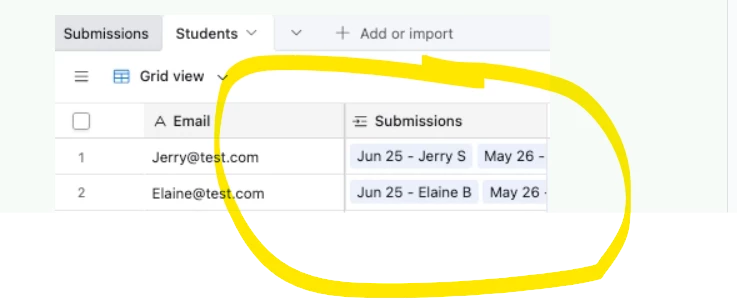
Hm, what’s the Submissions field in this context?  Could you provide a screenshot of the table setup?

Here is the print:


Another issue is that I need the data to be prepared to analyze the development of skills from participant to participant and from competency to competency within the interface.

Ah how you want the analysis displayed can heavily influence the data structure, and so if you could provide a mockup (maybe using Figma or Sheets or something) that would be really helpful

I don't know yet, but I will need to validate the progress by competency per participant and the progress of all participants by competency.

anmolgupta
Forum|alt.badge.img+7
  • Inspiring
  • June 3, 2026

@Alexandra 

How can I ensure that when a form response is entered, that information appears in the "submissions" field linked to the "Submission" table?

This will happen automatically when you put the email address in “Students” column (a linked record field linking to Students table). Since Email is your first column in Students table, any email entered in “Students” column of Submissions table will link it to exactly matching Students record and the corresponding “Submissions” column in Students table will also show that linkage.


TheTimeSavingCo
Forum|alt.badge.img+32
How can I ensure that when a form response is entered, that information appears in the "submissions" field linked to the "Submission" table?

Thanks for the screenshot!  This depends on how the data’s created in Airtable.  Assuming we’re importing them in bulk via a CSV then we’d put the CSV’s email value into the linked field when we’re importing via the CSV Import extension (https://support.airtable.com/docs/csv-import-extension)

If people are actually submitting the form, we probably have a text field for them to key in their email address (if we did a linked field we’d be exposing the emails of all the Students to anyone with access to the form), and so you’d have an automation that triggers when the form submits to paste the email value into the linked field

If you could talk more about how your data gets created in Airtable that’d be helpful!

---

I don't know yet, but I will need to validate the progress by competency per participant and the progress of all participants by competency.

Hmm...for competency per participant, the only thing I can think of is the field comparison but you mentioned that didn’t work for you?  Hopefully someone else has a better idea!

For the progress of all participants by competency, I’m thinking we could create a new table called ‘Competencies’ or something where each record represents a single competency.  This table would have a linked field to the Students table, and each Competency record would be linked to every Student record

In the Students table, we’d then create one formula field per competency to indicate their progress

Then in the Competencies table we’d be able to create rollup fields to get averages etc on the overall progress by using conditional filters


Matt_Shepherd
Forum|alt.badge.img+1
  • Participating Frequently
  • June 4, 2026

Hey Alexandra,

I have done a similar thing in the past, where participants answer lots of questions on an airtable form, with each form submission creating a new row on a submissions table with various fields for each question. We then had extra fields on that table for the score awarded per question, with other formula fields to calculate the total score. That way each submission has a score.

The form submissions all need to land in 1 table, so you can either group the fields by competency, with separate score fields for each competency (this is the simplest approach). If you need the competencies or questions to go into a separate table for some reason this would have to be an automation that runs after the form submission is received.

Then in your case on the student table (where the student records are linked to the submission via the email as Anmol mentioned) you can have filtered rollup fields to show the start and end score, and a progress formula field which shows the difference / progress.

Does that help?