Question

Best way to model recurring weekly employee shifts?

  • July 28, 2026
  • 10 replies
  • 47 views

shlomy
Forum|alt.badge.img+1

Hi everyone,

I'm trying to build an employee shift schedule in Airtable where the schedule repeats every week. I don't need specific calendar dates—only the day of the week and the start/end times for each shift.

I initially thought about using Date fields, but they always seem to require an actual date. I also looked at Duration fields, but those appear to represent elapsed time rather than a time of day.

I'm wondering:

  • What is the recommended way to model recurring weekly shifts in Airtable?
  • Is it best to use Date fields with an arbitrary date and simply ignore the date portion?
  • Are there better alternatives, such as text fields or another field type?
  • How do you handle sorting by time and calculating shift lengths in a setup like this?

I'd appreciate hearing how others have structured similar recurring schedules. Thanks!

10 replies

Mike_AutomaticN
Forum|alt.badge.img+29

Hey ​@shlomy,

I’d personally set up probably 3 different tables (or maybe more):
- Employees
- Template Shifts
- Shifts


Template Shifts will handle the modeling.I’d use (i) arbitrary date time field for Start, (ii) arbitrary date time field for End, and (iii) linked record field to Employee.

On a weekly basis, you process such data and create the actual records on the Shifts table.
I’d be happy to show you around on a call!
 

Mike, Consultant @ Automatic Nation 
YouTube Channel 


shlomy
Forum|alt.badge.img+1
  • Author
  • New Participant
  • July 28, 2026

arbitrary date time field What field is this?


Ac_dvlp
Forum|alt.badge.img+1
  • Participating Frequently
  • July 28, 2026

How about using the created time field. This field gives you the option to populate both the date and time of record creation. You can use 2 of these fields for the start and end times of each shift. Then use a AI agent to extract the day of the week from the created time field. 

For calculating the time and shift lengths a formula or an AI agent will both work well. 


shlomy
Forum|alt.badge.img+1
  • Author
  • New Participant
  • July 28, 2026

How about using the created time field. This field gives you the option to populate both the date and time of record creation. You can use 2 of these fields for the start and end times of each shift. Then use a AI agent to extract the day of the week from the created time field. 

For calculating the time and shift lengths a formula or an AI agent will both work well. 


To clarify, this is for the ABA company.

We have a weekly schedule, and for each BT we need to record their availability and unavailability throughout the week. Because of that, a simple date field or a record creation date won't work. We need to capture the exact day of the week and the specific time of day for each availability slot.

At the same time, we'd like the information to be structured and easy to read, rather than stored as plain text. Ideally, it should be displayed in a way that keeps the schedule organized and makes it easy to understand each BT's weekly availability.


Ac_dvlp
Forum|alt.badge.img+1
  • Participating Frequently
  • July 28, 2026

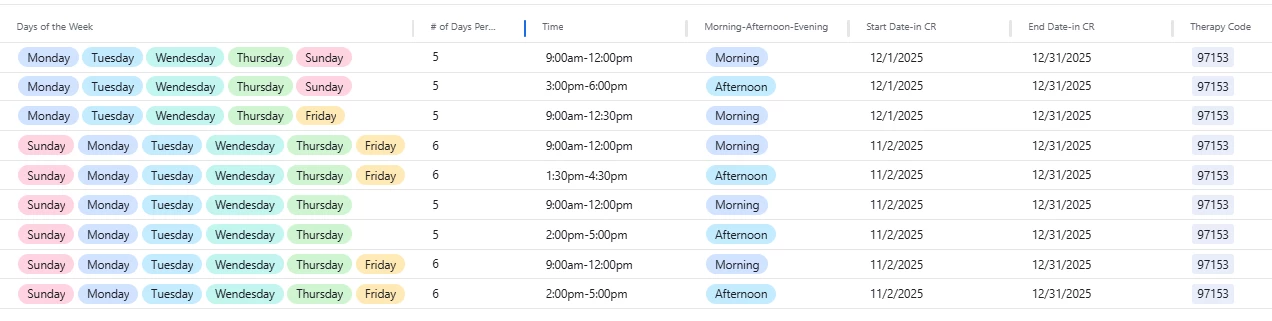
How about creating a multi-select field with each of the days of the week and then use a text field to log the times of each BT’s availibility. 

You can also utilize the calendar view on the interface that will enable easy viewing .

See screenshot of a similar set up that I built for another ABA company. 


shlomy
Forum|alt.badge.img+1
  • Author
  • New Participant
  • July 28, 2026

How about creating a multi-select field with each of the days of the week and then use a text field to log the times of each BT’s availibility. 

You can also utilize the calendar view on the interface that will enable easy viewing .

See screenshot of a similar set up that I built for another ABA company. 


How can I extract the time from the text and present it in a structured format or a calendar view?


Ac_dvlp
Forum|alt.badge.img+1
  • Participating Frequently
  • July 28, 2026

use an AI agent to calculate the time and use the calendar view in the interface to present it.


shlomy
Forum|alt.badge.img+1
  • Author
  • New Participant
  • July 28, 2026

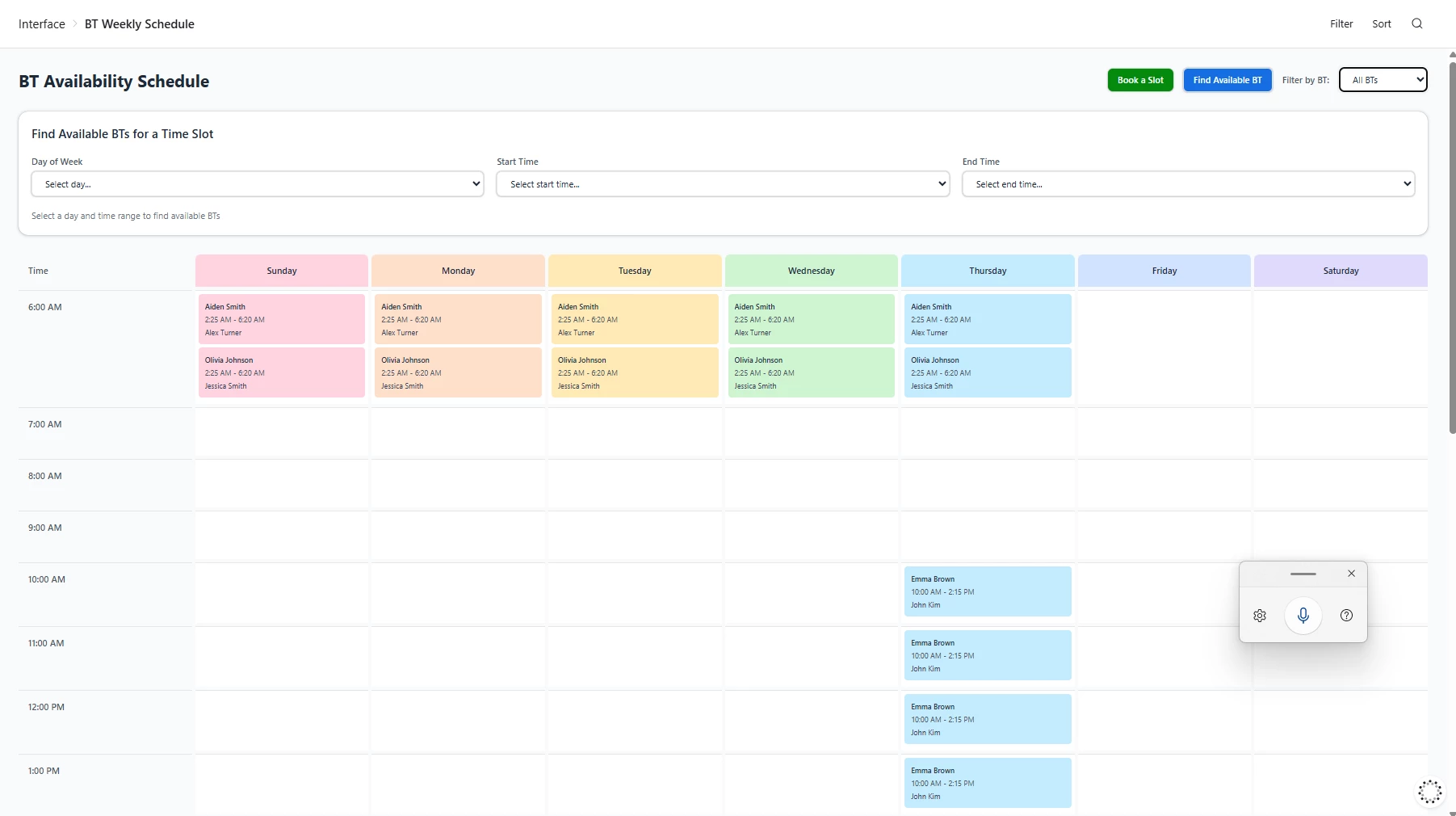
@Ac_dvlp Thank you I use your data structure instead of a text field four times and make drop downs for every five minutes from the day Here I will share a picture that I make with a new AI builder and on the interface it's very powerful


Ac_dvlp
Forum|alt.badge.img+1
  • Participating Frequently
  • July 28, 2026

Nice work! Looks great! 


  • New Participant
  • July 28, 2026

Dealing with recurring weekly schedules in Airtable can definitely be tricky since the Date/Time fields inherently require strict calendar dates.

Since you mentioned you need this for ABA scheduling, capturing exact availability slots, and calculating shift lengths, here are the two cleanest ways to structure this without relying on complex AI text extraction:

1. The "Dummy Week" Method (Best for Calendar Views)

If you want to view these recurring shifts on an Airtable Calendar or Timeline interface, you must use Date/Time fields.

  • The Fix: Pick an arbitrary reference week in the past (e.g., Monday, Jan 1, 2024, to Sunday, Jan 7, 2024).

  • Map all of your BT's recurring availability to those 7 specific dates.

  • In the Date/Time field formatting settings, toggle off "Include Date" so it visually only displays the time of day (e.g., 9:00 AM).

  • Use a Single Select field for "Day of the Week" for easy grouping and filtering.

2. The Decimal / Number Method (Best for Math & Shift Lengths)

If your primary goal is calculating the exact length of the shifts and avoiding Airtable's sometimes clunky DATETIME_DIFF formulas, skip the Date/Time fields entirely for the template.

  • Create a Single Select field for "Day of Week".

  • Create two Number fields (formatted as decimals) for Start Time and End Time (e.g., 9:00 AM is 9.0, 9:30 AM is 9.5).

  • To calculate the shift length, your formula is simply: {End Time} - {Start Time}.

If you go with this decimal method and need to quickly convert standard clock times into exact decimal hours (especially when factoring in unpaid breaks for your BTs), I actually built a free utility tool to automate that exact math: https://calculadorhoraspro.com  You can run the shift times through there to get the clean decimal outputs to input into your base.