Question

Best way to selectively autofill record data from linked table?

  • Nov 2, 2026 10:16 PM UTC
  • 3 replies
  • 42 views

Forum|alt.badge.img

We have a large job database that members can submit information to via a form. For repeating customers, I would like to set up a ‘registry’, where they can select their organization and specific pieces of information autofill based on that selection. 

Currently, this is done via an automation. The member chooses a single select field with their org name. I have a unique automation for each selection option that runs upon form submission which autopopulates information that is saved to that specific automation. While this works, it becomes cumbersome as more and more folks become regulars, as I have to create new automations each time. Additionally, it is difficult to keep up with on the form selection side - for reference, we have about 10 forms for different processes, so each time one is added or removed I have to update selection options on 10 forms. 

Ideally, I would like to have a linked field with a view filtered by an “Active” checkbox that members can choose from on the form. When an org is chosen and the form submitted, I want to pull the information from the linked table. The issue is, I don’t want a whole new set of fields - I need the data to populate in the current fields I use, as many users still will be manually inputting information and only about 10% would be using this registry option. 

Is there a way to simplify this process? I thought a linked table would be it, but that won’t work if I have to have completely new categories for the linked data. 

3 replies

TheTimeSavingCo
Forum|alt.badge.img+32

Hm, I put something together here for you to check out and you can duplicate it into your own Workspace to test it out.  I’ve uploaded a gif of it working at the link below as there appears to be some sort of issue with uploading gifs to the forums right now:

https://postimg.cc/LY6Mx82v

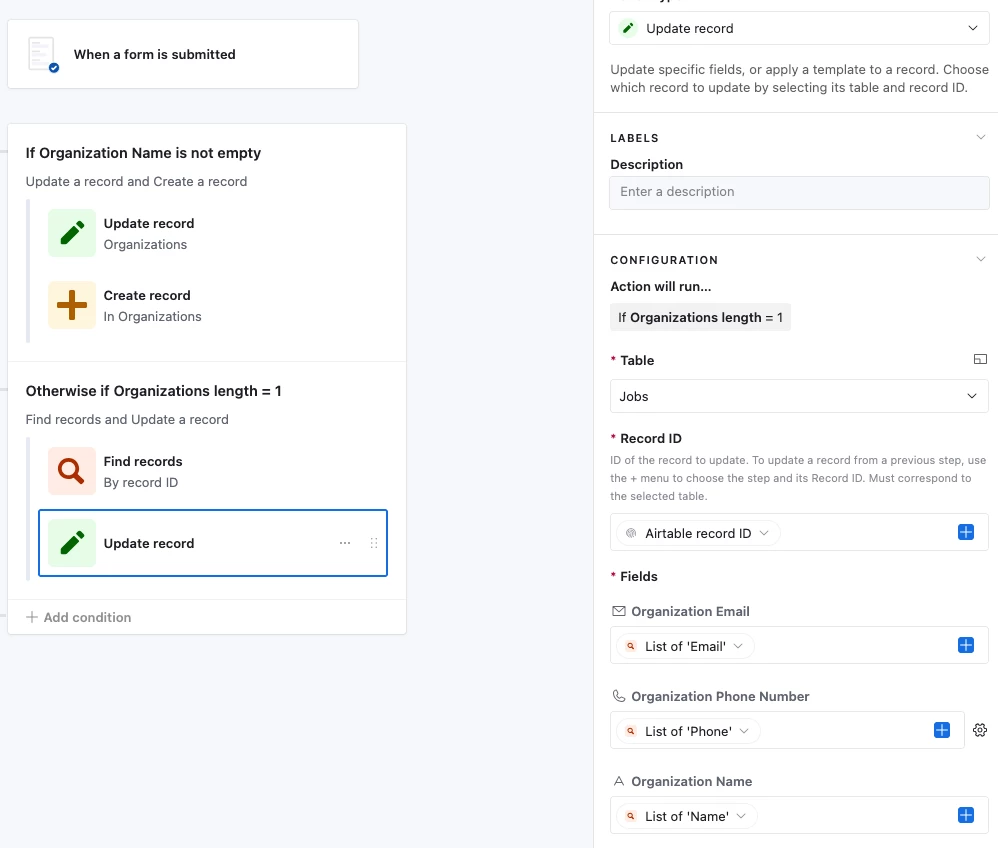
It has an ‘Organization’ table that contains all the Org details and an automation that triggers whenever the form is submitted

When a user selects an existing Organization record, the automation will:

  1. Look for the linked Organization
  2. Update the Job record with the details from that Organization

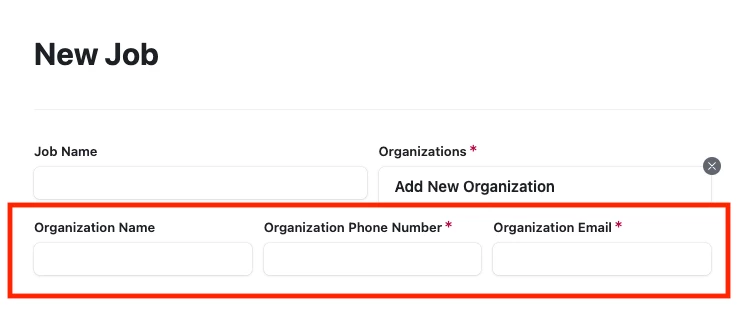
If it’s a new Organization, the use can select the ‘Add New Property’ Organization record, which will show the hidden fields that let a user key in the details themselves.  The automation will then:

  1. Create a new Organization record and store those details for future submission usage
  2. Link the Organization record to the Job record appropriately

This assumes that all 10 forms are submitting to the same table though and I’m not sure if that’s true?  I was also not too sure what ‘new categories’ meant either, and so apologies in advance if I’ve got some stuff wrong

Let me know if you have any questions and I’ll do my best to answer them, and you can also schedule a free half hour call here for us to go through the setup together!


ScottWorld
Forum|alt.badge.img+35
  • Genius
  • Nov 3, 2026 1:58 AM UTC

​@LiviaB 

If you’d like a more streamlined way of doing this, you might want to take a look at Fillout’s advanced forms for Airtable.

Fillout is 100% free and it allows you to view, edit, and create linked records using a single form. You can also display lookup fields on your form as well.

- ScottWorld, Expert Airtable Consultant


chelij
Forum|alt.badge.img
  • New Participant
  • Nov 3, 2026 10:45 AM UTC

Hi @LiviaB, yes—you can keep your existing job fields. The registry link identifies where the information comes from; an automation can copy it into the fields you already use.

Option 1: Keep your Airtable forms

  1. Airtable Registry table — store the reusable information. Create one record per organisation, with its standard details and an Active checkbox.

  2. Airtable Jobs table — add an optional registry link. Use a linked-record field allowing one organisation, and limit its selection to an Active organisations view. Keep your existing manually editable fields.

  3. Airtable automation — retrieve the selected organisation. When a new job is created, process it only if the registry link is populated. Use Find records to retrieve the selected registry record using a unique identifier. Find records guide

  4. Airtable automation — populate your existing fields. Use Update record, targeting the new job’s record ID, and map the registry values into your existing job fields. If manual answers should take priority, add conditions so only blank fields are filled. Update record guide

If all ten forms create records in the same Jobs table, this can be one shared automation. Adding an organisation becomes adding a registry record, rather than creating another automation and editing ten lists.

The copied values also preserve the job’s details as they were submitted, even if the registry changes later.

Option 2: Use Fillout for autofill before submission

If you want members to see and edit the populated details while completing the form:

  1. Fillout — let members select an organisation. Add an optional Airtable linked-record picker, restricted to your Active organisations view. Record picker guide

  2. Fillout — prefill the relevant questions. Set each question’s Default value to the corresponding field from the selected organisation. Members can review and edit the values, or skip the registry and enter everything manually. Prefill guide

  3. Fillout + Airtable — save into the existing job fields. Map those questions to your current Jobs fields and configure the integration to create a new job record.

I’d start with the Airtable automation if filling the fields after submission is sufficient. Fillout would be worth considering if reviewing the autofilled information before submission matters.

Hope this helps!