Greetings!
I’d created a formula:
CONCATENATE({Month #},“-”,Month)
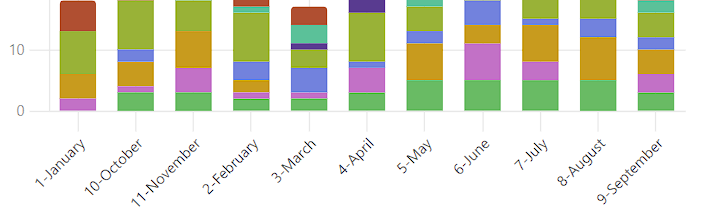
so that grouping in my table(s) would do so since obviously April would be first in the order, etc. However, when I have it sorted in the chart, as you see, the order is, well, not what I’d expect.
Any suggestions?

Solved
Chart displaying order incorrectly, or at least not the way I'd expect

 +20
Best answer by ScottWorld
It’s alphabetizing those segments, so you would need to put a leading zero before the Month #.
So, for the Month portion of your formula, change it to this:
RIGHT("0" & {Month #},2)
This topic has been closed for replies.

Enter your E-mail address. We'll send you an e-mail with instructions to reset your password.