Question

Creating base with tasks based on 3 different staff

  • June 1, 2026
  • 3 replies
  • 46 views

Forum|alt.badge.img+6

My job is changing and I’m going to be managing 3 employees.  Each has their own set of tasks, but when one person finishes a task, then the next person can then begin doing their task that is associated.  In my head, I have Task field, due date, and who it is assigned to in Table 1. 


I have an airtable I use for my tasks and when I have a date assigned, it will email me on that day and tell me all the things I have on my task list for that day. 


I’m wondering if I can do the same thing where when a task is assigned to Taylor, it will email her on the date, as a reminder.  And when a task assigned to Betty comes up, it emails her.  And the same for Augustine.  Is it possible to have it automatically email 3 different people based on the tasks assigned to them?  I’m watching training videos, but haven’t found one yet that advises me on the most efficient way to do that.


Thank you in advance for any guidance you can provide.

Mary

3 replies

TheTimeSavingCo
Forum|alt.badge.img+32

Yeap and I’ve set it up here for you to check out

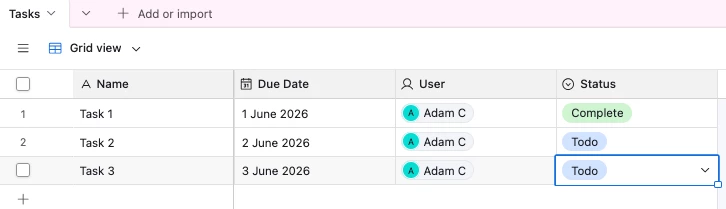
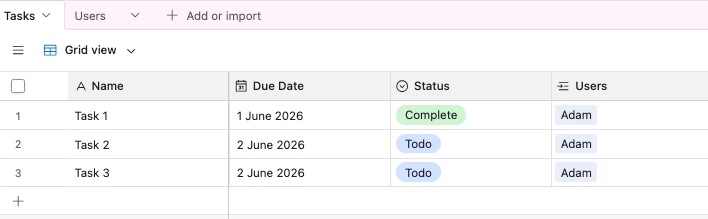
I’m assuming the table has a User, Due Date and Status field like so:

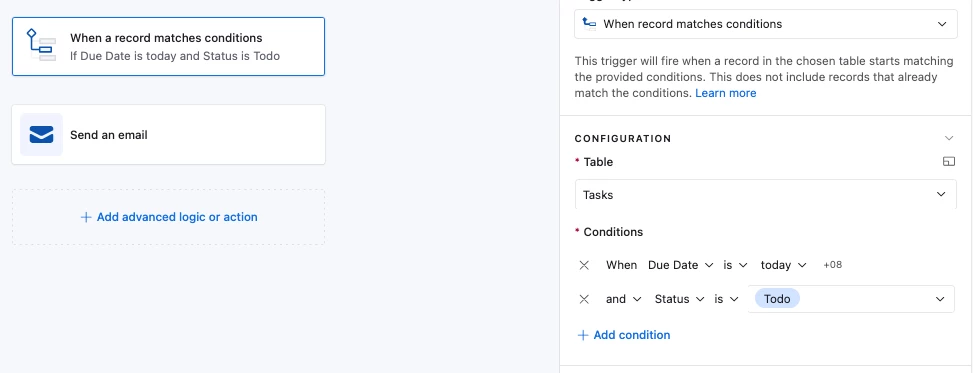
And so the automation would trigger for any Task that has a Due Date of today that isn’t set to ‘Complete’

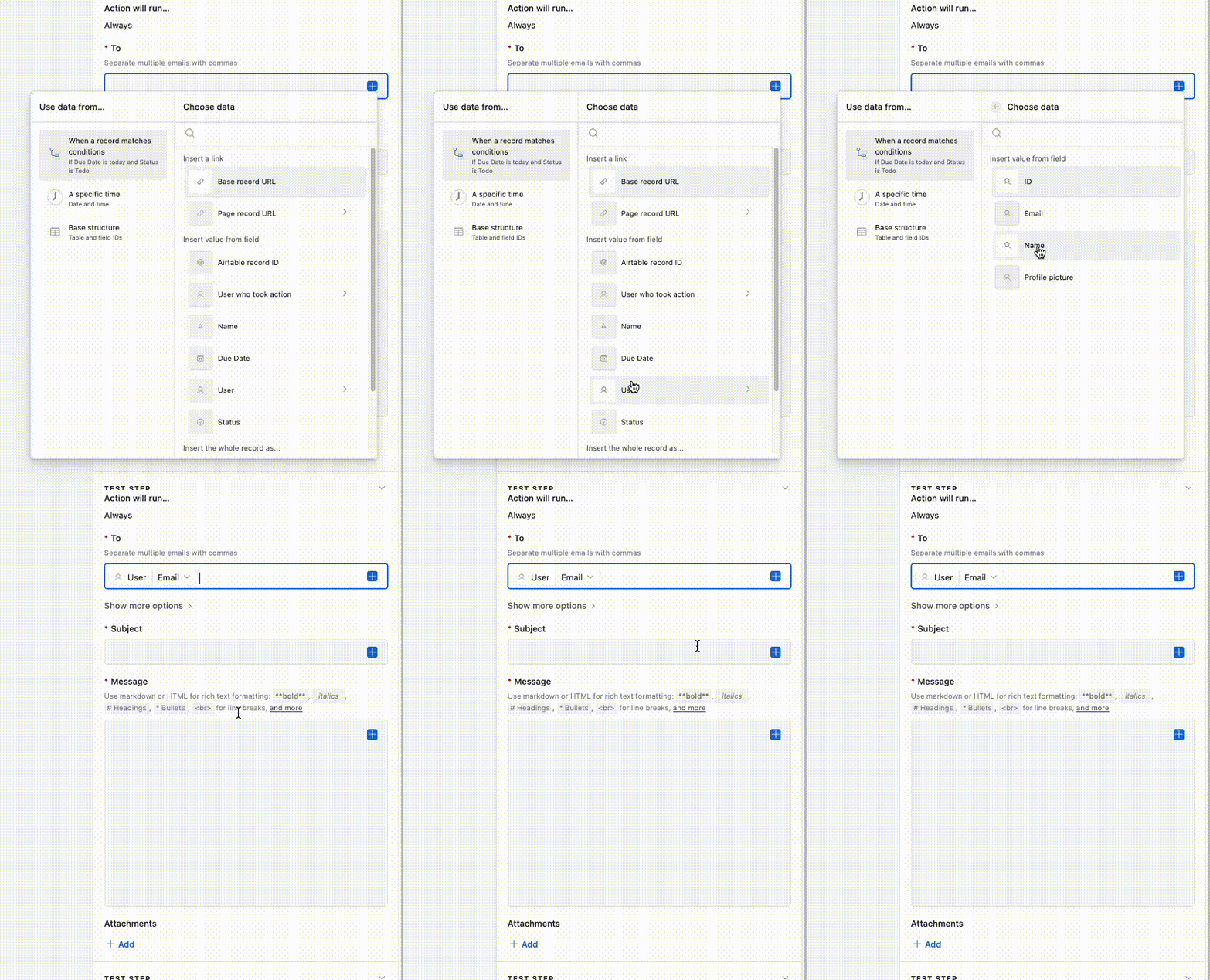
And for the email action we’d set it to send to the User’s email like so:

This might end up spamming people a lot though, and so another thing you can consider is having an automation that runs once a day and checks for any open tasks for each User, and then sends that person a single email that consolidates all their open tasks

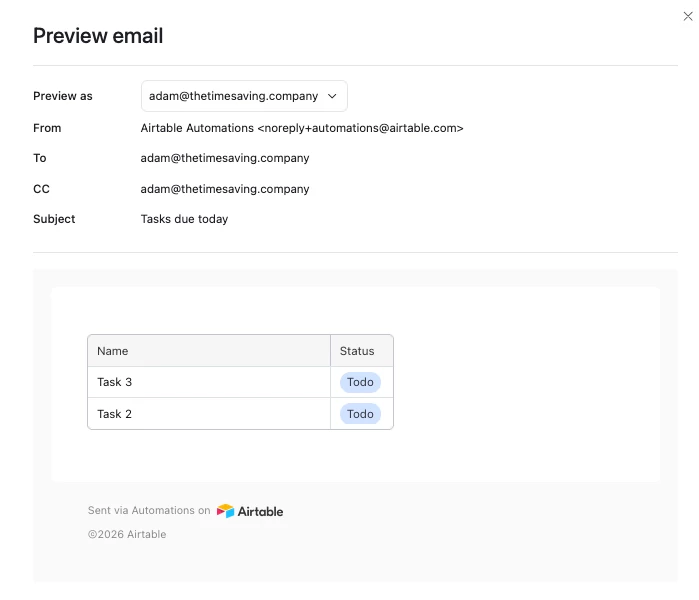
You can set this up as a single automation with a table that contains all the users, and the end result would look like this, a single email with all their open tasks due today

You could also set this up as one automation per employee which would be more straightforward to setup.  The main downsides of this approach are: 

  1. Any updates you want to make will need to be made to all the automations moving forward
  2. We only have 50 automation slots, and you’d end up using 3 here

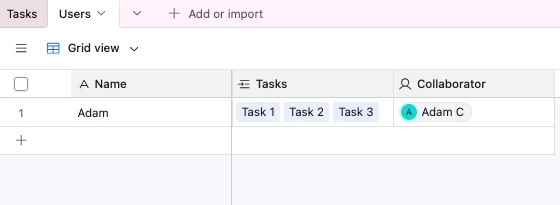
And here’s how the data would look.  We’d have a ‘Users’ table where each record represented a single employee with their Airtable account linked, and the ‘Tasks’ would be linked to the Users table
 

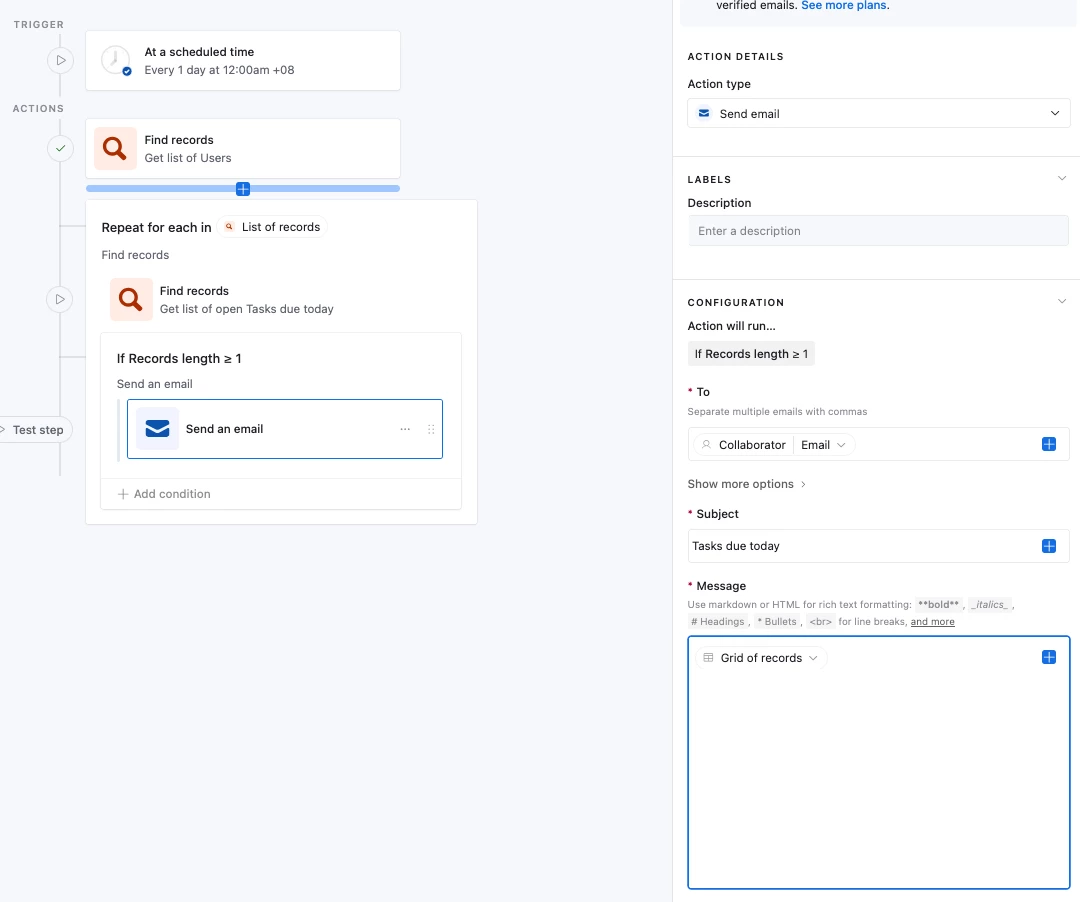
And the automation would look like this:


Every day at a time of your choosing, it would:

  1. Grab every User
  2. For each of those users, grab all their open tasks (This is what the repeating group is doing)
  3. If there’s >= 1 open task for the user, then send them an email
     

anmolgupta
Forum|alt.badge.img+6
  • Inspiring
  • June 2, 2026

What you're describing is very doable in Airtable, and the dependency piece makes it a bit more interesting than a basic reminder setup. Here's how I'd approach it.

Your Task table fields:

  • Task Name
  • Due Date
  • Assigned To (Collaborator field, not a text field - this is important)
  • Status (single select: Not Started, In Progress, Completed)
  • Depends On (linked record back to the same Task table)
  • Dependent Status (lookup field pulling the Status from the Depends On linked record)

Create a filtered view called "Due Today":

Add these filters:

  • Status is not Completed
  • Dependent Status is Completed (or is empty, to handle tasks with no dependency)
  • Due Date is today

This view becomes the source of truth for your automation. Only tasks that are actually ready to act on will show up here.

Build the automation:

  • Trigger: Scheduled, runs every morning at your preferred time
  • Step 1: Find Records - fetch all users from your Users or Staff table. This gives you the list of people to loop over.
  • Step 2: Repeat Group (loop) - set it to iterate over each user returned in Step 1. Inside the loop:
    • Find Records: search the Due Today view, filtered by Assigned To matching the current user in the loop
    • Conditional: check if any records were found. If yes, send the email. If no records found, skip. This prevents blank reminder emails going out.
    • Send Email: recipient is the current user's email, body lists all the tasks found for them

This way the automation scales on its own. If you add a fourth employee tomorrow, they get picked up automatically in the next morning run without you touching the automation at all.

A couple of things worth noting: the Collaborator field (vs a plain text field for names) is what lets Airtable properly filter by user. And the Dependent Status lookup is what enforces the handoff logic - Betty's task simply won't appear in her reminder until the upstream task is marked Completed.

Once this is running, you can fold yourself into the same Staff table and your reminders flow through the same system too.

Hope that helps. Let me know if anything needs clarification.


Forum|alt.badge.img+6
  • Author
  • Known Participant
  • June 2, 2026

Wow!  Thank you so much!