Question

Do I need an automation to have one table look at another table and ....

  • March 11, 2026
  • 9 replies
  • 35 views

Forum|alt.badge.img+1

pull a data point from the other table and auto-populate that data point in the original table based on a number common in both tables?  I am now using an automation to achieve this, but i want to make sure I need it.  

Here’s the situation: 

Table one is called Commission Upload

Table two is called Team Members

Commission upload has fields that correspond to a commission upload file that is consistent across most, if not all files that I will upload. 

Team Members has the rep name, rep code and the commission rate assigned to each rep. 

When I upload my commission file in CSV format, I want the Commissions Upload table to auto-populate the commission percentage by looking at the team members table’s percentage field and pulling it from there.  

The automation makes the process clunky and slow, but maybe that is just a reality one has to accept. I can live with this if it’s the only way, but I thought I would throw it out there to see anyone has been able to achieve something similar without the automation

Many thanks for interacting with my topic!

MHS_dreamer

9 replies

DevonK
Forum|alt.badge.img+16
  • Inspiring
  • March 11, 2026

If you link the Commission Upload table to the Team Members table, you can use a rollup or lookup field type to achieve this.


Forum|alt.badge.img+1
  • Author
  • New Participant
  • March 11, 2026

Thank you, DevonK.  I should have mentioned that I tried to use a lookup field to achieve the desired goal.  


ScottWorld
Forum|alt.badge.img+35
  • Genius
  • March 11, 2026

It sounds like you might be trying to import records into a linked record field? If so, that is only supported by Airtable’s CSV import extension.

Also, for even more advanced CSV imports, you can always turn to my favorite automation tool Make. You can use a combination of Make’s CSV modules along with Make’s Airtable modules.

I demonstrate step-by-step how to accomplish this on this Airtable podcast episode.

- ScottWorld, Expert Airtable Consultant


DevonK
Forum|alt.badge.img+16
  • Inspiring
  • March 11, 2026

Thank you, DevonK.  I should have mentioned that I tried to use a lookup field to achieve the desired goal.  

Are the two tables linked together? A lookup will work to do what you are describing, but only if the tables are linked. If may be helpful if you shared screenshots of the base setup.


Forum|alt.badge.img+1
  • Author
  • New Participant
  • March 11, 2026

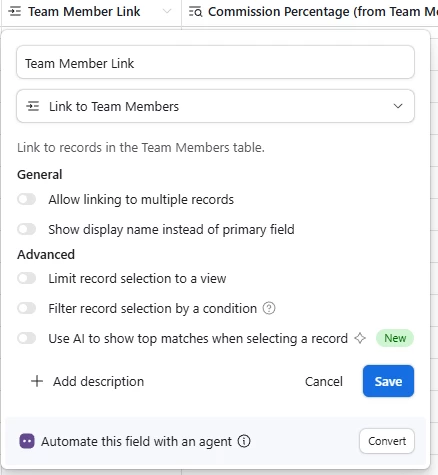
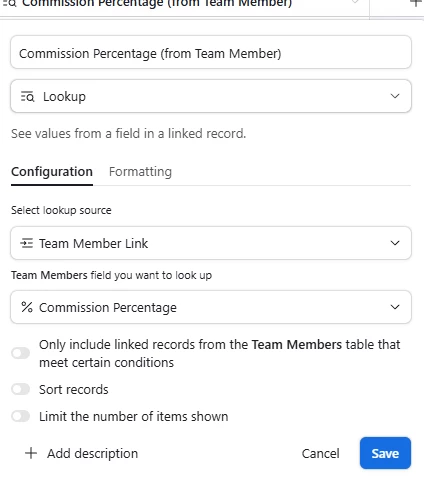
HI DevonK, at one point, I thought I had a functioning base without automations.  Once the automations were in place and I saw how many automations needed to be performed, I tried to find a non-automation solution.  I duplicated each table to do this work and it seemed like I found a winner but when I tried to separate the automated section from the non-automated section, the links wouldn’t work any more!  Anyhow, here are screenshots of the two fields that should do all of the work of pulling in the commission percentage from the Team Members table.  


DevonK
Forum|alt.badge.img+16
  • Inspiring
  • March 11, 2026

When you import a new report, is that Team Member Link field being populated when the report is imported? Or was that being populated with automation?

Your configuration is correct so there’s only 2 reasons why it would be blank. 1) The Team member Link field is blank, OR 2) The linked team member record doesn’t have any data in the Commission Percentage column.


Forum|alt.badge.img+1
  • Author
  • New Participant
  • March 11, 2026

At this point, I can select a team member from a drop down list in each row, then the commission % populates for each row.  Unfortunately, I can’t get the Team Member Link field to automatically populate with a  rep code when I upload my CSV file. Or for the field Commission Percentage (from Team Member) to look at the rep code that populates when I upload. .  


DisraeliGears01
Forum|alt.badge.img+21

At this point, I can select a team member from a drop down list in each row, then the commission % populates for each row.  Unfortunately, I can’t get the Team Member Link field to automatically populate with a  rep code when I upload my CSV file. Or for the field Commission Percentage (from Team Member) to look at the rep code that populates when I upload. .  

So when you’re bringing in the CSV, the team members are referenced by their rep code? 

In the Team Member Link field, change the Show Display Name instead of Primary Field setting, and choose the Rep Code field instead of the actual team member name. Now the link will be expressed using the Rep Codes instead of the Team Member names. 

Secondly, you need to follow ​@ScottWorld’s advice and use the CSV import extension so it will import those Rep Codes as linked records instead of raw numbers. Alternatively you could also just open up the CSV and copy/paste the data in


TheTimeSavingCo
Forum|alt.badge.img+31

Hm, if we’re only concerned about getting the linked record set up so that the percentage shows up in the lookup, then the CSV Import / copy pasting stuff should sort you out

I’m worried about historical data though, specifically, can the commission percentage be updated, and if it does, will its affect on historical data matter?  

If it does matter, then the only way around that is to:

  1. Create a new ‘Commission Percentage’ field in the ‘Commission Upload’ table
  2. Use an automation to paste the commission percentage into that newly created field

And the workflow might then be:

  1. Upload the CSV into Commission Upload
  2. Use an automation that’s either:
    1. Triggered per record 
      1. Depends a lot on how much data we’re uploading as we might exceed the automation run limits
    2. Triggered via a button click / checkbox etc
      1. And its action would be to look for all the records in Commission Upload that had an empty ‘Commission Percentage’ field, and for each of those, link up the team member and populate the commission percentage value