Form population and auto saving to base

  • May 30, 2024
  • 7 replies
  • 35 views

Rodney_Beadon
Forum|alt.badge.img+10

Hi 

I have started another base. The main base is working fine and this base is for an add on registration service. I tried to create the form https://airtable.com/app6DqS2bqGtz03sG/pagZRFkh5bC0Ay4TK/form

I have filled out the film and submitted it but it does not populate anything in the base. I also cant find the form when I go back to my work sheet.

Please may I have some assistance

7 replies

TheTimeSavingCo
Forum|alt.badge.img+31

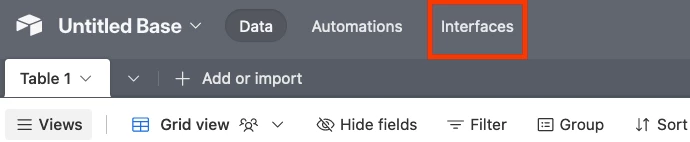
Assuming you have both an Interface form and a normal Interface, you can get to the Interface form by clicking "Interfaces" at the top of the screen:

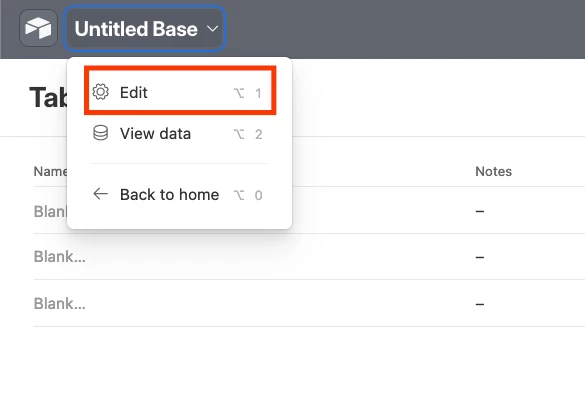
Then click the base name at the top left and then Edit:

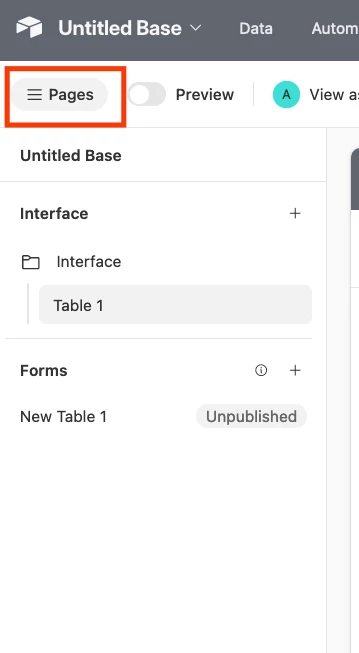
And finally hit "Pages":


---
Not sure why your form submissions aren't showing up in your base I'm afraid.  If you could provide a read-only invite link to duplicated copy of your base with no data in it I could take a look at this for you!


Rodney_Beadon
Forum|alt.badge.img+10
  • Author
  • Known Participant
  • June 7, 2024

Assuming you have both an Interface form and a normal Interface, you can get to the Interface form by clicking "Interfaces" at the top of the screen:

Then click the base name at the top left and then Edit:

And finally hit "Pages":


---
Not sure why your form submissions aren't showing up in your base I'm afraid.  If you could provide a read-only invite link to duplicated copy of your base with no data in it I could take a look at this for you!


@TheTimeSavingCo  thank you for responding. I am still struggling here is the read only link https://airtable.com/invite/l?inviteId=invk7OzDh8vP16TOe&inviteToken=6244c74ef67ef1f09ef609d9879307901cf2d4bb98bf9455e77560fa49865ff6&utm_medium=email&utm_source=product_team&utm_content=transactional-alerts

Many thanks


TheTimeSavingCo
Forum|alt.badge.img+31

@TheTimeSavingCo  thank you for responding. I am still struggling here is the read only link https://airtable.com/invite/l?inviteId=invk7OzDh8vP16TOe&inviteToken=6244c74ef67ef1f09ef609d9879307901cf2d4bb98bf9455e77560fa49865ff6&utm_medium=email&utm_source=product_team&utm_content=transactional-alerts

Many thanks


Got the invite, thanks!  I just tried submitting the form in the Interface and a new record was created in "Road watch 360", is that the table you want the data to appear in?


Rodney_Beadon
Forum|alt.badge.img+10
  • Author
  • Known Participant
  • June 12, 2024

Got the invite, thanks!  I just tried submitting the form in the Interface and a new record was created in "Road watch 360", is that the table you want the data to appear in?


@TheTimeSavingCo  hi yes thats exactly where I want the data to appear. I just for some reason cant publish the form 


TheTimeSavingCo
Forum|alt.badge.img+31

@TheTimeSavingCo  hi yes thats exactly where I want the data to appear. I just for some reason cant publish the form 


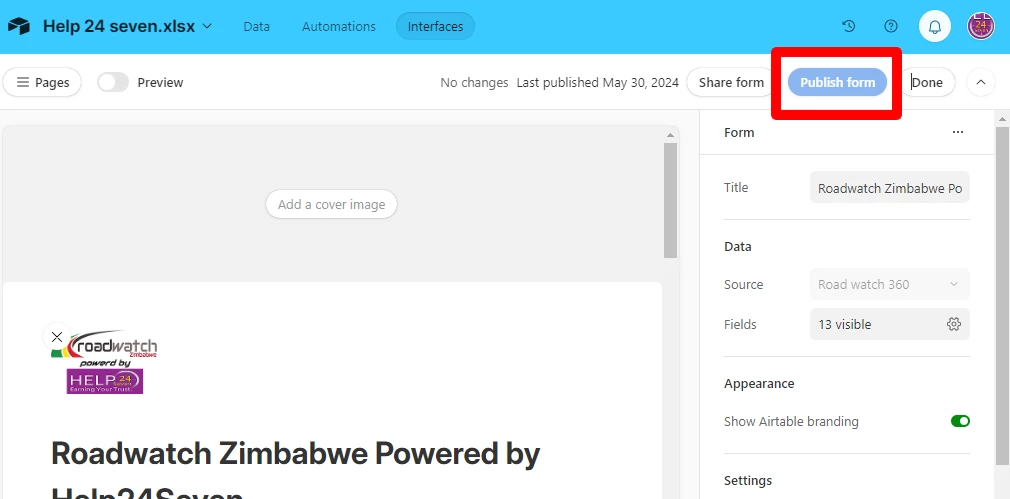
Hmm, I just clicked "Publish Form" at the top right and it seemed to work fine.  May I know what issues you faced while trying to publish it?


Rodney_Beadon
Forum|alt.badge.img+10
  • Author
  • Known Participant
  • June 13, 2024

Hmm, I just clicked "Publish Form" at the top right and it seemed to work fine.  May I know what issues you faced while trying to publish it?


 The publish Form is greyed out I cant publish it 


TheTimeSavingCo
Forum|alt.badge.img+31

 The publish Form is greyed out I cant publish it 


Yeap, once a form is published the button will be greyed out until you make a change to the form