

Question

Grid view font size in app.

  • September 21, 2026
  • 2 replies
  • 56 views

Forum|alt.badge.img

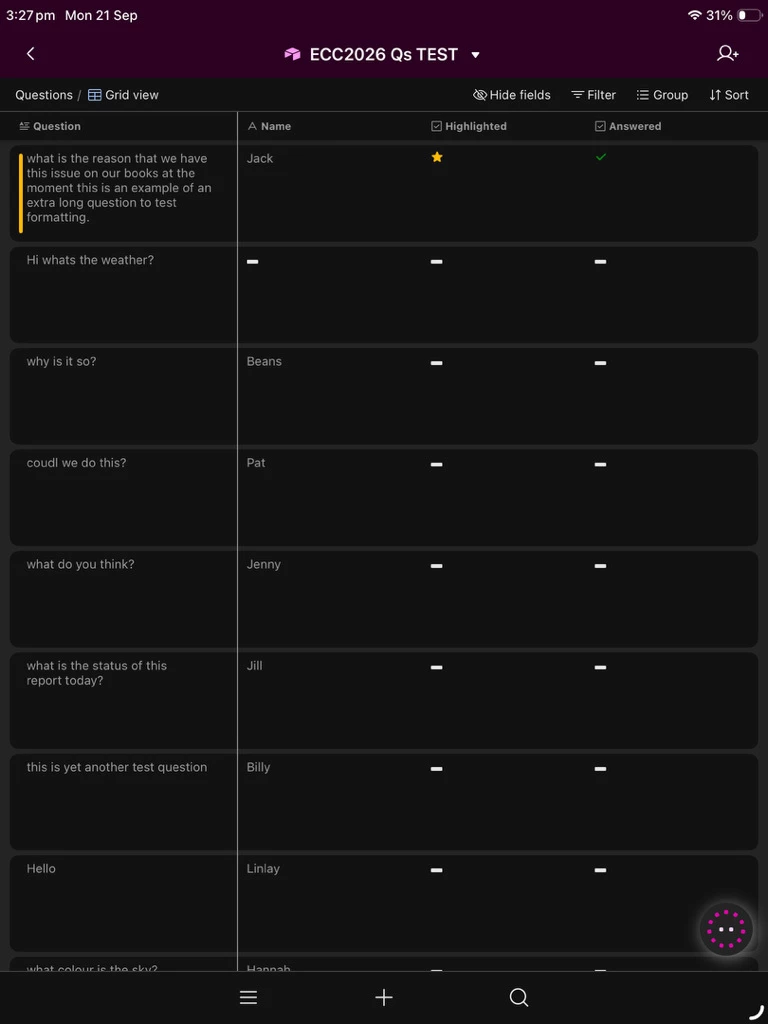
In the “Grid View” in the app (on Ipad), where the submitted data is displayed, I don’t seem to be able to control font size. It makes the app relatively useless for my intended purpose (see screenshot below).

System-wide font size adjustment on the device makes no difference in the Airtable app (same problem on Iphone). Is there any way to adjust font size?

I noticed i don’t have this issue on Android, where system-wide font size adjustment works in the Airtable app!
 

2 replies

TheTimeSavingCo
Forum|alt.badge.img+32

Might want to submit this as a feature request here: https://community.airtable.com/p/product-ideas


Reading submissions in a grid on an iPad is hard on the eyes. The grid is a weak screen for reading a submission on an iPad. Interface Designer has no font-size setting on that grid, and the iOS text-size control does not reach the Airtable app. A product idea is worth filing. It will not change the crew's screen this week.


I'd move the reading page to a list or a record detail on the same submissions, and show only the fields they need on the job. A name, a status, and one or two notes, at the normal size, is readable on an iPhone. Leave the dense grid for someone at a desktop who wants every column.


If people are marking work done in the field, give them an editable list with inline edit, or a short form, rather than the grid. The grid can stay as the office view. Android respecting the system font is a useful line in the product idea, and it does not add a control on iOS.


Hope the detail page covers the jobs you have open now.

— Ola
