Question

How I can create a unique field type

  • May 23, 2026
  • 3 replies
  • 70 views

Forum|alt.badge.img+1

I have a product table. The first field is ProductId and I want it as a unique field.


3 replies

ScottWorld
Forum|alt.badge.img+35
  • Genius
  • May 23, 2026

@Duducohn 

Are you trying to get Airtable to automatically generate a unique ID for you? You can do this by using an autonumber field or by using Airtable’s built-in Record ID that it creates for each record.

Otherwise, if you want a human to manually type in an ID and you want to enforce that the human is typing in a unique ID, that is not possible with Airtable.

Airtable doesn’t support any kind of field validations such as “unique value”, so you can’t use Airtable to prevent duplicate values from being added into your system. You may want to submit this as a feature request on the feature request form.

However, you can use Fillout’s advanced forms for Airtable to prevent duplicate values from being added into Airtable.

Fillout offers hundreds of features that Airtable’s native forms don’t offer, including the ability to prevent duplicate valuesupdate Airtable records using a formcreate custom PDF files from a form submissionaccept payments on formscustomize the style and branding of your formcustomize a theme for your form, display Airtable lookup fields on forms, create new linked records on a form, control access to a form via SSO or email domains or a list of email addresses stored in Airtable, perform math or other live calculations on your forms, collect signatures on a form, create multi-page forms with conditional paths, connect a single form to dozens of external apps simultaneously, add CAPTCHAs to your form, and much more.

I show how to use a few of the advanced features of Fillout on these 2 Airtable podcast episodes:

Alternatively, if your duplicate values are ALREADY in Airtable, you can cleanup the duplicates afterwards through one of these methods:

  1. Use Airtable's DeDupe extension to manually merge duplicate records together.
  2. Use Airtable’s automations to automatically find & flag duplicate records.
  3. Use this Airtable trick that I demonstrate on this Airtable podcast episode: https://www.youtube.com/watch?v=Xc-0Jp6AvAs&list=PLqssva4liHRwHhQIpTXekG8WObEoyC2F1
  4. Use a script to automatically merge or delete duplicate records.
  5. Use Make’s Airtable integrations to automatically find & flag (or find & delete) duplicate records. If you’ve never used Make before, I’ve assembled a bunch of Make training resources in this thread. For example, here is one of the ways that you could instantly trigger a Make automation from Airtable.
  6. You could even collect new records in a secondary table, and then use an Airtable automation to determine whether the new record should be added into the main table where you don’t want the duplicates to appear.

Although, as I mentioned above, the quickest & easiest way to deal with duplicates is to prevent them from ever happening in the first place, which you can do by creating new records with Fillout’s “prevent duplicate submissions” feature.

Hope this helps!

If you have a budget and you’d like to hire the best Airtable consultant to help you with this or anything else that is Airtable-related, please feel free to contact me through my website: Airtable consultant — ScottWorld


TheTimeSavingCo
Forum|alt.badge.img+32

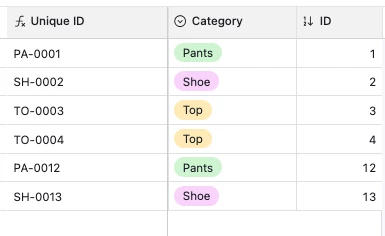
Hm, if you’re looking for something auto generated and human readable, I like to use an autonumber field + some sort of abbreviation that indicates the category of the product

SWITCH(
Category,
'Pants', 'PA',
'Shoe', 'SH',
'Top', 'TO'
) &'-'&
RIGHT("000" & {ID}, 4)

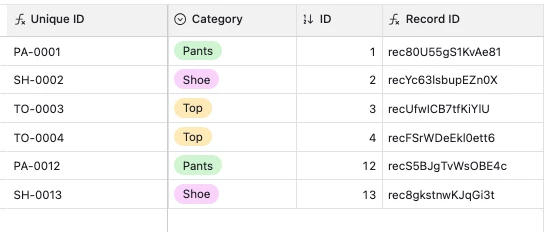
If you don’t need it to be human readable, each Airtable record already has a unique ID that you can reference via the RECORD_ID() formula too:


anmolgupta
Forum|alt.badge.img+6
  • Inspiring
  • May 25, 2026

Others have already informed you about autonumber field and airtable record id. But if you really want to enforce uniqueness on basis of your product id without using any external tool (which is a legitimate use case in a lot of cases), you will have to write a simple airtable automation. Here is how I typically handle such  cases:

  1. Create a replica of your original Product table. 
  2. Create an automation that gets triggered when a new record gets created in Product replica table
  3. The automation then finds all records in the original product table that have product id same as the record created in replica table.
  4. If the number of records is greater than 0, that means the record createdin replica table is a duplicate so you take necessary actions like alerting the user or simply not creating that record in the original table.
  5. If the number of matching records are 0, you go ahead and create the record in original table as the final step in automation.