Solved

How to get filtered record from another table

  • March 6, 2026
  • 4 replies
  • 87 views

Forum|alt.badge.img+1

Good day everyone. I’m a newbie to Airtable/Fillout, coming from another app builder.

I run a small school charter service on weekends, between schools and home towns.  My clients book their kids on the app. Currently I calculate the trip dates but I think a table with trip dates is easier to use. My problem is: The booking form needs to get the first available row from the dates table - the table has 3 columns for date home, date back to school and trips completed.(Clients book for both weekend dates at once, just selecting 1 or both dates.)

In my still-current app the users table is the logon validation table and its data is accessible everywhere in the app. There the dates are calculated in columns but then also checked against long weekends dates an school term dates. A lot of columns thus. So if I can get the first Date Home and the first Date School from the TripDates table where the Completed “cell” is empty, I can get rid of the calculations.

The problem obviously is that there is no relationship to the TripDates table from any other table. Any suggestions on how to get these values?

Regards
Best answer by leok

Hi, the simplest way to do this without a script is to use a view.

Step 1 - Create a view in TripDates

Create a new grid view called "Available Trips". Add a filter where Completed is not checked. Sort by Date Home ascending. Make sure there is no grouping.

Step 2 - Create the automation

Trigger: When a record is created in your Bookings table.

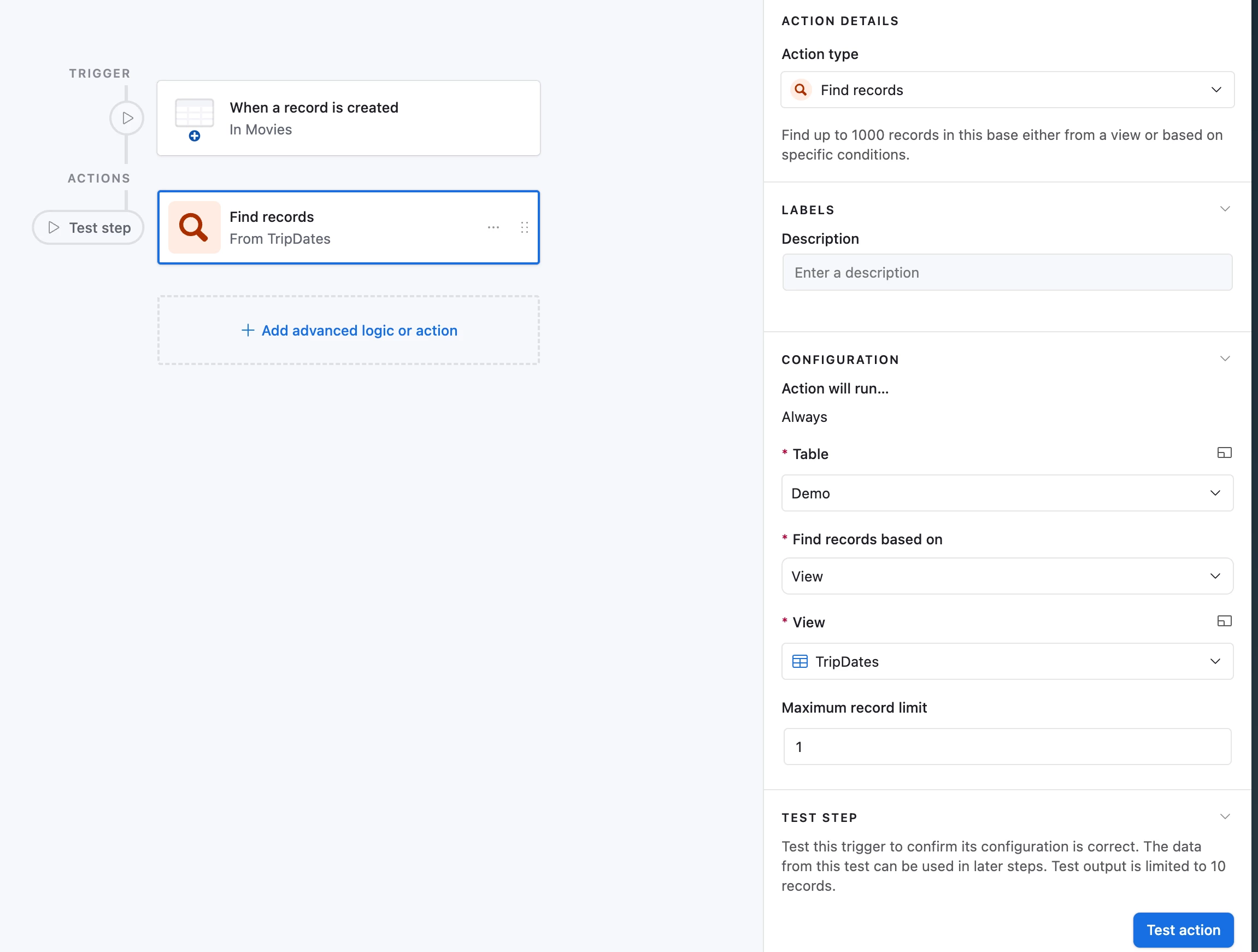
Action 1 - Find records: Select TripDates table, find by view and pick "Available Trips". Set limit to 1.

Action 2 - Update record: Select the booking record from the trigger. Map Date Home and Date Back to School from the found record.

That is it. The view handles the sorting so the automation always picks the earliest available trip.

Leo from UseEfficiently

4 replies

leok
Forum|alt.badge.img+2
  • Participating Frequently
  • March 7, 2026

Hi ​@HermanL , just to make sure I point you in the right direction. Do you want users to see all available trip dates and pick one themselves, or should the form automatically assign the next available date without them choosing?

The solution is a bit different depending on which way you want it to work.

Leo from UseEfficiently


Forum|alt.badge.img+1
  • Author
  • New Participant
  • March 7, 2026

Hi @leok. It should assign the date automatically. In my experience they are not always tech-savvy and letting them choose is just looking for mistakes to happen. 

Thanks.


leok
Forum|alt.badge.img+2
  • Participating Frequently
  • Answer
  • March 7, 2026

Hi, the simplest way to do this without a script is to use a view.

Step 1 - Create a view in TripDates

Create a new grid view called "Available Trips". Add a filter where Completed is not checked. Sort by Date Home ascending. Make sure there is no grouping.

Step 2 - Create the automation

Trigger: When a record is created in your Bookings table.

Action 1 - Find records: Select TripDates table, find by view and pick "Available Trips". Set limit to 1.

Action 2 - Update record: Select the booking record from the trigger. Map Date Home and Date Back to School from the found record.

That is it. The view handles the sorting so the automation always picks the earliest available trip.

Leo from UseEfficiently


Forum|alt.badge.img+1
  • Author
  • New Participant
  • March 8, 2026

 100%, thank you ​@leok ! Learned something important today.