Question

Impossible to delete a view

  • November 10, 2025
  • 6 replies
  • 94 views

Forum|alt.badge.img+2

Hello everyone, 

I started a new job at a company where I’m trying to structure how Airtable is used.

We have a view that’s publicly accessible, but we don’t know which account it’s tied to. We want to delete it, but without knowing the account, it’s impossible.

Do you have a way to help? 

Thank you for your help.
Maxime

6 replies

ScottWorld
Forum|alt.badge.img+35
  • Genius
  • November 10, 2025

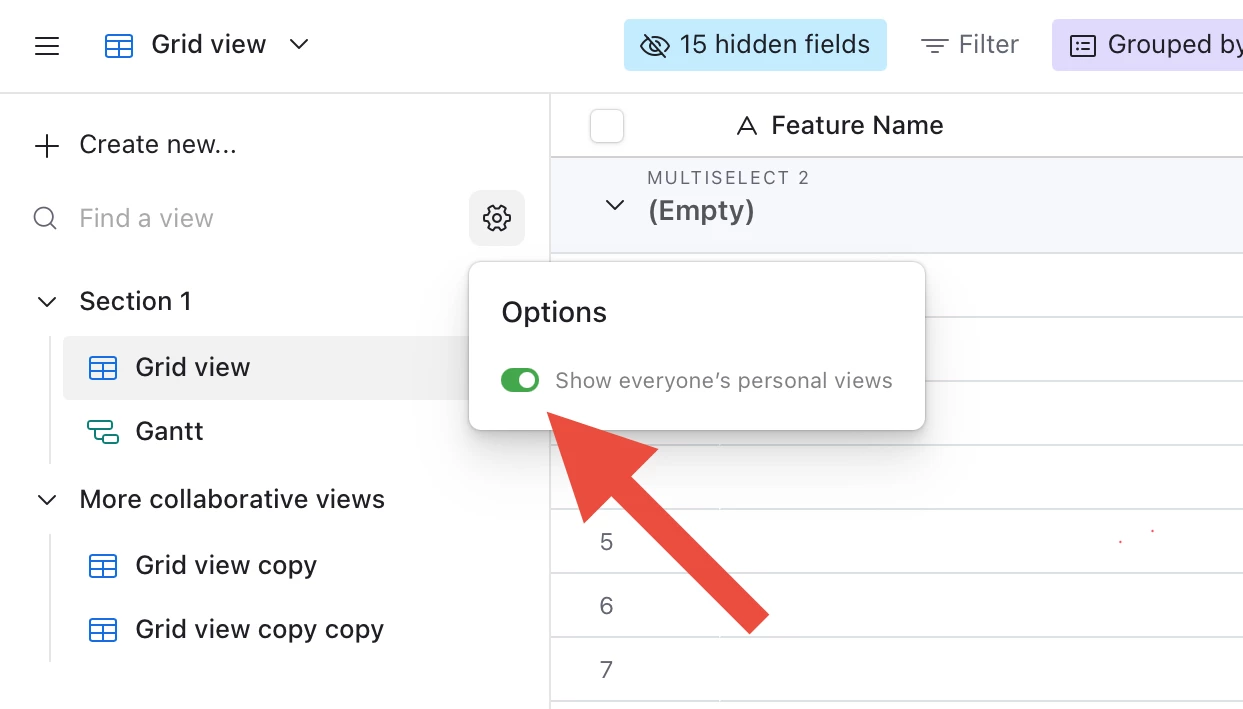
You can view all the personal views in a table by clicking on the gear icon at the top of the views list, and then selecting the option to show everyone’s personal views.

See screenshot below.

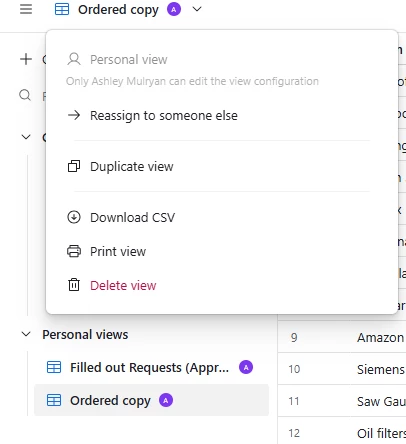
Then, if you’re a creator/owner on the base, you can reassign the view to yourself so you can delete it or unshare it.

Hope this helps!

If you have a budget and you’d like to hire the top Airtable consultant to help you with this or anything else that is Airtable-related, please feel free to contact me through my website: Airtable consultant — ScottWorld


Forum|alt.badge.img+2
  • New Participant
  • November 10, 2025

If you have the appropriate permissions you can click the drop down right above the views, and it will allow you to assign the view to someone else (including yourself). To make changes or delete this view you must do this and assign it to yourself, or change it to a collaborative view.


Forum|alt.badge.img+2

Thank you for your replys!

Actually, all we have is the public link of the view : https://airtable.com/appfU4PL0wSxePDiW/shrstuHun5wVBHfmt/tblatfXGXXQ5nR9u9

Is there a way to reach the back office of this view, from the public link?

We just want to know to which account the view is linked, to delete it!

Thank you very much


Forum|alt.badge.img+2
  • New Participant
  • November 12, 2025

“Shared” views still have to be attached to a regular view in Airtable. I’m assuming you know which table it is in, but you can shorten that link to just end with “tblatfXGXXQ5nR9u9” to find the table, and then the shared link has to be from one of those views. 


ScottWorld
Forum|alt.badge.img+35
  • Genius
  • November 12, 2025

@maxime.decouessin 

Go to this table, and it’s one of the views in that table.

Hope this helps!

If you have a budget and you’d like to hire the best Airtable consultant to help you with this or anything else that is Airtable-related, please feel free to contact me through my website: Airtable consultant — ScottWorld


Forum|alt.badge.img+2
  • New Participant
  • November 12, 2025

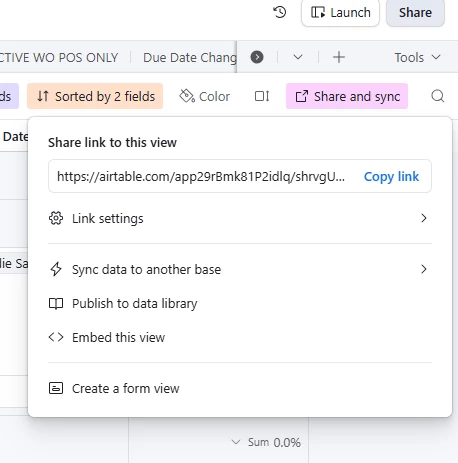
Just to add - whichever view it is, “Share and Sync” will probably be colored as it’s in use. Click on that in the upper right corner and go to “Link Settings”.