I’ve built a Development hub for a nonprofit, where all their ongoing grant tracking happens. Right now, the base is broken down into the following tables: Individual Grants, Funders, Applications, and Prospect Leads. I also created a support table for Years, which I have learned as best practice when using a database that’s meant to scale over time. This allows each year (2026, 2027, 2028) to be added as rows, connected to records in the other tables, and used to roll-up reporting amounts into each year. This works really well for all of our other databases and reporting needs.
Our development team has been testing the app, and they are missing one thing: they want to be able to track individual grant amounts per year. The way I would normally do this is to use the “years” table with a row for each year, link the relevant years to the grant record, and use a formula (total grant amount divided by number of years) to calculate the annual amount in columns for “current year” and “next year.” That would still allow the base to function year over year without breaking or getting too unwieldy. It also allows a lot more functionality in reporting through roll-ups than just having a column for each year.
The issue is - many of the grant amounts don’t divide evenly over years. One funder might give $500k in 2026, $2m in 2027, and $300k in 2028, and this differs for each grant. So far, it seems like the only solution is to scrap the “years” table and instead add year columns to the grant table, but I am hesitant to do this - creating a new column for each year will eventually make the base way too unwieldy to be used longterm, and won’t let us do as much reporting per year across the different tables as using a linked record would. Essentially, it’s not good practice because it limits how long the base could work and how much data we can effectively report. The other options I thought of is to use standard columns for “1st year,” 2nd year” amounts, and so on, and then use the start date column to calculate “this year” and “next year’ with formulas. But this also feels too convoluted.
Does anyone have a creative solution to this issue? Am I missing an easy fix?

Solved
Looking for a creative way to track grant amounts per year over time

 +6
Best answer by VedaSync_Aziz
Hi
- Make a table called “Grant Years”. Each record links to one grant and one year and has a currency field for that year’s amount, so your $500k / $2m / $300k grant becomes three records. A formula primary field like
{Grant} & " " & {Year}makes them read “Youth Literacy Program 2027”. - On the grant, a rollup of Amount gives you the scheduled total. I’d add a small formula comparing it to the awarded amount too, it catches typos before they hit a report.
- On Years, the same rollup shows everything expected that year across all grants. If you add a Status field to the yearly records (Pledged, Invoiced, Received), a second rollup with a condition shows what’s actually been received.
- For current year and next year, add
IF({Year} & "" = YEAR(TODAY()) & "", 1, 0)in Grant Years, plus the same withYEAR(TODAY()) + 1for next year. Then on the grant, make a rollup with “only include linked records that meet certain conditions” set to that field = 1. It moves forward on its own every January, no new columns needed.
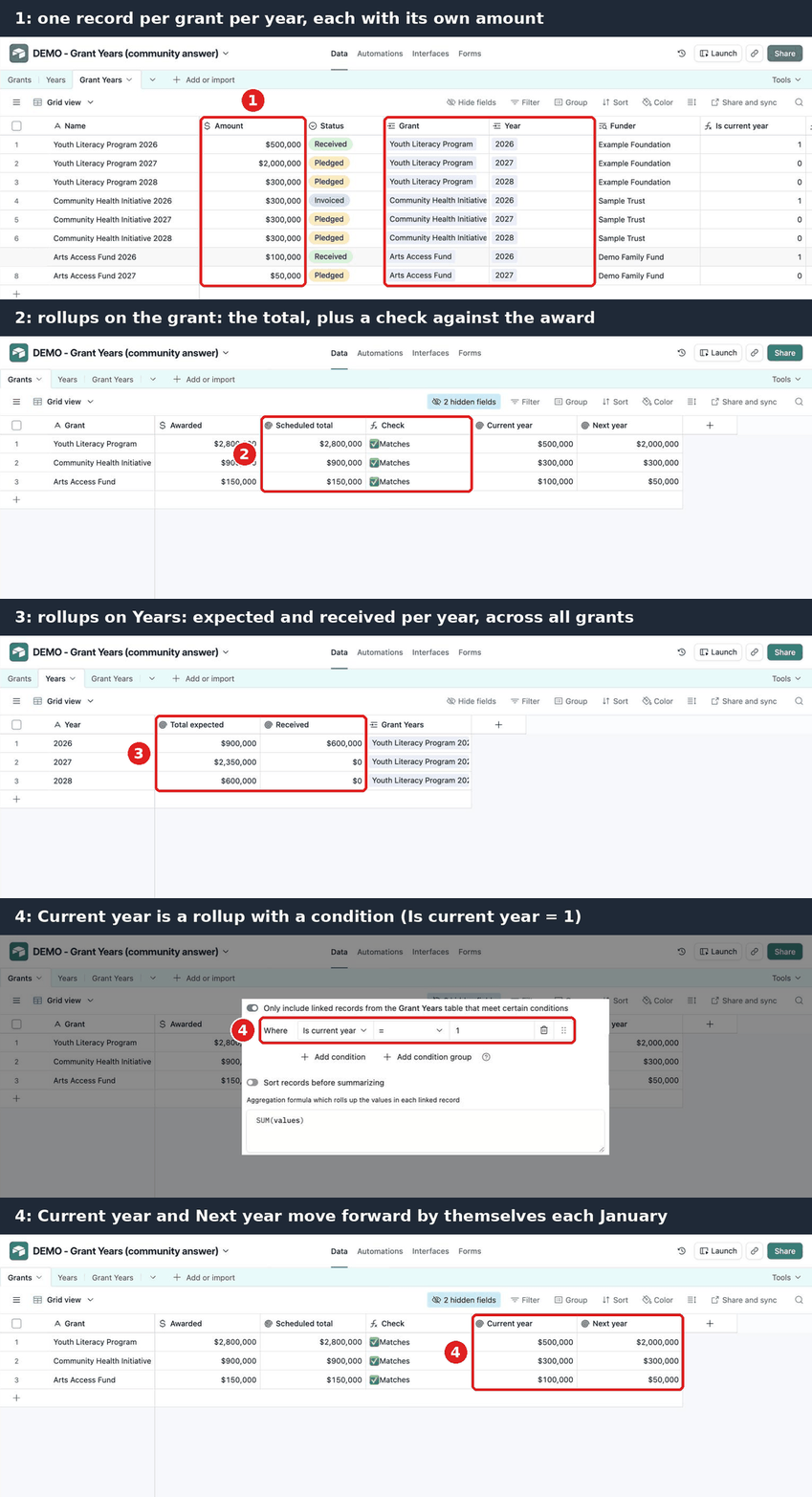
- If you pull the funder into Grant Years with a lookup, you can group by funder and year in one view.
For data entry, your team can add the yearly rows straight from the grant record in an interface (linked record field with “create new” turned on), so it never feels like a separate table to them. Even splits still work, you enter the same amount on each row.
Hope this helps, and good luck with the hub, it sounds like a really well thought out base.



Enter your E-mail address. We'll send you an e-mail with instructions to reset your password.