Question

Merging single select fields

  • June 19, 2026
  • 6 replies
  • 126 views

saresum
Forum|alt.badge.img

Hello! 


I am importing messy data entered over many years in many different formats. I am hoping there is an easy way to merge similar single select fields in one.

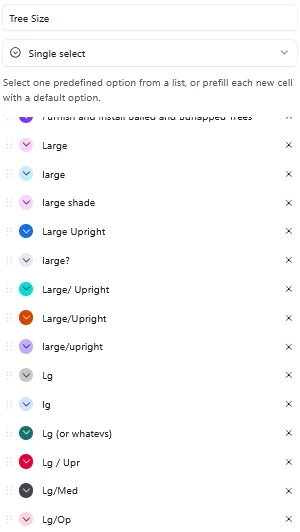
For instance, in the screenshot below there are 50+ ways that people have entered this info over the years, but I would like to consolidate those into under 10 categories. So I would want to take the “Large” single select option and then pull in the various fields such as: “lg” “Lg” “large shade” “large?” etc.

Hoping there is a simpler way to do this because there’s a large volume of records.

Thank you for any thoughts!
 

6 replies

saresum
Forum|alt.badge.img
  • Author
  • New Participant
  • June 19, 2026

I thought on this a little more and I guess I could just rename all of the single select options and then sort them to consolidate. That’s a good option if there’s not an even easier way!


TheTimeSavingCo
Forum|alt.badge.img+32

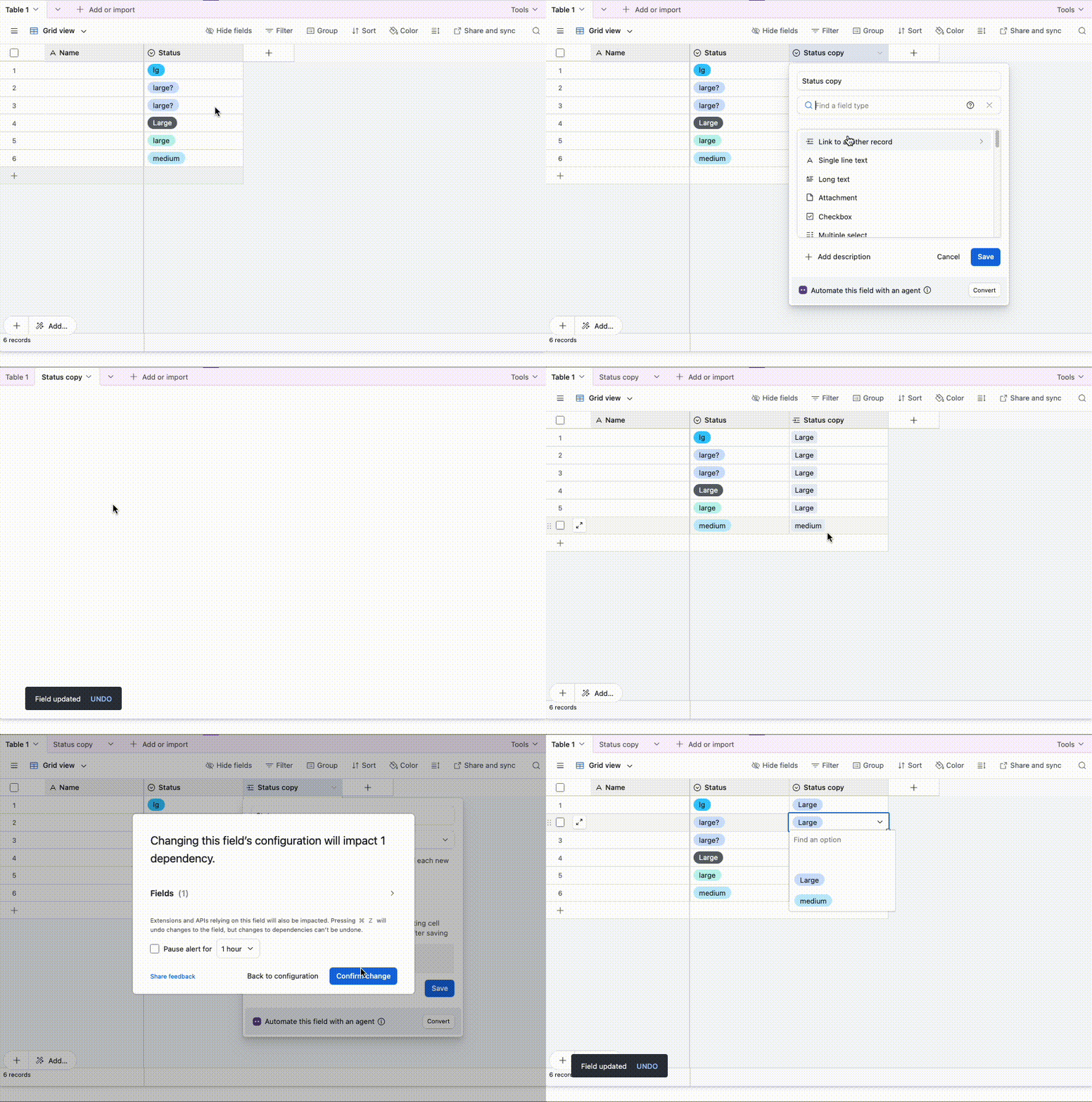
Hm, what if you converted it to a Linked Field to a new table, cleaned up the data there, and then went back to the original table and converted it back into a Single Select Field?

In the gif below I duplicated the field first but that’s really just so we can compare the end product


Forum|alt.badge.img+3

Deleting/editing this to avoid confusion. Thanks for calling it out ​@ScottWorld 

Holly @Simple Stack


ScottWorld
Forum|alt.badge.img+35
  • Genius
  • June 22, 2026

@Holly Nilson-Clay Renaming the options won’t actually merge the options… Airtable will see each “Large” as a different option.

Adam’s method above is a great way of handling the merge: Changing the field to a linked record field, making the changes in the linked table, and then changing the field back to a single-select field.

Another way of handling the merge is slightly less technical but more time-consuming… it involves filtering the view for all the incorrect options that you want to merge with one of the correct options, and then using Airtable’s Batch Update extension to replace the records on that view with the correct option. That would update the records, but you would still need to manually remove the incorrect options from the dropdown list. And you would need to repeat this process for each set of incorrect options that needs to be merged into a correct option.

Hope this helps!

If you have a budget and you’d like to hire the world’s best Airtable consultant to help you with this or anything else that is Airtable-related, please feel free to contact me through my website: Airtable consultant — ScottWorld


DisraeliGears01
Forum|alt.badge.img+22

Another way of handling the merge is slightly less technical but more time-consuming… it involves filtering the view for all the incorrect options that you want to merge with one of the correct options, and then using Airtable’s Batch Update extension to replace the records on that view with the correct option. That would update the records, but you would still need to manually remove the incorrect options from the dropdown list. And you would need to repeat this process for each set of incorrect options that needs to be merged into a correct option.

Depending on the number of records, I’ve also just done this with copy/paste. Filter to include all your old options you want to replace, switch one to the corrected version, copy the field before it gets filtered out, select all your remaining records, paste into that field and viola. 

If there are literally tons of duplicative options, you could also make a formula field that’s just {Tree Size}, which converts the single select to a string, in order to enact a filter for Contains = “large” or Contains = “lg”


ScottWorld
Forum|alt.badge.img+35
  • Genius
  • June 22, 2026

Yes, I love the copy and paste method, but for some reason, I was encountering a strange Airtable bug where the paste wouldn’t work if I had over 21 records in a view.

It was an intermittent bug, too — every time I tried to make a Loom video to send a bug report video to Airtable support, it started working again.

And then, the next day, the bug intermittently cropped up again.

I’m still trying to figure out what causes the bug, because my client was trying to merge 100 single select options together.

I ended up using the Batch Update extension with him.

But yes, in theory, copy and paste would be the easiest! 🤪

- ScottWorld, Expert Airtable Consultant