Solved

Pre-fill options for a column to select one of several linked values

  • April 11, 2026
  • 3 replies
  • 31 views

  • New Participant

I’m an executive assistant who manages a “phone sheet” for an individual in the entertainment industry for someone who “rolls calls.” For those not familiar, essentially I call on the behalf of my boss and then keep a running log of all the outgoing calls placed but not answered, incoming calls not answered, reminders for calls to make at a later date, and then mark completed/connected calls. I use a program called “Phoneslate” that I’m attempting to make a dupe on Airtable.


Here’s my question: I would like to be able to enter in someone, let’s say “John Smith,” and then have a column where I can select any of the phone numbers linked on the record.


 

As you can see in the example photos, I would like to add a column between the lookup “Company (from Person)” and “Notes”, where it’ll auto-pop up the 4 different phone number columns and I can select one of the linked numbers. I don’t need all of the numbers listed to appear in the grid, just the one that I would select as the best number to try/call back. (Some people can be very particular about cell phone vs office line, and I’m often calling multiple people in a row and need to be able to move fast!)


Is this possible with Airtable? I have the free account at the moment; if this is possible only with a paid account, I would need to make a case with my employer for a license. 
Best answer by TheTimeSavingCo

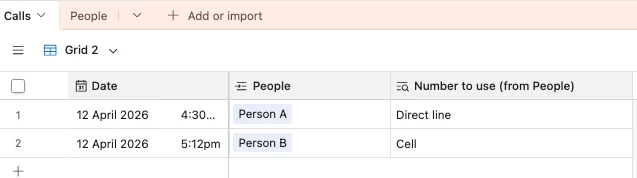
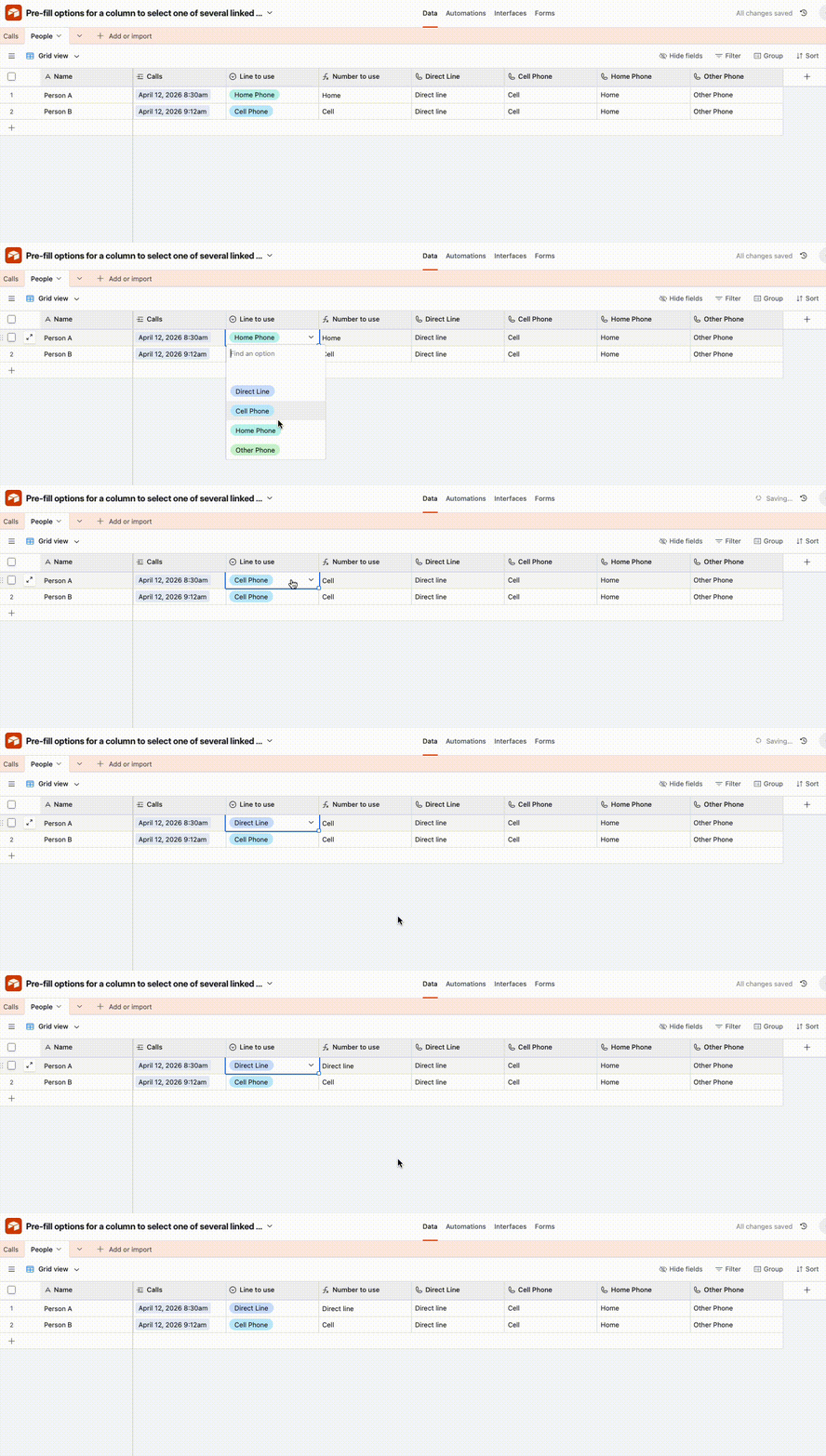
Hm, you could try using a formula field + single select field to handle this.  In the ‘Person’ table, we’d have a field called ‘Line to use’ or something where you’d select what line that person prefers to be contacted by, and then we’d have a formula field that outputs the actual number, which you’d then use in your lookup field

I’ve set it up here for you to check out


SWITCH(
{Line to use},
'Direct Line', {Direct Line},
'Cell Phone', {Cell Phone},
'Home Phone', {Home Phone},
'Other Phone', {Other Phone}
)

Not as scalable, but it feels like people generally won’t have that many phone numbers and you could extend this fairly easily if needed

3 replies

ScottWorld
Forum|alt.badge.img+35
  • Genius
  • April 11, 2026

That is not possible with the way your system is currently setup.

You would need to move all the phone numbers into their own table called “Phone Numbers”, but you would need to make sure that each row in your “Phone Numbers” table only has ONE phone number. (Not multiple phone numbers per row.)

So in your “Phone Numbers” table, you would have 2 columns: “Phone Type” and “Phone Number”.

Then, you would need to add a 3rd column that is a linked record field that links back to your “Individuals” table.

Also, I would recommend adding a 4th column (which you can turn into your primary field). This 4th column would be a formula field that combines the “phone type” and “phone number” together into one cell, so you can see both phone number and phone type together in the same cell. When you change this field to become your primary field, this field will become the default field that Airtable shows you in all of your other tables. 

Back in your “individuals” table, instead of having 4 different columns for phone numbers, you would delete all 4 of those columns, and you would use the brand new “Phone Numbers” linked record field that Airtable has ALREADY CREATED FOR YOU automatically. (You will find this new linked record field underneath the “hidden fields” button in your toolbar.)

Make that brand new “Phone Numbers” linked record field visible, so you can see it.

Then, for each individual in your individuals table, you would put ALL of their phone numbers within that one linked record field. So all 4 of their phone numbers will appear in that one linked record field named “Phone Numbers”.

Now, here’s the trick:

In your “Call Log” table, you will create a NEW linked record field that links directly to the PHONE NUMBERS table. You already have a linked record field that links to the “individuals” table, so don’t get rid of that one. But now, you also need to create ANOTHER linked record field that links to the PHONE NUMBERS table.

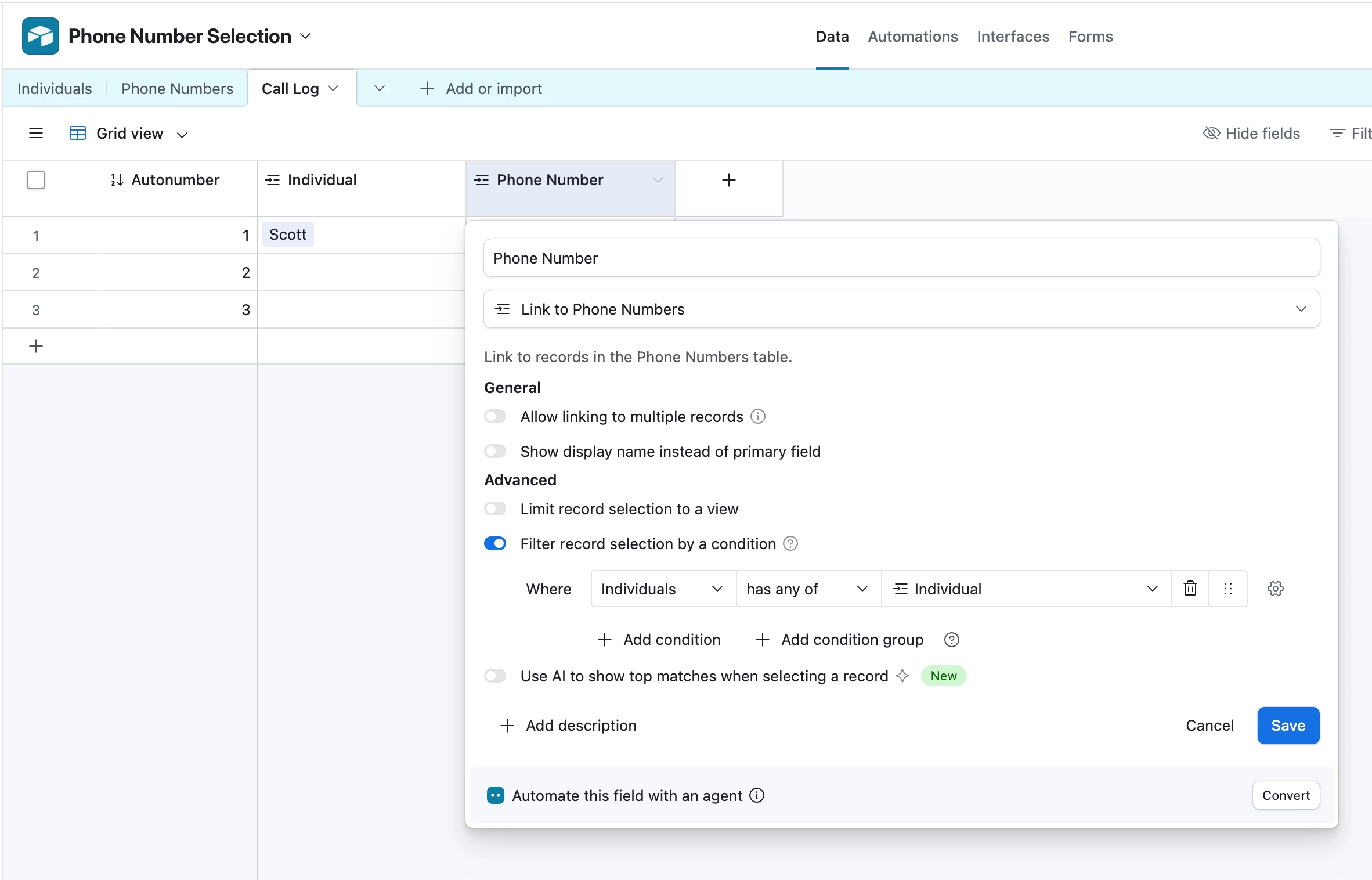
For this new “phone numbers” field, you will use Airtable’s dynamic linked record filtering feature to only show you the phone numbers that are related to the individual that you chose in the individuals linked record field.

See screenshot below for how this “phone numbers” field would be setup.

Hope this helps!

If you have a budget and you’d like to hire the best Airtable consultant to help you with this or anything else that is Airtable-related, please feel free to contact me through my website: Airtable consultant — ScottWorld


coderkid
Forum|alt.badge.img+5
  • Inspiring
  • April 11, 2026

@ZMP,  ​@ScottWorld ’s solution is the best and most scalable approach. It lets you easily support multiple phone numbers per person (even if someone has 2+ same kind phones) and keeps your structure clean and flexible as your data grows.


TheTimeSavingCo
Forum|alt.badge.img+32

Hm, you could try using a formula field + single select field to handle this.  In the ‘Person’ table, we’d have a field called ‘Line to use’ or something where you’d select what line that person prefers to be contacted by, and then we’d have a formula field that outputs the actual number, which you’d then use in your lookup field

I’ve set it up here for you to check out


SWITCH(
{Line to use},
'Direct Line', {Direct Line},
'Cell Phone', {Cell Phone},
'Home Phone', {Home Phone},
'Other Phone', {Other Phone}
)

Not as scalable, but it feels like people generally won’t have that many phone numbers and you could extend this fairly easily if needed